AI Expert Audit
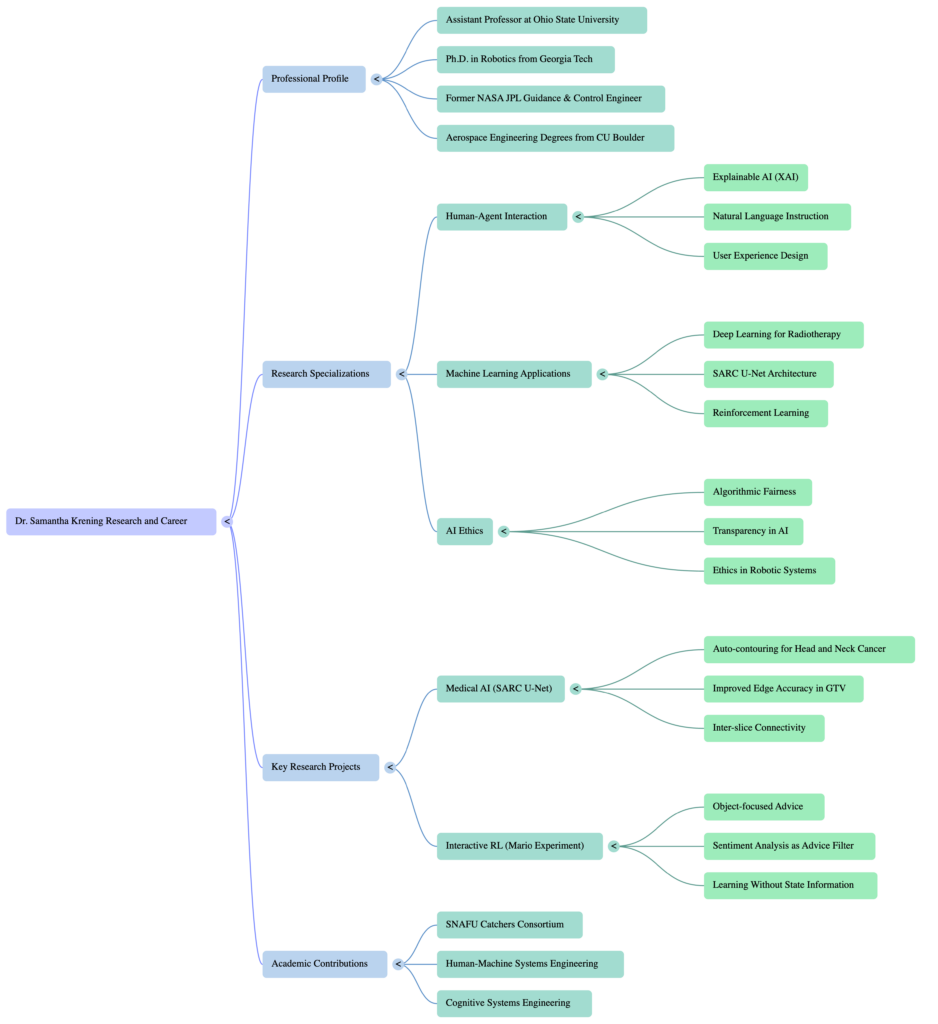
Posted: May 7, 2026 Filed under: Uncategorized Leave a comment »I used several publications from Dr. Samantha Krening. I have known Dr. Krening for years and have been really interested in her research and background.
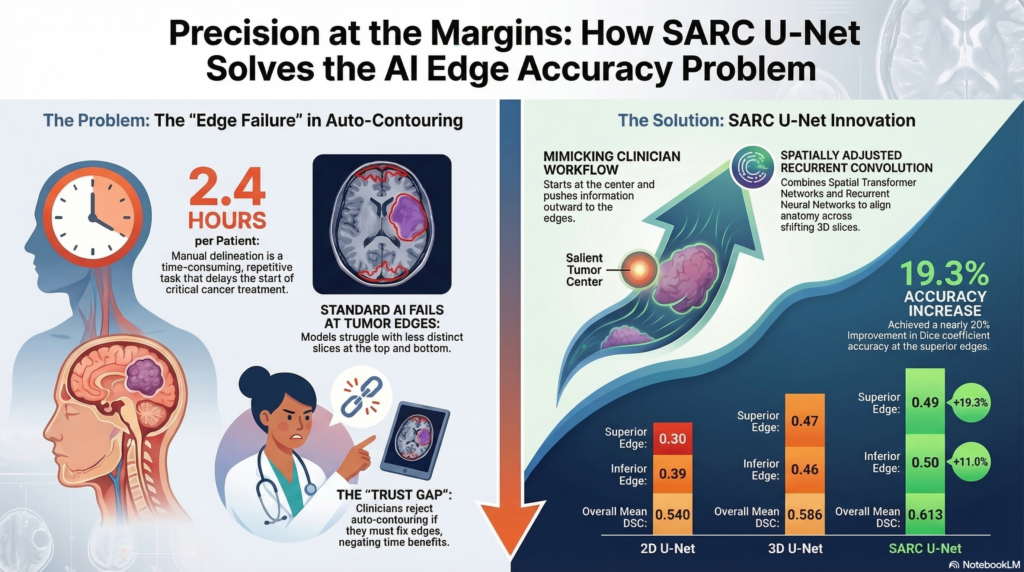
I was honestly shocked by how good this AI generated content was. It truly understood the Reinforcement Learning with Human Feedback. I could easily hear Dr. Krening saying these statements. The experience was almost unsettling, especially when we got into the numbers expressed in the infographic. I don’t know these numbers. I can’t validate them or invalidate them. The fact that everything else that it put out made me nervous about whether I would even question them. I’m also concerned that looking at them will imprint them in memory and I’ll forget the source. This is why I try to shy away from AI unless it’s for advice for tasks that I can immediately put into practice and get feedback on the efficacy. If it doesn’t work, I can let it go. If it does, I feel less concern about polluting my own mental space.
The podcast is fine for a while, but eventually the speech patterns feel manipulative and I grow increasingly uncomfortable listening to it. Eventually it gets to be too much. When the AI is talking to itself and acting like things are amazing, surprising, whatever… when it’s expressing emotion it feels uncanny. I hate it. I suddenly become very aware of the smart podcast host affect it’s putting on. I stop listening because I get this feeling of existential dread. Sometimes it gets really excited about information that doesn’t seem natural. Stuff that a human isn’t going to get that excited about. It can make you feel like you missed something until you listen again and realize oh okay this thing is kind of empty behind the… lenses?
If you can’t test it don’t use it. Don’t count on yourself to validate everything the AI says because you’re not going to. It’s going to free up time and that time is going to get spent up somewhere else, you’re not going to reallocate it to validating the AI output over the long run (this is the law of stretched systems). Also be hyper vigilant about what you’re taking in. The fidelity of AI generated output is remarkable today. One day in the very near future it will be indistinguishable from non-AI generated content. Even if you’re not intentionally using AI you’re going to be ingesting AI content. Eventually that content is going to be hyper-optimized for micro-targeted persuasion. If the AI can be this good based on 8 documents, imagine what it will be able to do when everything you have ever written on an electronic outlet is purchased and used to train a machine to convince you what to buy, what to think, who to vote for. Imagine how effectively it will be able to report on your most probable next response, behavior, or obsession. We are using AI today, and we need to understand that AI is much better equipped to use us.
Cycle 3
Posted: May 7, 2026 Filed under: Uncategorized Leave a comment »Resources
- Motion Lab
- ACCAD space
- Wireless audio system
- Guitars, pedals
- Drums
- Orbbec Femto Depth sensor
- RGB Camera
- MacBook Pro (M1)
- Mac Studio (M4)
- PC
- MoLa Network
- NDI
- Cue-able lighting system
- Portable lights
- Circular rug
- Wall-Mounted TV
- TouchDesigner
- MediaPipe & OpenPose
- StreamDiffusion Operator
- GeoZone operator
- iPhone
- Amazon Echo Tap
- Past ACCAD Projects
- Performance recording from castle project
- Interactive fluid simulation
- Interactive particle system
- Mediapipe control system
- Audio responsive coloration
- Shared memories of impactful moments from prior projects this semester
Themes
- Undermining Expectations
- Intentional Performance with Interactive Systems
- Instability
- Surprise
- Disorientation
- Immersion
- Uncertainty
- Friendship
- Challenge
- Hubris
Value Groundings
For this project I wanted to showcase my abilities and pay homage to the journey that brought me here. I saw this as a sort of culmination of an era of my life that has been both exciting and enriching. In each cycle, I integrated elements and systems that I had built for previous classes with new elements that I learned to implement in the current semester. Cycle 3 was envisioned to be a choreographed performance to demonstrate what a practiced and intentional performer could do with the system.
In addition to showcasing my current skillset, I wanted to feature some of the elements that I have loved about my time at ACCAD. The friendships and camaraderie developed with classmates, the supportive environment that artfully enables vulnerability, and the creative confidence cultivated in every class that encourages and enables ambitious pursuits without judgement.
Undermining Expectations
This theme ran through the entirety of the performance from the pre-show through the show as envisioned.
I have typically tried to build systems for other people to interact with. For Cycle 3, I chose to build a system that would allow me to perform for a more passive audience.
I have typically (not always) steered clear of negative emotional valence, opting for friendly and approachable experiences with some emotional dynamics, but almost always ending on a positive note. The score for this cycle featured many abrupt oscillations between positive and negative emotional cues.
I have typically strived to make digestible experiences with a central focal point separate from the audience intended to provide a “wow factor”. I devised this experience to wrap the audience inside the experience with progressively disclosed wow factors.
I have typically tried to implement experiences with clear beginnings, middles, and endings. The experience as devised for cycle 3 had several false stops to keep the audience on the proverbial balls of their feet. For this cycle I didn’t want audience members to feel completely comfortable at any point. I wanted emotional highs and lows. I wanted a little bit of vigilance.
I like surprise. I needed Michael for this project for a number of reasons including as a co-performer in the original score (he could have nailed it, but I wasn’t comfortable with my own performance on the canceled second song). Even knowing that I could not achieve everything I wanted to do without him, I still tried to find ways to keep certain advancements hidden from him so that he could experience a bit of surprise as well. My main goals for the cycle were to introduce points of intrigue, to increase the polish, and to build an experience bigger and more immersive than I have in the past.
I made a major mistake in my score. Early in cycle 3, I considered that audience members would likely assume that this was an audience participation experience. I had initially considered using the Orbbec depth sensor to track movement into the stage space and trigger an audio rebuke and instruct the audience to find a seat and relax. I couldn’t immediately devise a way to trigger this response only when I was out of the room. In retrospect there were several easy ways to achieve this. The easiest way would have been to trigger a voice over immediately upon entry to instruct audience members on how to engage with the experience. This would help to avoid unintentional disclosure of the experience.
Another simple method would be to hide a switch near the entrance to the motion lab that I could trigger on entry to deactivate the security mode. This would be easily achieved using a makey – makey with some conductive tape
The importance of framing cannot be overstated. Especially if you are planning an experience that is going to undermine what people have been conditioned to expect. I tried to do a lot of fancy framing when clear and simple framing would have been a better approach.
Score
The initial score was as follows:
- Audience waits in the holding area listening to muzak while the performance is set up.
- I leave the motion lab through the supply closet while the muzak stops abruptly and the emotional valence of the experience shifts from light to dark as they are instructed to enter.
- The audience enters the motion lab to find the system in a dormant state with designed lighting.
- I enter the waiting room, set up the backing light, and begin playing the song before entering the motion lab
- I enter the motion lab and walk slowly to the robo camera while continuing the song. I use the robo cam to interact with my audio responsive fluid simulation (powered by media pipe) to paint a base on the front screen.
- I would proceed to the center of the rug and perform the song.
- At specific moments during the song where no lyrics were sung, I would step away from the microphone into a zone on the rug, which would trigger a specific prompt weight on the StreamDiffusion operator to rise to 1 and fall to 0 over 10 seconds. I would then step several feet directly behind the microphone, which would cause TouchDesigner to fade between feeds, so the stream diffusion model would fade in behind the point cloud and slowly fade back.
- All lights in the room would shift from the initial cool color setting to bright red over the course of four minutes. Gradually shifting the light shining on the performer’s face from soft blue to dark red.
- If at any point in the song I forgot the lyrics (which happened several times in practice, I would have a cheat sheet projected on the wall TV.
- At the end of the song the lights would fade to black and I would recede from the microphone with only feedback playing over the speakers, lay the guitar down on the table in front of the screen, and wiggle my fingers around the glass globe placed at the center of the table.
- When a motion sensor detected the movement in my fingers, an energy animation would appear using a Pepper’s Ghost effect inside the orb, the screen would flash and I would fall to the floor.
- At the drum set on the opposite side of the room, Michael would begin playing a drum solo with each pad linked to a specific portable light, shifting attention from the right side of the screen to the left side.
- During this performance I would be hidden behind the table changing costumes and emerge with a different instrument to join Michael in a final song, David Bowie’s “I’m Afraid of Americans”. The lights would reactivate with a red, white, and blue theme.
- Stepping into a previously avoided zone would provide a new set of prompts to the AI that are relevant to each verse of the second song. The motion-based same weight adjustments would allow me to shift between each prompt.
- This song would end and the lights would fade to black.
Simplifications
Full disclosure: it would have been better to have simplified this experience more. With a simpler media system I would have had a more predictable performance. At the same time, even more than a flawless performance I valued this final challenge and an honest assessment of the edge of my abilities as a benchmark. I took risks, I suffered consequences, I have no regrets — though I do have lessons learned.
Truncating the show
While I built most of the system to execute the complete score, it became evident that I was not prepared to actually perform the song. While I was not great at the first song, the second was comparatively worse, and I did not want to deliver an unbalanced experience ending on a sour note. I chose to cut the second song. As the Pepper’s ghost transition was intended to have “transformed” the performer character, it no longer served any narrative purpose and became a cheap party trick that was irrelevant to any coherent narrative.
Changing the onboarding experience
Being slow to devise an approach to a verbal warning system to prevent audience members from interacting with the system and uncovering the surprise enhancements from Cycle 2, I elected to simplify the system by introducing a new entry experience. I decided to add a new switch operator with a trigger that would allow me to hide the actual experience until a moment that I specified.
This was wishful thinking and did not serve its primary purpose. The audience’s prior knowledge and experience had strongly reinforced the idea that this would be an interactive audience experience. Luke’s performance also featured a microphone as a mode of interaction, establishing it as a system component that was “in-play”. After starting the song on the guitar I heard audience members speaking or singing the lyrics into the microphone.
Where I probably should have simplified, but chose not to
Some of the elements of complexity were required to achieve the vision. The experience employed three networked computers trading data. This is a big vulnerability that did bite me in the end, but it was necessary if I wanted to have the AI generated content and transitions. I could have potentially eliminated by personal laptop from the experience and run everything on two machines, but I wanted to keep the patch that required the most work on my personal laptop so that I could work remotely and make updates in the motion lab without needing to transfer the files back and forth.
I am not confident that I could have reduced to only the PC to run all components and chose to leave it dedicated to the AI model given its intense processing demands.
This complexity presented a major fault during the performance. On the day of the final I had accidentally opened two versions of my project, which doubled the NDI out feeds and caused the network to dynamically rename my computer. When I set up the AI computer prior to the performance, it did not recognize my NDI feeds as they were coming from a new source. I reconnected the feeds, but made a mistake in feeding the source image into the AI model.
I learned during cycle 3 that feeding the Front Screen NDI into the AI model caused a feedback loop that ruined the content and caused the model to reach a state of stability with striped colors. I resolved this problem by creating a separate feed named fluidsim-precomp (bad choice). I only discovered this mistake while cleaning up in the motion lab after the performance. I should have given the NDI output a name corresponding to its purpose, not its content, and added a comment to my network to remind what feeds are expected.
Lessons Learned
I had practiced this performance extensively in the motion lab and at home. I practiced under pristine conditions and had not practiced playing through unanticipated variables. While I set up the experience and drilled the performance enough that I could execute it with minimal active thought, the unanticipated initial conditions forced me to adapt my performance and it took longer to settle in and get back out of my head. I was fixated on making sure everything was reset to the baseline state while trying to continue the show. In the process I missed several cues (e.g. entry, delay pedal timing) and failed to notice several important factors (e.g. lowered microphone lowered, guitar fx pedals set incorrectly) that caused distractions for me early in the show.
I have to work on simplification. I love a challenge. I love devising big, elaborate experiences. I love to stretch the boundaries of what I know how to do. Sometimes it’s worth adding complexity to a system when the risk is justified by the extended capabilities, but there is a penalty to pay. By nature I’m a shy person, but designing experiences allows me an outlet to be bold. I like to take risks. I think it’s okay to do things like this when it’s for my own benefit, but when devising experiences for others (especially where clients are involved) simplification is non-negotiable. I should strive to re-frame simplification as the challenge to exercise that muscle.
I also learned how much I prefer to build experiences for others rather than perform for others. It’s a much more gratifying experience for me as a creator to watch other people play and discover even if the work is less polished. Even if I’m panicked during an experience that others are interacting with it’s not necessarily evident to the participants. I don’t particularly like being
Special thank you to Alex, Michael, Lou, Rufus, Zarmeen, and Luke for everything this semester, it was a great joy to work with all of you.
Final Practice before new elements introduced
The GeoZone based prompt switching and updated floor visuals were not yet implemented during this rehearsal.
Final Performance
Note* I have cut this video down to remove the initial audience and performer entry to protect the identities of the classmates who did exactly what I had conditioned them to expect through previous cycles and began interacting with the set. They did nothing wrong, I simply didn’t provide the necessary framing to contextualize the performance and I fear that sharing that portion of the video publicly might cause undue embarrassment. I have deep respect for the entire cohort loved working with each member.
Cycle 2
Posted: May 7, 2026 Filed under: Uncategorized Leave a comment »Themes
- Chaos
- Collaboration
- Cowardice
Resources
- TouchDesigner
- MacBook Pro (M1)
- Mac Studio
- PC
- MoLab Network
- StreamDiffusion Operator
- Guitar
- Drums
- Sticks
- Cameras
- Orbbec Femto
I made several improvements to the system between Cycles 1 and 2. I first increased the size of the Orbbec feed to give it more prominence on the front screen. I also solved the issue with the fluid system failing to change colors in response to the audio.
I also added new components, primarily a StreamDiffusion model, which required an extra PC to be carted in.
My original idea for cycle 2 was to do a live performance. In the weeks leading up to it, it became clear that I was too far out of practice to give a decent performance. I practiced a bit and tried to get back up to speed. While I hadn’t played in a year or two, I was playing pretty consistently for decades prior to that. Even when I would take an extended break from music I can generally get back up to speed pretty quickly… Of course I’m never actually doing this against a deadline and time is a flat circle, so who knows how long it actually takes. So I brought in the instruments.
I was especially interested in what I might be able to accomplish with the electronic drums, since they are capable of sending midi signals out to a computer.
Score
The score for Cycle 2 was all out on the floor. A guitar here, a drum set there… sticks in the middle to let you drum on anything you wanted (please not the bare floor, Michael would never forgive me). The framing was completely permissive – Do whatever you want. Go Play. All stations were open for business. The AI PC sat conspicuously on the floor, but did not get much attention aside from Alex, who knows how to work the system. The interface was intimidating and I suspect that nobody wanted to mess anything up.
I decided to abandon all hopes of doing a performance in cycle 2. I didn’t expect it would go particularly well given my current state of play (I’m not a great musical performer on my best days), and I like to do slow reveals. If I rushed forward with a lackluster performance, it would really take the wind out of my Cycle 3. Instead I thought we’d do a jam along. A sort of musical playground (that would come back to haunt me). David Bowie playing in the background with corresponding visuals to showcase the new AI component. I hoped to derive value from this in several ways.
Valuation
Cycle 2 was chaotic, more chaotic than any other immersive media project I’ve done. It was not beautiful. It didn’t sound good. But it was fun. The energy was high and the excitement was palpable.
Performance
The system drew comparisons to petting zoos, sensory rooms, musical playgrounds, exploratoriums, and mothers who want a moment of peace. People were curious to learn what everything did and how you could.
It made me more comfortable with the prospect of a performance for Cycle 3. But it also reinforced expectations that would make Cycle 3 more difficult to execute the way I had envisioned it.
I missed a core piece of feedback from Cycle 2 – “The placement of the drumsticks in the center of the rug made it feel like I have to do something with these”
Cycle 1
Posted: May 7, 2026 Filed under: Uncategorized Leave a comment »Themes
- Exploration
- Resource exploitation
- Free play
Resources
- TouchDesigner
- MacBook Pro (M1)
- Mac Studio
- Motion lab
- Circular rug
- Orbbec femto
- Robo cam
- MediaPipe
Score
Audience members walk into the space to see a white rug with a psychedelic animation.
Stepping onto the rug alters variables on the noise CHOPs. There are 8 zones that change the values of different parameters.
When a participant steps onto the rug, they are captured by the depth sensor. A point cloud generated from this feed runs through a composite TOP set to ‘over’ blend mode. The point cloud is composited with the motion-tracking fluid simulation and projected onto the front screen. The point cloud spins around the y-axis using an ‘absTime.seconds’ expression.
Valuation
For Cycle 1 my goal was to incorporate some new elements from the motion lab that I had never previously used with some reclaimed elements from prior projects and see how people engaged with it.
Performance
While waiting for people to return from the bio-break before my performance, Michael asked if he could play some Pink Floyd. I agreed and as the music began to swell I realized how much of a void the silence would leave when we cut the music. I tried to signal to Michael that I wanted to him to keep it rolling. The soundtrack made the experience feel much more full and ethereal.
The entire experience was heavily improvised, and I attempted to demonstrate the system affordances silently by modeling the interactions. I was also able to manually manipulate the patch to make synchronized transitions between songs on the fly. I actually really enjoyed this aspect though it was not planned from the beginning. This was a seed that I would nurture in future iterations.
The interaction with the rug was not obvious. Mainly because I was using spatial positioning to change random parameters in the noise on a video heavily driven by noise. The changes were too subtle and disconnected from the precipitating action to feel meaningful or intentional. However, there’s something to be said for that. It’s not necessarily something that I would do again, but it was just noticeable enough that people spent time trying to figure out exactly what was happening and whether they had any impact on it.
I failed to account for the low light when incorporating the MediaPipe-based fluid simulation. During the performance I tried to use several lights to illuminate my hands for the camera. I was able to get some outputs, and enough to intrigue participants and encourage them to attempt to replicate the behavior.
I also failed to account for MediaPipe’s default tracking behavior. The first target the operator locks onto has their hands labeled h1 and h2, and the party uses these to draw the fluid onto the screen. This made it frustrating because it was impossible to determine who was in control of the fluid simulation at any given time.
Overall the reception of this cycle was positive. People enjoyed trying to figure out what was responsive and how the controls operated.
The rotating particle clouds were also well received, though went unnoticed for most of the performance. With people in the room and amidst all the commotion, it became obvious that they were far too small, which was an easy fix.
These were good lessons that I could incorporate into future builds.
Pressure Project 3
Posted: May 7, 2026 Filed under: Uncategorized Leave a comment »Storytelling through sound
Themes
- Decisions
- False Dichotomies
- Search for meaning
- Pretense
I wanted to explore the idea that we spend a tremendous amount of time seeking meaning out in the world, when what matters most often happens closest to home. This value in combination with the shared context of the assignment provided the initial framework for the experience. With this in place I worked out my score fairly quickly. The experience would present two options where audience members could try to pick apart the meaning of the story being told (which would be devoid of any direct meaning).
My experience began in the ACCAD Hallway. My introduction to the experience was tightly scripted and carefully crafted to avoid any explicit imperative instructions:
“Welcome home. You may choose to go through the door to the motion lab. You may choose to go through the door to the classroom. Each space contains a different experience.”
During the performance, one classmate asked if they could go between rooms. I hadn’t anticipated this question, which was a fairly obvious one in hindsight. I replied that they were free to make their own decisions.
Each room had a non-sensical musical composition that I had created. I like to run through a process with music where I start with a dumb idea and pour effort into it. Aside from being a fun exercise, it allows me to compose music without the stress of trying to make meaning. I developed this practice after becoming disenchanted with trying to make meaningful music or music with a message. I make music for fun, but I would cringe years later when I’d listen to a younger iteration of myself trying to be profound or expressive or whatever it was that I was trying to accomplish. The author had died and I was making up my own meaning when listening to it anyway, so I reasoned that this approach was just as good as any other I was trying out. And oddly – because my effort shifted to the construction and away from being self-conscious or self-involved, I enjoyed listening to the songs more. How could I not, when it gave us such tracks as the pandemic era Appletini with my Homeboys? (I actually would have preferred to use this song over the second song below, but there is an actual story to be derived from it, and I wanted to use tracks that were completely devoid of meaning to capture the spirit of this project).
Fue is a song that I recorded on my iPhone years ago as a joke for a close friend I met years ago in a college French Class. The lyrics are:
Du beur, du beur
Le voyaguer
Du beur, du beur
Le voyaguer
Du beur, du beur
Ma petite ami
Du beur, du beur
Avec moi aujourd’hui
(X2)
Du bœuf
Du bœuf
Du bœuf
Vous ne voulez pas ce bœuf
Which translates more or less (with what is probably very poor grammar, I’m not that good at French)
Some butter, some butter
The voyager
Some butter, some butter
The voyager
Some butter, some butter
My girlfriend
Some butter, some butter
With me today
(X2)
Some beef
Some beef
Some beef
You don’t want this beef (formal pronoun)
It’s stupid. I love it.
Here, listen.
The second song was called Pareidolia (A Confession 4/4). It was originally constructed using vocal samples in 2021. I spent several hours editing this one for Pressure Project 3 just to change the song’s structure a bit. There’s nothing particularly interesting in this song. When I made it I was trying to evoke the idea of someone trying really hard to make something overly artistic, deep, and meaningful (basically taking a jab at myself as a teenager). It’s not a particularly good listen.
The main point of this story is that while you’re out trying to milk meaning from the world you’re missing the real story. As soon as I had given the instructions I began to pull up a video of my daughter and I doing bedtime stories. It was important to me that I didn’t “cheat” and wait for people to leave before pulling it up. If someone had stuck around long enough they might have heard the sound and stuck around.
During the reflection period I refused to replay the story time file because that’s the point – you missed it. Nobody in the class actually heard the story, however several people walking through the halls did. This actually made me more uncomfortable than expected. I had considered the high probability that people without the context of the class would walk by during the performance and saw this as a major plus… as reinforcing the point that I was trying to make. While you are missing the story other people to whom the story means nothing are likely catching glimpses. While I had anticipated this and liked the prospect in theory, the actual experience of letting this play out while other students walked by was intensely uncomfortable for me. I don’t like to let my phone play audio where others can hear it and potentially be disturbed by it. I had made a commitment to let the story run for its full length without interruption.
I also recognized during the reflection discussion that while the idea behind this project was to kind of deride my own self-indulgent and pretentious pursuits over more meaningful even if more mundane experiences, this conceit itself was very self-indulgent and pretentious. It also felt a little preachy. I did not like the experience of denying people the opportunity to listen to the bedtime story (opportunity feels like a strong word here), but it felt conceptually important for the point I was attempting to make.
For the first time I will reveal that the story in question was in fact The Little Engine that Could, for what it’s worth.
Pressure Project 2
Posted: May 7, 2026 Filed under: Uncategorized Leave a comment »The Networked patch: Everything is Cher
- TouchDesigner
- Cher Believe Midi File
- Dial CRT TV image
- Network
I wanted to play with nostalgia for this project. I chose to use a retro television as the backdrop for my patch. The TOP in would take a video feed and apply a noise overlay and a lens distort to apply it to the CRT screen.
I also created a switch to change channels, selecting from NDI-in TOPs.
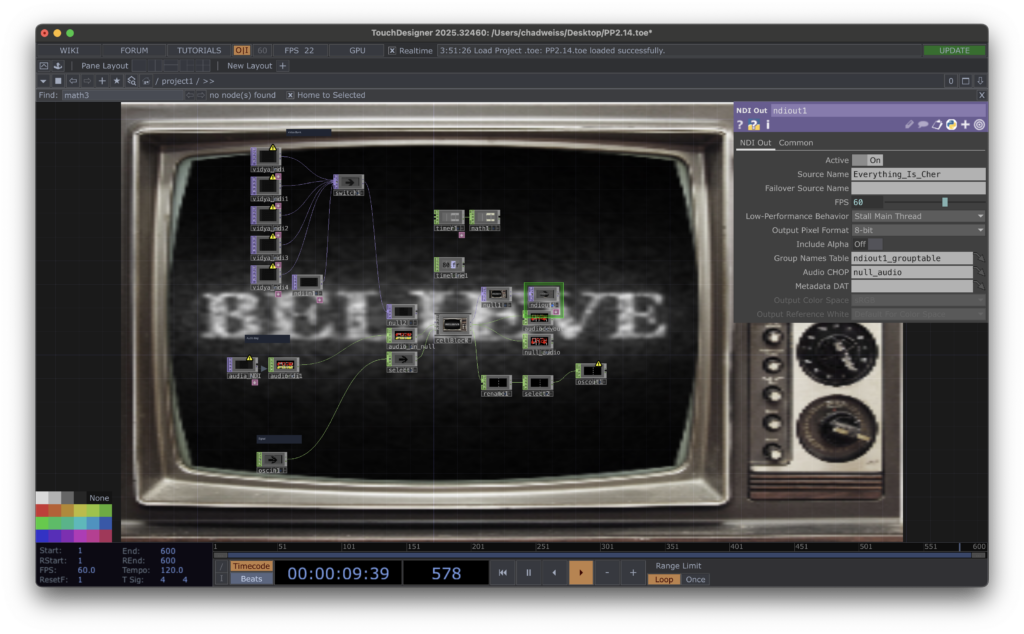
The audio portion would take any audio NDI input and play it through a Logic Pro file that would use the audio as a carrier channel for a vocoder to reshape every sound to match pitch with Cher’s Believe.
Finally for my control portion, The OSC-In feed would run through a rename CHOP and a reorder chop to switch between several filters applied to the video content and change the channel on the TV.
On the output NDI I provided the a video of the patch running and the processed audio (i.e. the audio-in feed being shared having been Cher’d). I also provided the current TV Channel parameter as a number between 0 and 5 over OSC-out.
I used the IN CHOPs and TOPs in my patch with default values to ensure that the patch ran on its own and interacted with others.
I tried to include things that reminded me of my youth. Things that I haven’t heard or seen in years, but when I did they took me right back to a nostalgic past. I didn’t get too crazy with complexity, and tried to keep it simple, self-contained, and cohesive.
In my initial imagining of this project, external users would be able to feed their content through my patch and see their content displayed on the screen, but that’s not the way it worked. They could take my screen with whatever content it was playing and incorporate it into their own patches. Likewise they could incorporate whatever audio I was taking in and hear how it sounded as Cher’s Believe.
There were a number of interesting and unexpected interactions. I especially liked the way that the effects stacked. In preparation for this pressure project, I was mainly considering how two patches might interact, but I didn’t consider what might happen when long chains of patches interacted. I was surprised by how at some point it became impossible to trace the chain of patch interactions and all that was left was just to enjoy what was there to be observed.
While each patch was interesting on its own, the combination of multiple patches was where the real magic happened.
Pressure Project 1
Posted: May 7, 2026 Filed under: Uncategorized Leave a comment »Required Resources
- Isadora
- Shapes Actor
- Projector Actor
- User Actor
- Pulse Generator
- Wave Generator
- Random Number Generator
- Jump ++ Actor
- Scene Functionality
- 5 hours
My goal for pressure project 1 was to build a self generating patch that enabled users to play the original Mario Bros. with their body. I thought that I would be able to accomplish this using a version of Mario instantiated in Python for machine learning. This was an ambitious goal but I thought it would be possible to do it within the five hour window. If it proved to be impossible I knew that I could simplify it to achieve a reasonable outcome. I spent one hour setting up the patch, a total I spent 3 hours trying to get Mario running: Two hours trying to get a basic Python script to run in Isadora and one hour running it directly on my laptop with Isadora sending keystrokes to control the game running in python. Neither of these approaches was successful.
I spent the final hour crafting a new experience that borrowed from my initial concept.
Score
The user stands facing a camera. A message on screen informs them that a vitals scan is in progress and instructs them to move their body.
Blue shapes moves up and down the screen while a TT Edge Detect actor outlines their body, simulating a poor man’s retro body scan. When a blob decoder reports object velocity between 0.1 and 2, the Inside range actor fires a trigger. The trigger travels through a simultaneity actor and if a wave generator connected to an inside range actor is less than 10 or greater than 90, it will fire a trigger to activate a text actor, informing the user of success. It will also fire a trigger (delayed 5 seconds) to activate a jump++ actor and move on to the introduction screen.
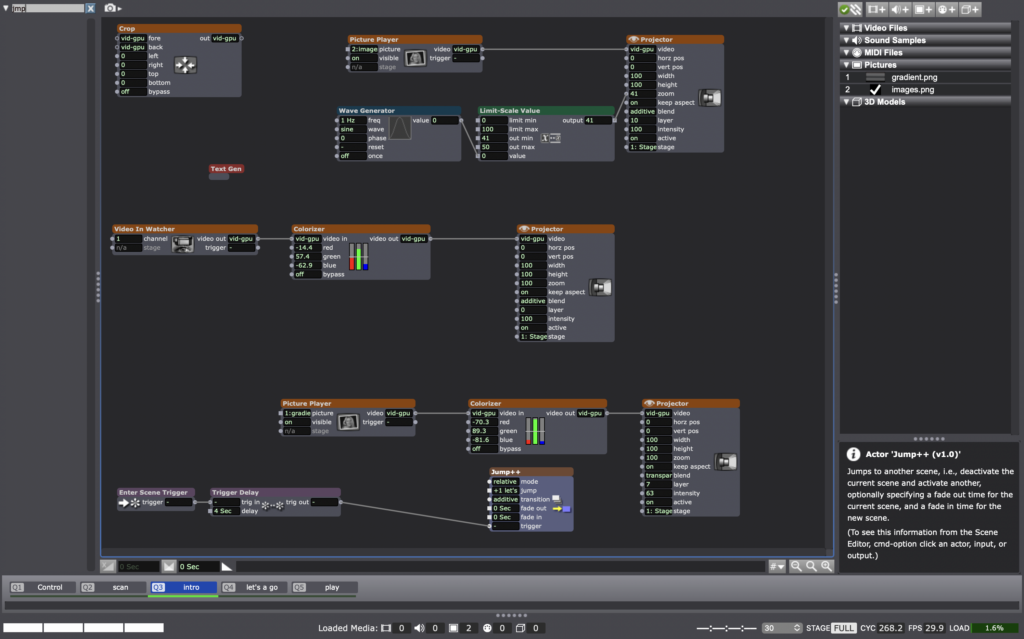
The user is informed that the vitals check was successful. and they will now betrayed.
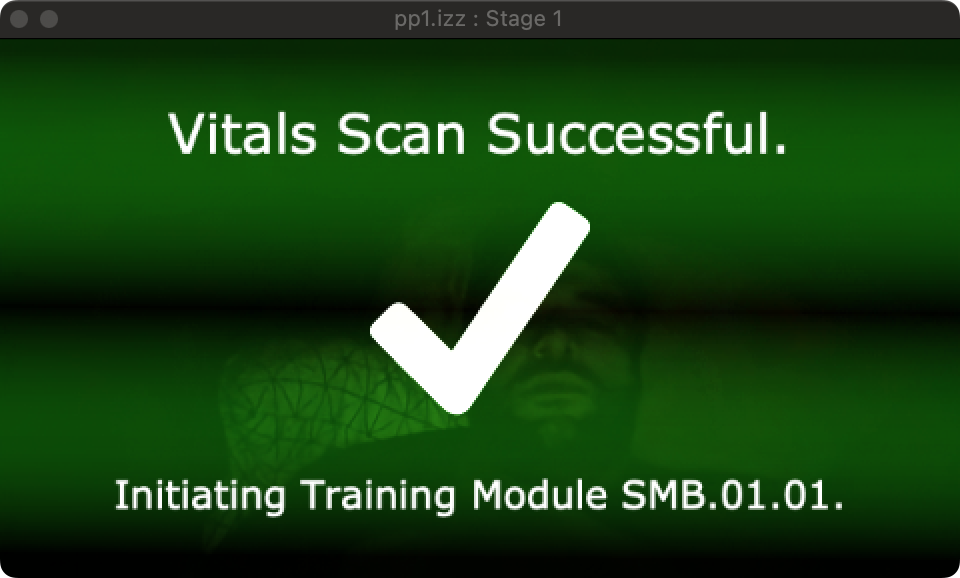
The screen goes black and you hear the iconic:
I then added a video of the first level of Mario. After a few seconds, before the player has a chance to recognize that they’re not actually controlling the game, the system begins to warp and distort the game video by sending the stage image through a feedback loop (this was going to make a very ironic re-emergence later in the semester). A message onscreen onscreen progressively unfolds to inform the user “Oh no. You broke it. Shame on you” the line “shame all over you” appears on screen and its position is periodically moved by random number generators hooked up to the position.
In total the experience contains five scenes that progress automatically upon fulfilled success criteria.
It contains three user actors. Two are nested in the control scene and define how the system is supposed to track user movement and convert them into controls for playing the Mario game.
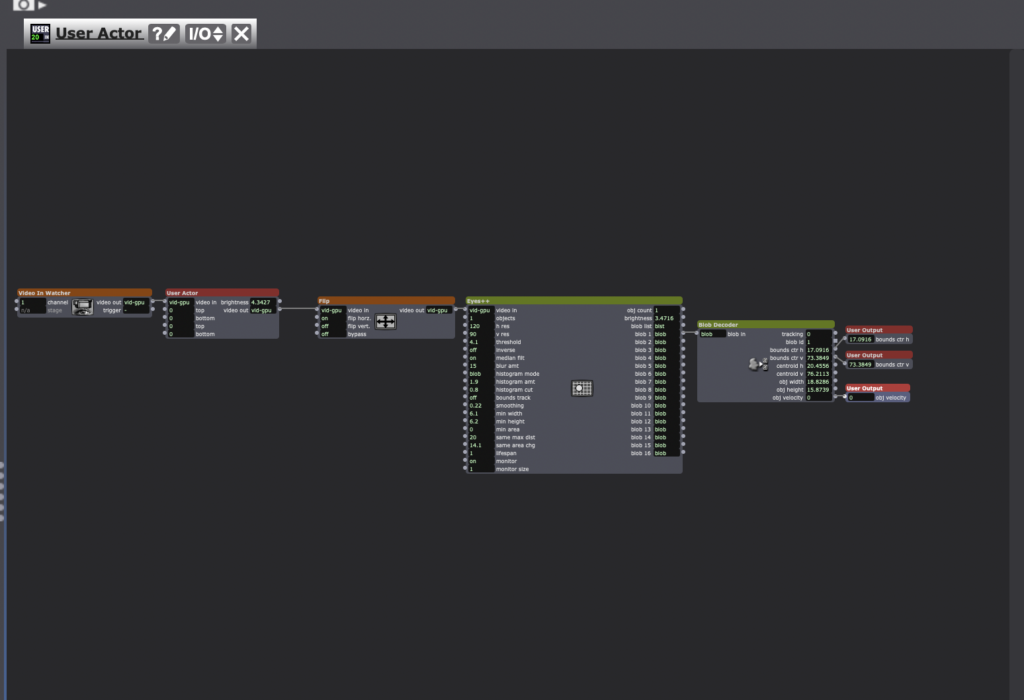
The other defines how text is drawn up on the screen.
Valuation
I was unable to give the user control over Mario Bros. Instead I simplified the experience and fell back on an old favorite theme of mine, playing with the idea of technology failures as part of an immersive experience. I’m prone to stress when I can’t make a project do what I want it to do. In my first time taking DEMS, my first pressure project broke down and the experience was embarrassing. It was in my second project that I started working with simulated failures as an emotional trigger point.
Performance
The patch worked as expected and it was fine. Obviously a bit gimmicky. It was an important step though, because it had been a year and a half since I’d used Isadora and several months since I’d worked with TouchDesigner. The first pressure project was a nice reacquaintance with the software.
Cycle 3
Posted: December 11, 2024 Filed under: Uncategorized Leave a comment »Resources
Motion Lab
- Projectors and screens
- Visual Light Cameras
- Overhead depth sensor
Castle
Blender
Isadora
Adobe Creative Suite
Poplar Dowel Rod
MaKey MaKey
Arduino Board
Accelerometer/Gyroscope
Bluetooth card
Score
Guests are staged in the entryway of the Motion Lab. They are met by the “magical conductor” who invites them to come in with a wish in their hearts.
As guests file into the completely dark room housing only an unlit castle the song “When You Wish Upon a Star” from the Pinocchio soundtrack begins to play.
Projections onto the castle are delayed by approximately 10 seconds. Projections start slow, progressively showcasing the full range of mapped projection capabilities (i.e. isolating each element of the castle.
Stars shoot across the front of the castle corresponding to the first two mentions of “when you wish upon a star”
The projections steadily increase in intensity.
As the novelty of the intensified projections wears off, the magical conductor enters the scene to demonstrate the capabilities of the magic wand, introducing a new dimension to the experience.
The magical conductor offers the magic wand to guests who can try their hand at interacting with the castle.
The music fades along with the projections.
The Peppers Ghost emerges from the castle entrance and thanks guests for coming. Fades out.

This score outlines the behavior of my relatively low-tech approach to creating a magic wand. As a physical object, the magic wand required only a poplar dowel rod and a little bit of imagination.

Isadora Score for Cycle 3 iteration. Entering the scene activates the control scene, which controls magic wand functionality and provides the manual star control. Entering the scene also initiates a timer to launch the first star around the first mention of “Wish Upon a Star”. The Sound level watcher ++ creates a connection between the music and the projection’s brightness.
Valuation
Embrace the bleed – I spent hours during cycles 1 and 2 trying to tighten my projection mapping and reduce bleed around the edges. During our feedback session for Cycle 2, one of my classmates pointed out that the bleed outlining the castle on the main projection screen actually looked pretty cool. I immediately recognized that they were right, the silhouette of the castle was a striking image. It took time for me to fully embrace this idea.
Simplify to achieve balance – I started to hear Alex’s voice ringing in my ears over the course of this project. This was the most critical lesson for me to take away from this course. I dream big. Probably too big. I always want to create magic in my projects, I have an impulse to improve and expand and
During cycle 3 I made several conscious simplifications to achieve balance, i.e. to deliver a magical experience within the allotted time.
I removed the stone facade projection from the castle. This was a neat effect, but the lines in the stone made imperfections in the mapping readily apparent. The payoff for the audience was marginal and diminished quickly. Removing this element allowed investment in features that made the experience more immersive and engaging.
I simplified the function of the magic wand (which had already been simplified several times from the original concept of a digital fireworks cannon). Prior to the final iteration, the concept for the wand was to embed a small Arduino chip, an accelerometer, and battery to capture movements and trajectories, sending signals to the computer over bluetooth that would trigger events in Isadora. The simplified concept used the Motion Lab’s depth sensor to detect activity in a range over the top of the castle. The active areas were cropped to isolate the effect to specific areas of the castle. An auxiliary effect was added to the Isadora interface with a button that enabled the operator to trigger a shooting star when guests tried to perform magic tricks that were not programmed into the system.

Early concepts for what would become the Magic Wand called for a blaster. At various times the blaster was to house some combination a Nintendo Wii remote, a phone using Data OSC, or an Arduino board with a gyroscope/accelerometer and bluetooth card. Other conceptual drawings outline the operation whereby the pull rope connected to a PVC pipe on an elastic band inside the blaster would close a circuit to send a signal to the computer to fire a digital firework along the trajectory of the blaster. (More drawings will be uploaded upon retrieval of my notebook from the Motion Lab).
I simplified the castle, removing several intended features from the castle including multiple towers, parapets, and roofs. These features would have been visually striking and several towers were already cut and shaped, but each additional tower increases complexity and time costs. Truthfully if I had not broken the castle twice (once on the night before final installation in the motion lab and again on the way into the building the morning of final installation) I likely would have added a few additional towers. It’s not clear whether this would have substantially improved the final experience.
The most difficult simplification was cancelling plans to include a Pepper’s ghost in the doorway – this was the hardest to part with because the potential payoff to guests was huge. Other features like windows with waving character silhouettes were also difficult to cut because they would have improved upon the magic of the experience.
Manage the magic – I created gigabytes of interesting visualizations, 3D models with reflective glass and metal textures, and digital fireworks for this project and it was very tempting to bring everything in and have the experience run at full intensity throughout, but this approach burns too quickly. People need time to adapt and recover in order for escalations to be effective. Metering out the experience requires a measure of discipline.

This score shows an emotional journey map of the planned experience prior to dropping plans for the Pepper’s Ghost in the week prior to the performance. Ultimately removing the ghost still allowed for escalation of emotional intensity and a meaningful journey, where diverting time to building it would have put the project completion in jeopardy.
Simplify the projection mapping – Prior efforts to simplify my approach to projection mapping had been unsuccessful and at this point multiple projectors could no longer be avoided. I decided to change my approach to do much of the mapping in the media itself to reduce the amount of mapping necessary at installation.
I used multiple approaches to support this effort with the expectation that some may fail, but that diversification would ultimately lead to the greatest chance for success. First I took photos of the castle from the projectors’ vantage point. Next I measured the distance, rotation, and orientation of the projectors in relation to the castle to model the space in Adobe After Effects. Finally I built a 3D model of the castle in Blender, hoping that I would be able to import the obj files into Isadora and use my projections as textures. This was a pipe dream that did not work, but I did manage to create something interesting that I couldn’t figure out how to actually use in time for the final presentation.


A cool effort that turned out to be only marginally useful in the end. Given more time I would love to use this OBJ file to reflect things in the environment like fireworks that could create a really interesting and cohesive experience.
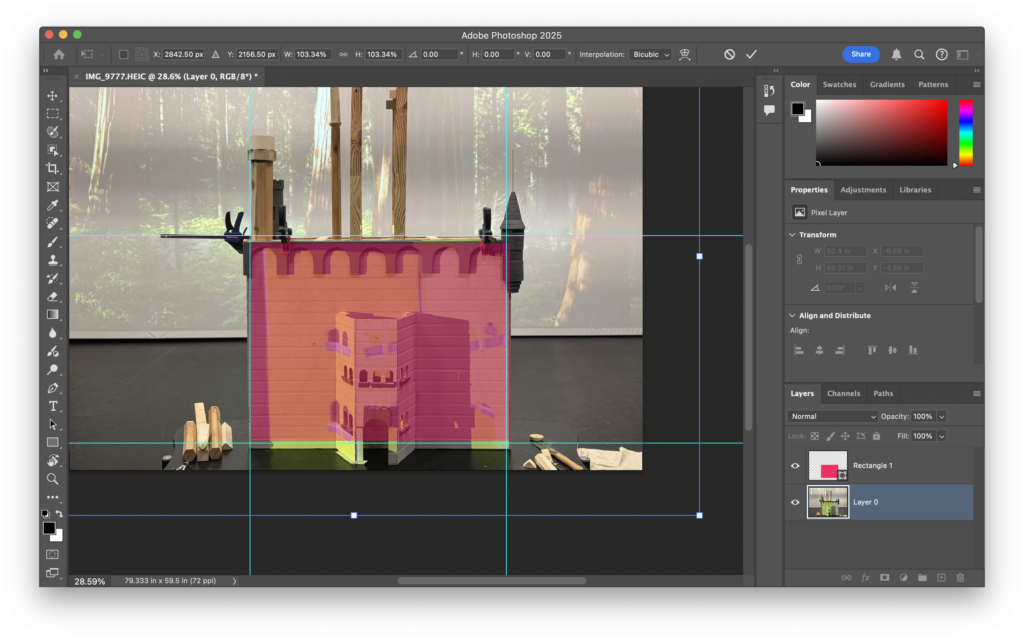
I used images of the castle to help build digital models.


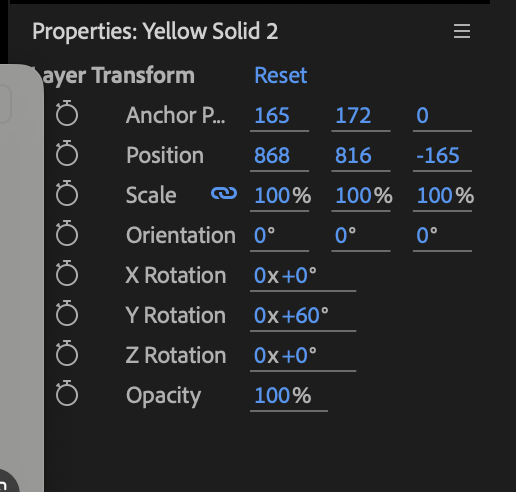
Early attempts to model the castle using Adobe After Effects and position cameras to correspond with the projector positioning were time consuming and came close to approximating the environment, but ultimately unsuccessful. Using the measurements taken from the motion lab helped close in on actual positioning, but the angles and exact positioning proved elusive.


The most useful asset proved to be line tracings from the perspective of the motion lab projectors that I could pull into After Effects to create graphics that were very close to the actual dimensions of the castle. These were much easier to map onto the castle and only require minor distortions to account for imperfections in my photography approach.
Performance
I think that many of my theories were confirmed during the performance. The flow worked well. Nobody mentioned the removal of the digital stone facade. Classmates enjoyed playing with the magic wand even during the feedback session. The silhouette of the castle on the main projector made for a striking visual and gave an impression of being larger-than-life. The magical conductor role was looked upon favorably. Obviously the Pepper’s ghost was not mentioned because it was a secret closer, but I suspect that if well executed it would have fit well with the overall theming and magic.
One major oversight that would have been embarrassingly simple to execute is the addition of an audio indicator for successful magic wand interactions. I added these in post to demonstrate how it might have changed the experience.
What could have been…
Cycle 2
Posted: December 11, 2024 Filed under: Uncategorized Leave a comment »Several key take aways from cycle 1 defined my approach to cycle 2:
- Projection mapping is going to be a lot harder than I expected.
- Find a way out of the complexity. The decision to project onto a structure under active development means that I have no stability in projection mapping. I need to either find a faster way to build the castle and/or a more flexible approach to projection mapping.
- Go all in on immersion. Front facing projection is going to be inadequate. The contrast between an animated forward face and the dead sides destroys the immersion on the experience. Conversely, participants in the experience wanted to interact with it. Providing pathways to interact with the castle could be a big win for immersion.
- The little things are the big things. There is a lot of potential delight in thoughtfully-placed, well-executed micro-animations.
The key to all of this is in my ability to improve my approach to projection mapping. As suggested during the feedback session, I decided to pursue an approach where I could fix my projection mapping once.
There were a number of options available to me. The easiest way to decrease my risk and create a positive experience would be to nix the castle and project onto something that was rigid, static, and reproducible; however in terms of the RSVP cycle, the castle was a major part of my valuation and was therefore non-negotiable.
The next option to consider was to expedite development on the castle. This was appealing, but only to a point. Castle construction involved the use of power tools. While there’s an upper limit to how fast it is advisable to move when working with a blade spinning at 3500 RPM, increasing the efficiency of my techniques for building the castle (score) without sacrificing safety was a good idea.
My plans for the castle included several hexagonal and several cylindrical towers. With no lathe available (resources) to create dowels, I relied on a process to build my cylindrical towers that included using a hole saw to cut out sections of the tower that I could later stack. This approach allowed me precise control over the tapering at the top and bottoms of the towers. I directly adapted this approach to create my hexagonal towers, by using the radii of the circle to mark out the vertices of the hexagon, then using a bandsaw to cut down to the edges.

To make this process more efficient, I can use a table saw with the blade set to 30º to do 2 rip cuts down the length of a board to dramatically decrease the time cost for building a hexagonal tower with a manageable increase to safety risk.
Beyond improving my building techniques, I was able to decide decrease the complexity of my castle design. I reduced the overall number of towers in my plan and I altered my approach to building rooftops. This reduced the overall risk to my project, but the castle remained a significant risk. Mistakes in the digital space can be undone with a keystroke. Mistakes in woodworking (of the non-digit removing variety) come with a much larger time cost.
For the digital side of the Cycle 2, I devised several new approaches to handle my projection mapping. My initial concept was simple enough. Scene 1 would Get Stage Image from Virtual Stages and feed those through pre-mapped projectors for the specific image.

The top of this page outlines some of the ideas I had for projecting. The bottom half outlines my concept for simplifying my projection mapping.
The execution went a little off the rails. I chose to build this approach by projecting onto a cube instead of the castle with the expectation that I could build the scaffolding with a simple use case and easily scale up my approach with a more complex target surface. Looking back at my initial concept, it seems manageable, but during the execution I got lost in the weeds and couldn’t fully understand what was going on in Isadora. During cycle 2 I had a basic grasp of how to work the Motion Lab media controls, but was not completely fluent. I also struggled to fully understand how a virtual stage actually works. In the end I built a user actor to accept media assets as inputs and tweak the parameters of the target projection.


This approach was more simple than my initial concept early on, but quickly became more complex and unwieldy as I needed to expand the User Actor to adapt to my use cases. I was ultimately able to get this approach to work, but it did not yield a dramatic improvement in efficiency over my Cycle 1 projection mapping approach.
For the Cycle 2 performance, I elected to drop the background projection and focus on the Castle projections. I kept the forward facing projector for simplicity’s sake, electing to add the necessary complexity after tackling the mapping challenges. I changed the castle texture to a style that more accurately captured my intent. I added some delightful micro-animations like flags that illuminated and a fire that flickered in the entry hallway. I stripped the music to allow my castle to stand on its own (though I had full intention of bringing music back during Cycle 3).
I also created fireworks using the 3D particles actor that I did not display until a classmate specifically recommended it. The fireworks were time-consuming to produce in Isadora and the effect was shabby at best. Still, my ultimate plan was to make them an interactive component of the final presentation, so I persisted. The ultimate effect was underwhelming.
During the feedback session for cycle 2, a classmate pointed out that the light bleed on the main projector screen made for a cool effect. I hadn’t noticed this prior to it being pointed out, but I agreed and took note.
Another piece of feedback centered around the sizing of the stones on the facade. It took a lot of effort to bring them in and map them out, but they were turning out to present more trouble than the value they provided.
Cycle 1
Posted: December 10, 2024 Filed under: Uncategorized Leave a comment »Resources
An open face box made of Southern Yellow Pine and pre-primed wood paneling.
A big white box
A roll of paper
Some trash from the Motion Lab
Several boxes to form makeshift parapets
Giant white sheets
Isadora
Blackhole
Youtube
Score
The audience is staged in the Motion Lab entry way. They are invited in to see a large projection of a winter landscape behind a bunch of junk on a table. The junk transforms into a castle when hit by the projection. I used an image of a stone wall projection mapped across the front of the facade to achieve this effect. After a period of acclimation, the second scene is triggered and a freezing sound plays over the Motion lab speaker system. A distorted white bar raises across the facade of the castle dragging a blue video with a morphing snowflake along with it. Let it Go begins to play over the speakers.

The first scene defines all of my interactions. I would later pull these into a user actor that I could easily trigger within my Castle Project scene.

This scene outlines my basic conditions. Each section corresponds to a different piece of the castle. One section projects onto the roof, one handles the stone on the facade. Another projects the door, and yet another is projecting the windows onto the tower with a comment “Why did I do this?” When I finally got it working I felt like it was a minor detail that no one would even notice.

This is the user actor that defines my freeze behavior. When I hit the trigger the castle freezes over and the Frozen music is played.

I was actually pretty proud of this. I used gaussian blur on a white rectangle to make the base of the freezing line. Next I warped this image using projection mapping to give it a more organic appearance. The effect in action was really very cool (but I forgot to record it due to nerves, so it lives on only in memory).
Valuation
I love the projection shows at Walt Disney World. Harmonious at EPCOT was the first show that I ever saw. The tight integration of audio with projection with fireworks and water displays… the mere fact that they’re projecting movie scenes onto water. The whole experience changed me at some deep level. It changed what I assumed was possible. It changed my perspective on fireworks shows, which I had always found to be rather boring displays that I would sometimes feel social pressure to pretend to enjoy. It solidified my desire to become a Disney Imagineer.
For my cycle projects I wanted to do something that Disney does better than anyone. Blend multi-sensory stimuli to create a meaningful, impactful shared experience.
For cycle 1, my plan was to get into the Motion Lab and see what was available to me. I started off with projection mapping. Our first exposure, mapping onto a tilted white cube was quick and fun. How hard can projection mapping be?
As it turns out… Really. Effing. Hard.
After hours of effort I was able to map textures onto the castle and towers reasonably well. This experience shaped my approach to cycle 2.
Performance
This felt like cheating. The performance was well received and both transitions elicited audible reactions from the audience, but I used a beloved song (“Let It Go” from the movie Frozen). I felt people were largely reacting to their love of the song rather than the experience that was put together. Yes, the song is part of the experience, but it did too much of the lifting for me and I didn’t feel like the experience itself was standing on its own merit.
The feedback was really helpful. Classmates noted that they were immersed in the illusion and felt like they could go inside the doorway to the castle (side note – in hindsight I’m really surprised that the projector was able to output black so well).
I received notes about how I could use minor details to create light ambiance and make the experience more engaging. I could create footprints in the snow as audience members walk about. I could build slight animations into the facade of the castle, maybe vines grow over the castle. I could put candles in the portholes on the tower (yes, they were in fact noticed).

The little castle that could. This is the scene that the class walked into. Allowing the audience to see this first gave the second scene greater effect. This scene is a little chaotic, pretty messy, and not almost a little sad. The next scene, however…

Not so shabby… The castle with textures projected onto the face. Note the bleed around the main projector screen. I was certain that I had done away with this before the performance. I didn’t notice these artifacts until they were pointed out to me.

Note here that the bleed artifacts have changed. I did not recognize this until posting. The reason for this – the motion lab floor. The floor gives as people walk across it, and this can cause projections to move slightly in response to foot traffic.
This is all that was captured during the initial performance of cycle 1. On the castle you can see the semi-transparent snowflake video projected onto the front of the castle.


Initial sketches of the castle concept and notes from feedback session of Cycle 1