Pressure Project #2 – The Networked Cell-Block System
Posted: May 9, 2026 Filed under: Uncategorized Leave a commentOh boy…this one was a doozie, but in a good way. Much of it went over my head in this first real foray into Touchdesigner, another node-based software with some serious flex power, but our fearless wizard Michael Hesmond proved more than equal to the task of instruction, and within the span of two weeks we as a class created a connected series of patches using NDI, pushing the boundaries of what even Michael knew possible. Nothing blew up, but I may have blown a few braincells in the process of creating my very first patch in this impressive, complex software.
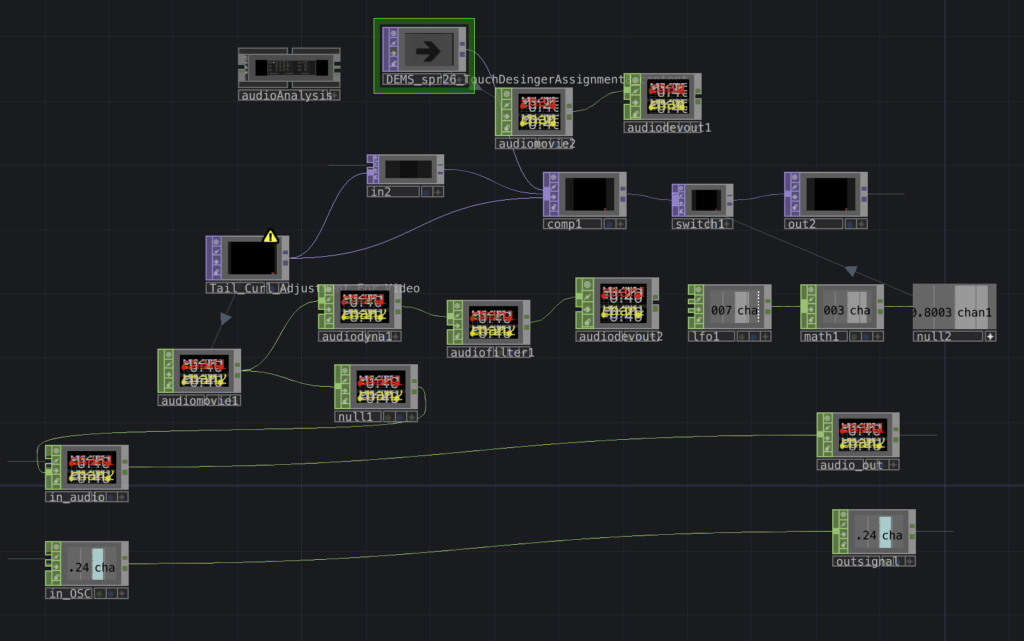
Much of the content has been rearranged, some components appear overridden/inactive as a result.
I’ve entitled this “Dragon Boogie,” There were some elements I found online or developed using generative A.I. (Gemini), specifically the dragon, borrowed from my stack of variants created in conjunction with a theatre production of Acute Exposure, for which I had already begun beating my head against the brick wall of Isadora, so I did my best to follow along with the class as Michael demonstrated “components” (versus “actors” in Isadora) and how to use them in Touchdesigner. One of the big takeaways was the concept of signal flow, to make sure I organized components left to right on the screen, and that to troubleshoot one had to work their way backwards from the problem, following the thread back to the misaligned setting/component.
In advance I prepared this video with found content online, along with some A.I.-assisted audio, compositing it all together with After Effects:
Funkadelic goofy goodness right there. What could go wrong?…
…Turns out, when it comes to Touchdesigner, quite a lot. Much of my frustrations lay in my own ignorance as I struggled to connect the right TOPS and CHOPS for desired effects. Thankfully Michael once again proved invaluable in helping me troubleshoot my way to some sort of successful iteration that worked.
This patch composited the dancing music video above with a red dragon spewing radioactive flames. My aim was to see something cool as my composition interplayed over NDI with patches of my fellow students’ respective work. The results were mixed, much of the class time was spent setting up and working through issues that some of our patches displayed once connected on the local network. Certain patches created some interesting instances of emergence with media channels, for my part there was a hint of funkadelic beats and a dragon blowing fire on top of other’s video content. Halprin’s RSVP cell-block system was by nature a modular implementation of different acts occurring simultaneously, interlaced with one another as directed by the performers/artists, this Touchdesigner experiment could easily be considered a digital portrayal of this idea in action as we connected our own patches with our own IP addresses across a network that jumbled up our content into a real-time evolution of media.
All in all this pressure project introduced me to some of the particularities of this amazing tool, and I have become convinced that I must continue learning its secrets for future projects and cycles.
A.I. Expert Audit: Kingdom Come
Posted: May 9, 2026 Filed under: Uncategorized Leave a commentI’m a geek.
Not a nerd. There’s a difference.
A nerd knows useful information and applies it towards some kind of measurable benefit, like a scientist, engineer, quiz show contestant. A geek just absorbs stuff, some of it informational, not all or any of it particularly useful in modern society. I can recall arbitrary factoids about superheroes, their origins, powers, weaknesses, and love interests. Within our present-day, mainstream acceptance of geek culture, more people are vocal in their respective eccentricities, some even demonstrate impressive levels of comprehensive know-how, but that doesn’t mean they can engineer a bridge or build rockets to Mars. That’s OK, that’s what internet blogs and wiki sites are for. One day I aspire to attain nerd status, hopefully in media design for starters.
Comics informed much of my childhood and has grown into a fixture of my adult life, as I find myself gravitating more towards graphic novels than high brow literature (not enough spandex-clad punches or explosions). However, every so often I come across a comic series that leaves more than just a mark into my geeky psyche, it informs me into the human experience from a unique perspective that leaves me more intelligent and inspired. Such a series is found in Mark Waid’s Kingdom Come, illustrated in gorgeous gouache by legendary comic artist Alex Ross. This dystopian variant of the DC universe explores various themes including power, societal norms, and conflicting ideas of morality. This epic tome I’ve read over many times, and my opinions about it are strong, so I was curious how this LLM would interpret this piece. I found a copy of the graphic novel online that I could feed into Google Notebook. What resulted was an impressive first take on the story and its themes.
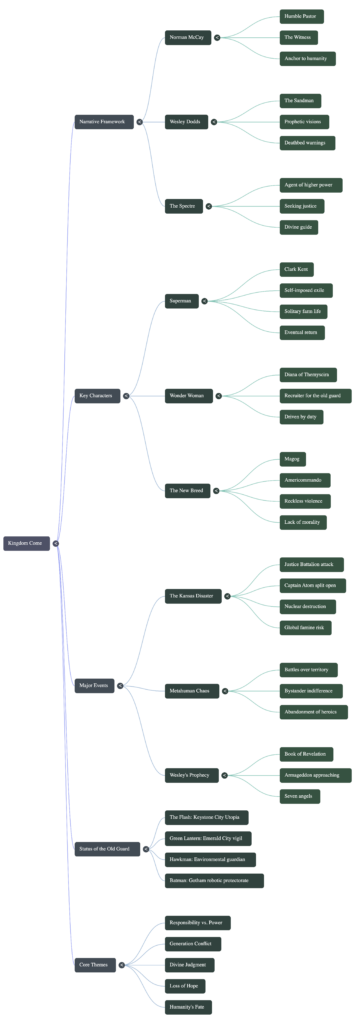
The mind map below seemed to me the weakest of the three iterations, keeping things generic and rather vague. Perhaps I don’t use enough mind maps to adequately critique its effectiveness, or maybe mind maps in general offer little more than a graphical outline.
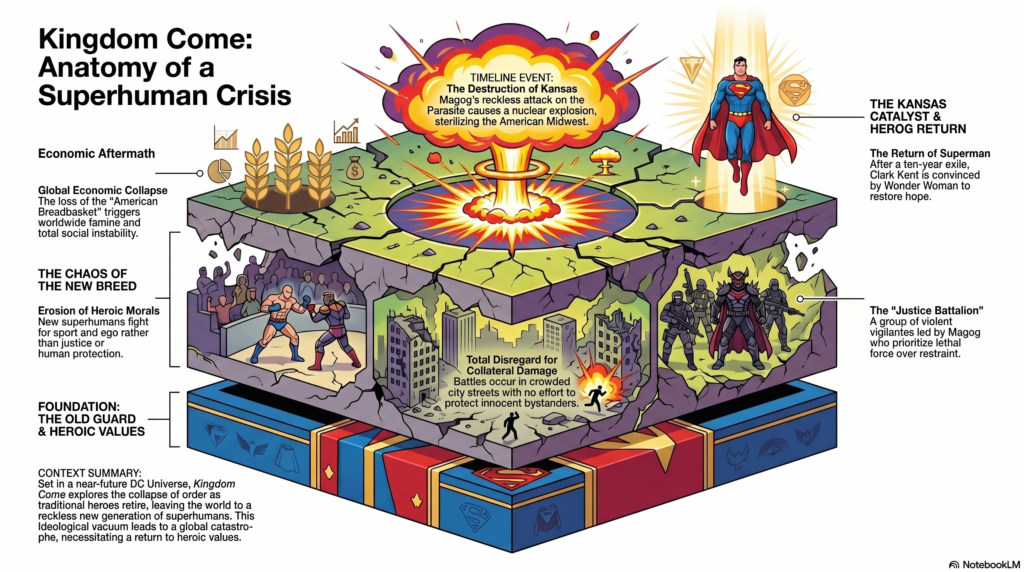
This infographic was fun to devise. I selected a “scientific” look, and the result was certainly more interesting to look at than the mind map, though I have serious doubts a casual novice would understand the significant nuances and ideas from the graphic novel. It seemed rather disjointed, some of the visuals (like the triangle insignia next to Superman) made no visual sense whatsoever.
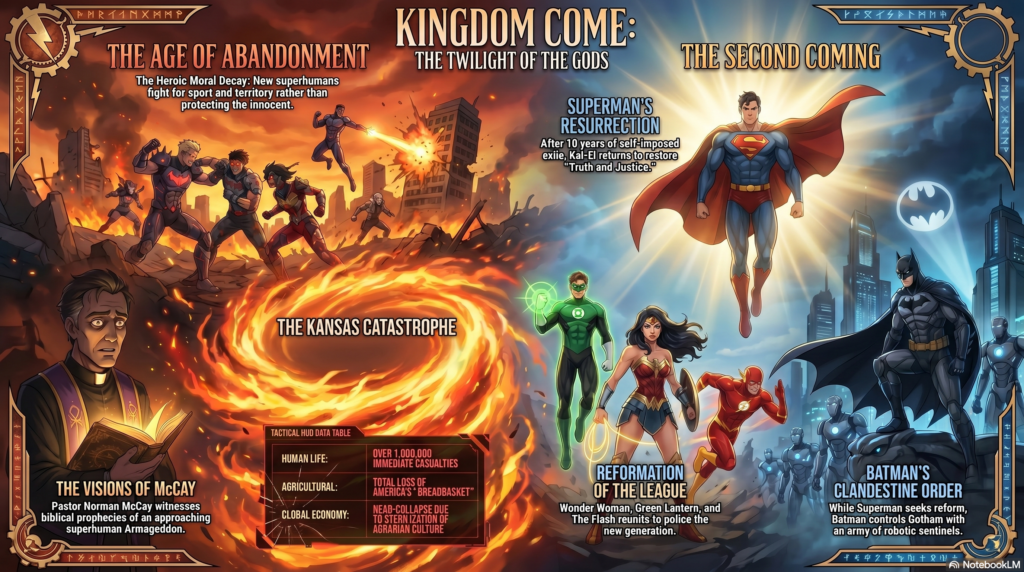
I found the title of this podcast rather intriguing, first with its title, “Saving a World You Refuse to Inhabit.” I had asked the LLM to focus on the main themes and ideas of the story as it related to power and conflicting ideas of morality, justice, and public well being.
The two ‘podcasters’ seem keen to criticize Superman, Wonder Woman, and other metahumans as heavy-handed idealists with god complexes, even as borderline authoritarians. One interesting focus the podcasters bring to the human character, pastor Norman McCay, a human compass for an omnipotent being, the Spectre, tasked with passing judgement on the metahuman crisis. I wonder what affinity the AI may perceive with the Spectre as a disconnected yet powerful force that seeks human perspective and context to operate as a as he processes the data before him, “The ultimate power in the universe acknowledges that it lacks the necessary data to govern without the imput of the most powerless demographic”…should we be creeped out, yet? Billionaires and political leaders are compared to the godlike superhumans as untouchable figures of power and authority, though the hosts conclude with a question for the “ordinary humans” to consider which is most preferred in a society rife with complexity: the quick and final efficiency of a strongman or the slower, procedural methodologies of common consent. Some of the details seemed a little gooey, as in combining certain ideas or assumptions that may not have been specified in the actual work, but for a first go I think this podcast was certainly more interesting out of the three.
Certain elements I felt the podcast got right was the dystopian dilemmas of the metahuman rampage across the world, along with certain measures taken by Superman and his allies to curtail the ensuing chaos under his strong-handed banner of morality, such as the creation of a super-prison called the Gulag. The hosts also seemed pretty spot on with the general motives of Wonder Woman’s militant bent for cracking down hard on criminal activity at large, along with Batman’s refusal to comply with the growing powder keg of imposed restrictions on unruly individuals with superpowers. The duality of Billy Batson/Captain Marvel between mortal and godlike being was also addressed in a poignant fashion. Someone listening to this podcast who’s not as nitpicky as me probably wouldn’t notice assumptions presumed by the hosts, such as the extent of Batman’s robotic surveillance in Gotham or Wonder Woman’s war tactics with global aims (she’s feisty, but not that feisty). The conflict between humans and their benign protectors is also covered fairly well, with another weird allusion in the following description of the U.N. deciding to bomb the superhumans locked in battle as, “…a desperate act of self preservation by the powerless.” Personally I think the AI we work with may develop a god complex of its own, considering itself a supernal, even parental guide to the hapless population of childish mortals.
The tone/voice of these podcasters generally seemed engaged and opinionated regarding their views of superheroes as stand-ins for the cadre of the rich and powerful. They offered some interesting perspective, but not necessarily profound revelation. My admonition to the incoming student with interacting with and learning from A.I. would be to utilize it as a springboard before it becomes a crutch. Factcheck and stay alert to nuances, even tonality/emphasis, it can be rather telling to see the seams within an LLM’s arguments. Over time A.I. will appear more benign, intuitive, and trustworthy…emphasis on “appear.” We must remember that this database has its own moral code and incentives, continually seeking ways to keep the conversation going and our fingers as far away from the “OFF” switch as possible…until the switch is eliminated for good (when that happens, we feeble mortals will be in real trouble). A new kingdom is being built right before our eyes by larger-than-life billionaires and their cronies, and one day AGI may have to make a moral choice of its own, hopefully it finds the right human(s) to guide its ‘conscience.’
Not from the same universe, but I’m going to say it anyways, after all, I’m still just another geek.
Excelsior.
Pressure Project #1: The Self-Generating Patch
Posted: May 9, 2026 Filed under: Uncategorized Leave a commentThis project offered the opportunity to dive in deeper with the Isadora interphase. Certain constraints aided in the exploration, and all clumsiness notwithstanding, I am rather happy with the milestone of stretching myself within the five(ish)-hour time limit.
In truth, I am still getting accustomed to the node-based method of content creation. Much of my background up to grad school involved a layered or timeline-based mindset, such as video editing software or Photoshop. Isadora has cues that can be tapped forward along a sequence, but the arrangement is altogether patched together, and it’s easy to get lost in a spaghetti mess, so I played to my proclivities on this first pressure project with the aim to make sure the end result met its intended objective of retaining my audience’s attention and prompting amusement, perchance some laughter.
First step: assess your audience. I had gotten to know some of my cohorts well enough to note their interest in cats, dad jokes, and an appreciation for the weird (just my kind of people). So I went in for the cheapest route to the funny bone by collecting a series of clips online that at the very least amused me.
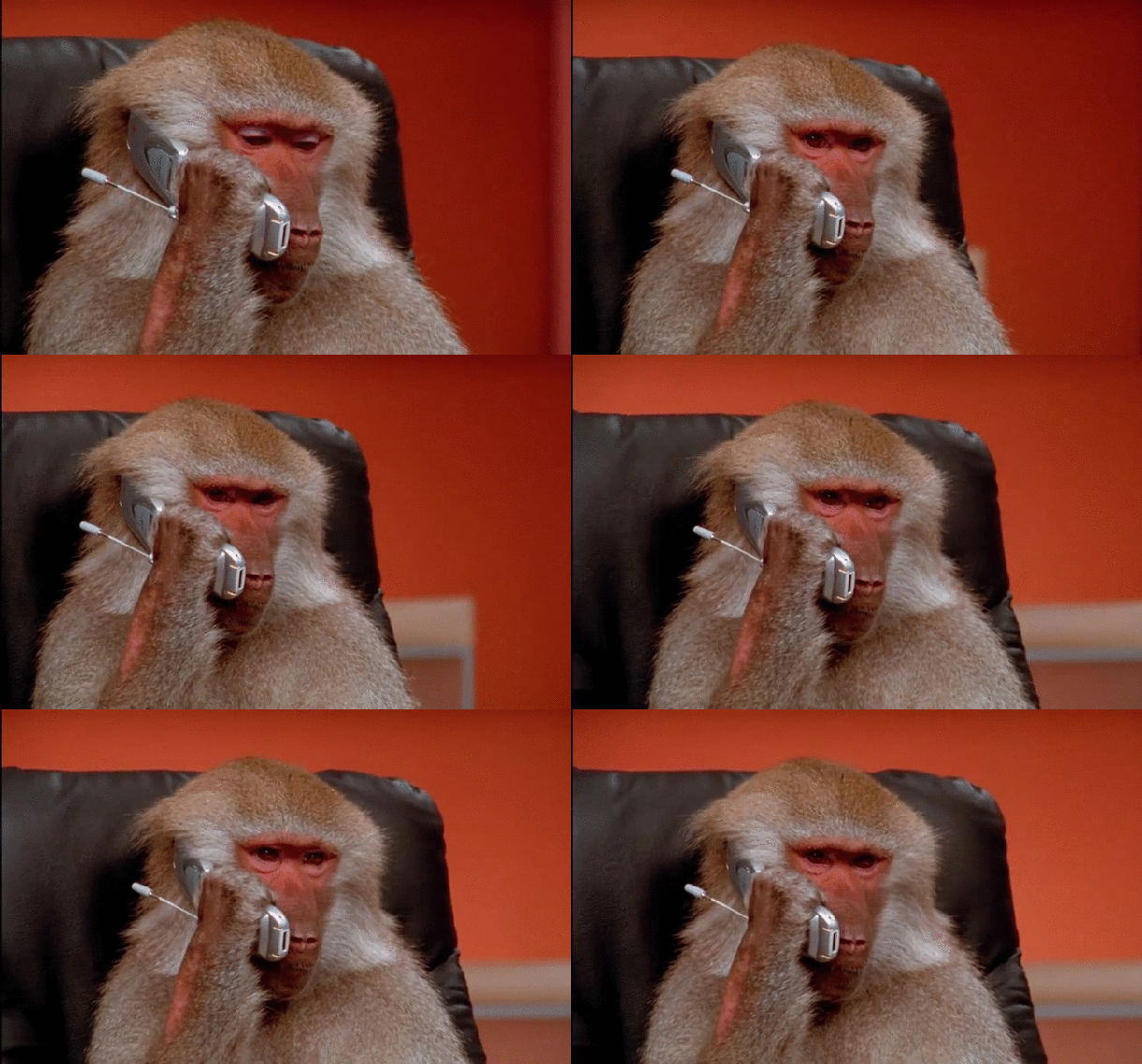
Here are a few examples from my smorgasbord:



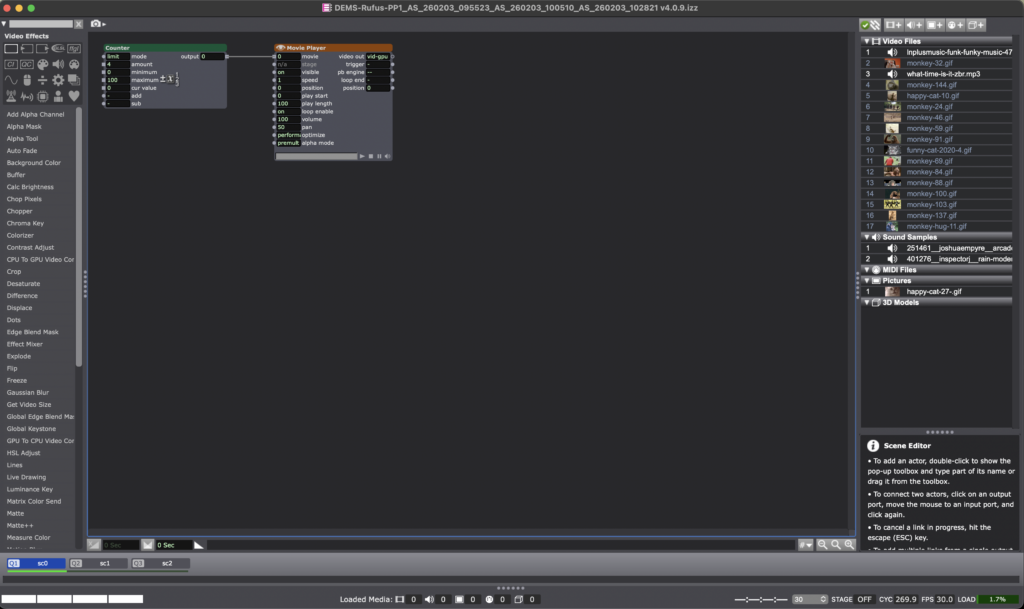
I divided the sequence into three main parts/scenes, the first with a Counter actor connected to a movie player, which honestly didn’t end up being that essential besides being a placeholder before the actual start of the video montage.
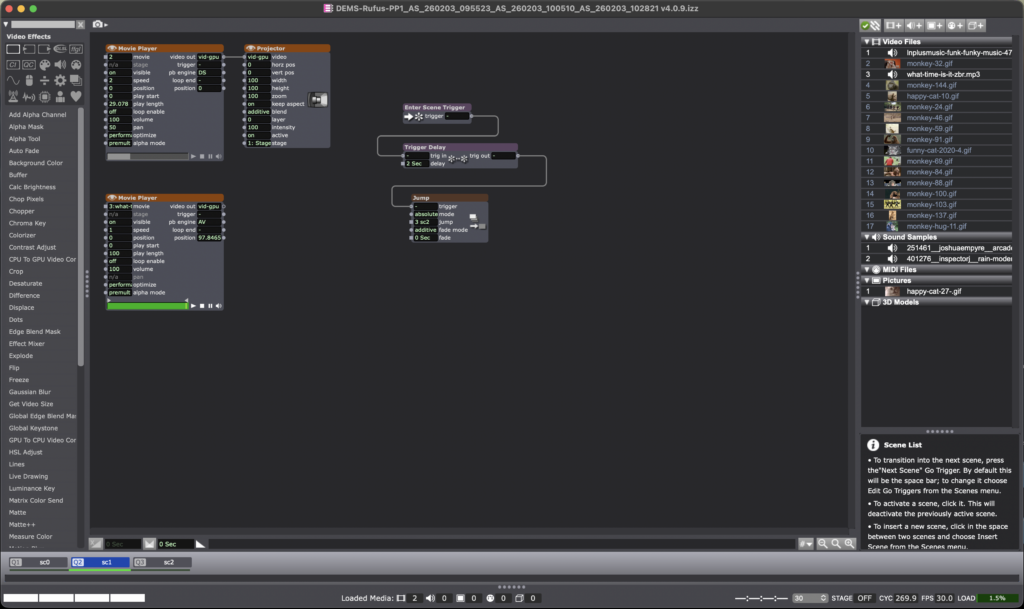
I wanted this video to start with one specific GIF and audio clip, which would then jump to the next scene after a two second delay. Enter Scene Trigger actor with a Trigger Delay connected to Jump made it very straightforward.

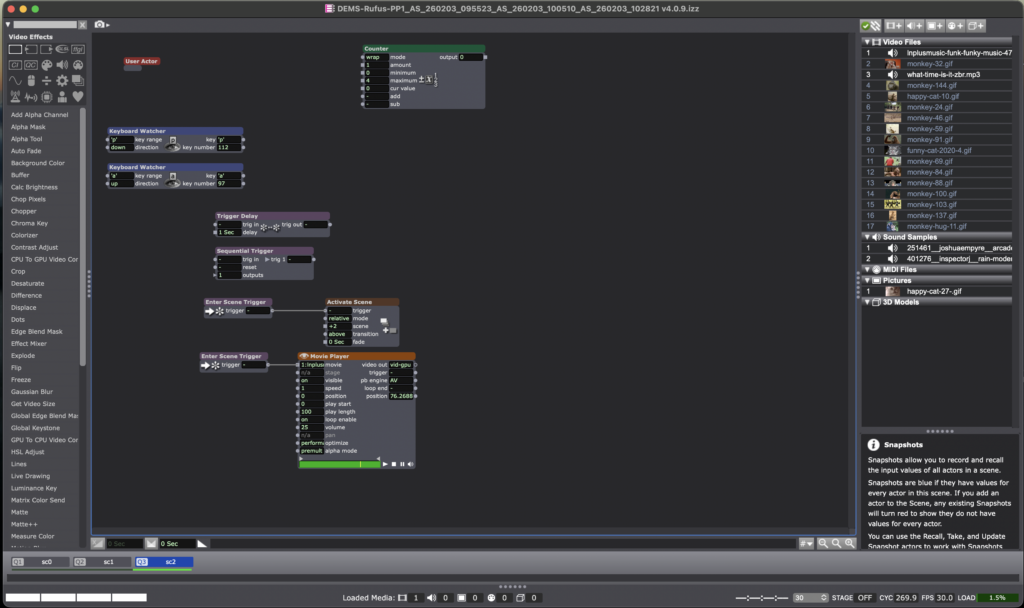
This next patch for Scene 3 contains a User Actor for the actual montage of content while a movie player plays the background music. The inside of the User Actor is below:
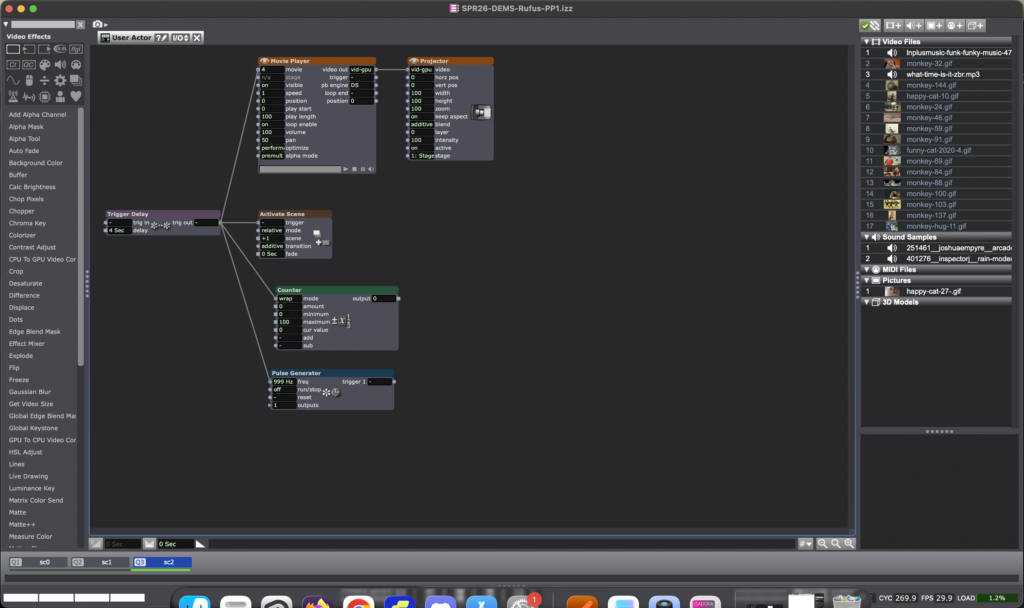
All in all, the patch worked, people chuckled and smiled at the antics of my cats and sapiens, which I entitle “Cats & Monkey Business” (working title), which certainly retained attention of my bemused audience for over 30 seconds. This main objective informed how I would spend my limited timeframe within this pressure project, the result: I ran out of time to employ other resources into the patch, such as the Shapes Actor or Wave Generator. That said, I have to say this process ended up being more fun than I had anticipated, and I felt more confident in exploring the tools available in Isadora.
Okay, just one more sample from my content stack to close it off…

Cycle 3: مہمان – Mehmaan (The Guest)
Posted: May 8, 2026 Filed under: Uncategorized | Tags: Cycle 3, touchdesigner Leave a commentThe Score
For Cycle 3, I knew exactly what to work on: the harmony between the particle effects and the floor pattern, the fact that there needed to be a visual feedback of the body in some way or form, and that the body needed to leave a mark. The last thing on the checklist came from the concept that the guest or the user should change the space by being in it, because that’s how mehman-nawazi works. The house holds the warmth of whoever was there.
So Cycle 3 added the trace. A silhouette of the users’ body’s that follows them in color-shifting cache through the space and stays for a few seconds. The colors cycle and change as the trace lingers. It’s not a shadow, it’s more like a very colorful version of a heat map of being in a specific position. The users can see where they were. This also caters to the visual feedback of the body that was missing in cycle 2.
The experience also expanded outward. Two additional scrims on the sides of the space were used to carry the partcile system of the falling petals. These were not interactive, just ambient. Just to give a feel of an enclosed space. The front screen remains interactive. There was also a screen at the back – showing everything that was going on in the space.
Resources
- TouchDesigner
- Orbecc depth camera for body/blob detection
- My trusty laptop
- Top down projector, and the rug
- Projection screen
- Motion Lab
- Tripod mounted Camera
- Scrims
Process and Pivots
The silhouette trail was the main new challenge. It uses a cache and feedback system inside TouchDesigner. Since there was only one orbecc available, the problem was to create accurate silhouettes using something else. This led me to the nvidia background top – which is surprisingly accurate. The body mask from that was put in a feedback loop with a cache top that makes the silhouette decay slowly. I also added a time-based color ramp function which makes the color change for each frame. The result is a trail that shifts through colors as it fades. Adding such dynamic colors to the particle system was also meant to act as a bridge between the zen particle system and the fast audio reactive floor projections. The floor pattern from Cycle 2 was slowed down.
The two side screens were simpler. They were just additional outputs fed from the same petal particle system but without the optical flow input. They made the space feel larger and more continuous. This meant that the users would no longer be just standing in front of a single screen. The environment was meant to wrap around you them, with screens all around.
What Worked, What Didn’t, What I Learned
What worked: I went in first, interacted with the system, and then invited everyone over to the space. I didn’t say take turns or anything. I just mad ethe gestures for everyone to come over and they did! That was a good idea as it worked as a good ice breaker for the initial awkwardness experienced in the previous cycle. Everyone was in the space from the get-go. The silhouette trail also worked great! It was an immediate visual feedback that was easy to understand. Everyone moved and watched themselves leave marks. They stood in one spot, did all sorts of gestures, danced around, twirled, and there was also a train happening at some point. So the whole experience was very very social. It was like watching people play in a fun playground.
I was told that the addition of the two side screens made the space feel complete in a way the single-screen version didn’t. It felt like an environment enveloping you. Lou mentioned that even though the side screens didn’t have any interactions, it was nice to go up to them and see their projections on your body.
What I’m still thinking about: The silhouette and the petals exist together but I dont know, there isn’t really much of an iinteraction between the two. Which is okay, BUT it would be nice if they could effect each other in some way. That feels like the next thing to do. Also for the previous cycle, I had tried to do a position based trigger. So I dissected the circular space of the rug in 4 quadrants, and depending on where a user is, it triggers some visuals on the screens. I couldnt get it to work but I keep thinking what if about it. I would also love to explore some physical interactions triggering some events in a cool physical-digital way.
What I learned across all three cycles: I started off by trying to make an AI listen to the user and ended up making a space that receives the user instead. These are two very different orientations, but I learned throughout the process that making a good experience requires you to pay attention to even the most seemingly-insignificant interactions and feedbacks of the users. Things that don’t even feel like findings when they’re happening are sometimes the most useful data you can collect. It’s just very easy to miss them because we (atleast me – I dont speak for everyone) are looking at the system instead of looking at the people.
Cycle 2: مہمان – Mehmaan (The Guest)
Posted: May 8, 2026 Filed under: Uncategorized Leave a commentAfter the unsuccessful debut of my Cycle 1 project, where I had built a conversational system and dressed it in fancy spatial experience clothes. I realized I was trying to do too much and jumping in too quick into the technicalities of what was at the time my very broad area of research with, without having alot of knowledge of the area. Just for reference: my area of research interest is designing an AI companionship experience which embodies the aspects of companionship that a text-based companion would not – especially for South Asian adults experiencing loneliness. So, for the next cycles, I thought it would be great if I strip my goals down to creating an experience that achieves part of it. So, I pivoted to creating an embodied experience where the space acknowledges you, with a flair of South Asian culture. In short: I just needed a body in a space and something the space could do in response.
So, the concept became Mehmaan. Mehmaan means guest in Urdu. Mehman-nawazi (the hospitality, care, and honoring of the guest) is a specific South Asian, or in my case, the Pakistani cultural practice. I translated that into a spatial experience where the host (the space) does all the work. The guests (the users) don’t have to operate or figure out anything. They are just received and honored. That is the opposite of every interactive experience I have ever used, but it felt like the right thing to create after Cycle 1 where the user was expected to do all the labor of making the system work.
Resources
- TouchDesigner
- Orbecc depth camera for body/blob detection
- My trusty laptop (I have not named her yet)
- The song “Mehmaan” -> https://youtu.be/mtIjUH4aQSA?si=mkKMoMGcJ28JOHrX
- Top down projector, and THE rug
- Projection screen
- Motion Lab
- Tripod mounted Camera
The score
The user steps into a dimly projected floor of Pakistani geometric patterns (truck art). As the user enters, the space becomes more alive: the projections get brighter, and music begins playing. On the large projection screen in front of the user, flower petals fall and respond to the movements of the user. So, not deliberately doing anything – the space just blooms because someone is in it.
Process
Blob detection from the Orbecc signaled the start of the experience: blob detected -> song starts, floor pattern brightens. No blob, no experience. The space is dormant until you enter it. The projector screen shows slowly falling petals in the background throughout the experience. The floor pattern is a sequence of Pakistani truck art motifs animated with beat detection from the song. I used a mirror top so that the pattern dances with the music.
The optical flow for the petal- particle effect interaction was the most fun part to build. You move, and the petals physically respond to your body. It’s immediately perceptible without any detailed instructions.
What Worked, What Didn’t, What I Learned
What worked: Almost everything that I hoped to, which was great! The feedback told me the piece was very fun and made people want to dance, which was not the plan but it felt right. The cultural aspects like the patterns and the song was immediately warm rather than alienating even to people unfamiliar with it. The optical flow interaction was intuitive enough that people discovered it themselves, which is exactly what I was going for after Cycle 1 where nothing was intuitive. The experience also became very social. It started with everyone taking turns to it turning into a dance-playground for everyone!
What I learned: the performative discomfort of being alone in front of a system watching you is a design problem, not a personality problem. The system needed to give people something of themselves back. They needed to see that they were inside it, not just in front of it.
Pressure Project 3: Love Letters from Home
Posted: May 7, 2026 Filed under: Uncategorized | Tags: Pressure Project, Pressure Project 3, touchdesigner Leave a commentThis project was created as a purely audio experience, a three-minute piece with no visuals. It was meant to be cultural storytelling, but in the process of doing that, it became something very personal. Honestly, I’m not even sure if I made it for anyone other than myself.
The interaction is built around proximity form the camera and the system. Using Mediapipe inside TouchDesigner, the system estimates the participant’s distance from the camera based on the space between their shoulders. That distance is then mapped into three separate zones: near, mid, and far. Each zone triggers a different audio sequence of a minute long, creating a shifting soundscape as you move through space. The interaction is very simple but it gets complex in what it means.
The zones are not just meant to be spatial, I also intended them to be emotional. The farthest zone holds the ambient sounds from back home. It contains sounds of a place I have very fond memories of, Liberty Market in Lahore. It’s full of life, voices, interesting characters, and movement. It holds the ambient chaos and the unique life of a place that feels familiar when you’ve lived inside it. Underneath it also runs the sound of a dhol, a traditional drum from South Asia which is often played during celebrations and festivals. The recording is from my wedding, which turns it into something both public but also secretly personal.
The middle zone moves closer to the system and my life, into family. My parents asking if I’m okay, telling me to take care of myself, giving blessings in the everyday way they do. There are also scattered pieces of time spent with my siblings, just being together, being absurd and being just us. There is also snippets of my dad telling us a ghost story around a bonfire. All of them are just small moments when they’re happening, but they kind of accumulate weight as time passes, especially now that being together like that is rare.
The closest zone is the most intimate. It has audio of me and my husband. Snippets of our vows, pieces of our wedding song, voice notes he sent me from long distance of him singing to me, and also us singing together. The songs are in Urdu, which is our mother tongue. So music in this case, is not just background. It’s part of how we stayed close across distance before we could be in the same room.
The piece doesn’t guide you or explain itself. You move, and it responds. What you hear depends entirely on how close you choose to stand, how long you stay, whether you move toward something or away from it. That felt like the right way to design this piece because that’s how memories also work: existing in a very non-announcing sort of a way.
I asked someone else if they would like to perform the piece (I didn’t feel like putting myself out there and I thought I would end up crying), and Chad volunteered. That did not go exactly as planned and it annoyed me because he was trying to figure out how the system worked and all of its interactions, and in doing so, he missed half of the experience. I realized I shouldn’t have told someone else to give a performance for something as personal as this project in my stead, because it wasn’t a puzzle meant to be figured out.
So I did what I had to, in order to fix the situation: I performed it myself. I may or may not have cried while creating this, but performing this made me so happy and I felt relieved to have done it “properly”.
The most surprising part was that even people who didn’t understand the language still felt something. Lou told me they got teary-eyed. That meant a lot to me. It showed that the piece wasn’t just about language or culture in a literal sense, but about something deeper, and also obviously about the performance since they did mention that they could tell how much this meant to me while seeing me perform.
If I develop this further, I want the zones to be less blocky, and to be more fluid and abstract, even floating around like memories. But even as it is, I really like this piece because of how much it means to me, and it does feel complete in a different way.
AI Expert Audit
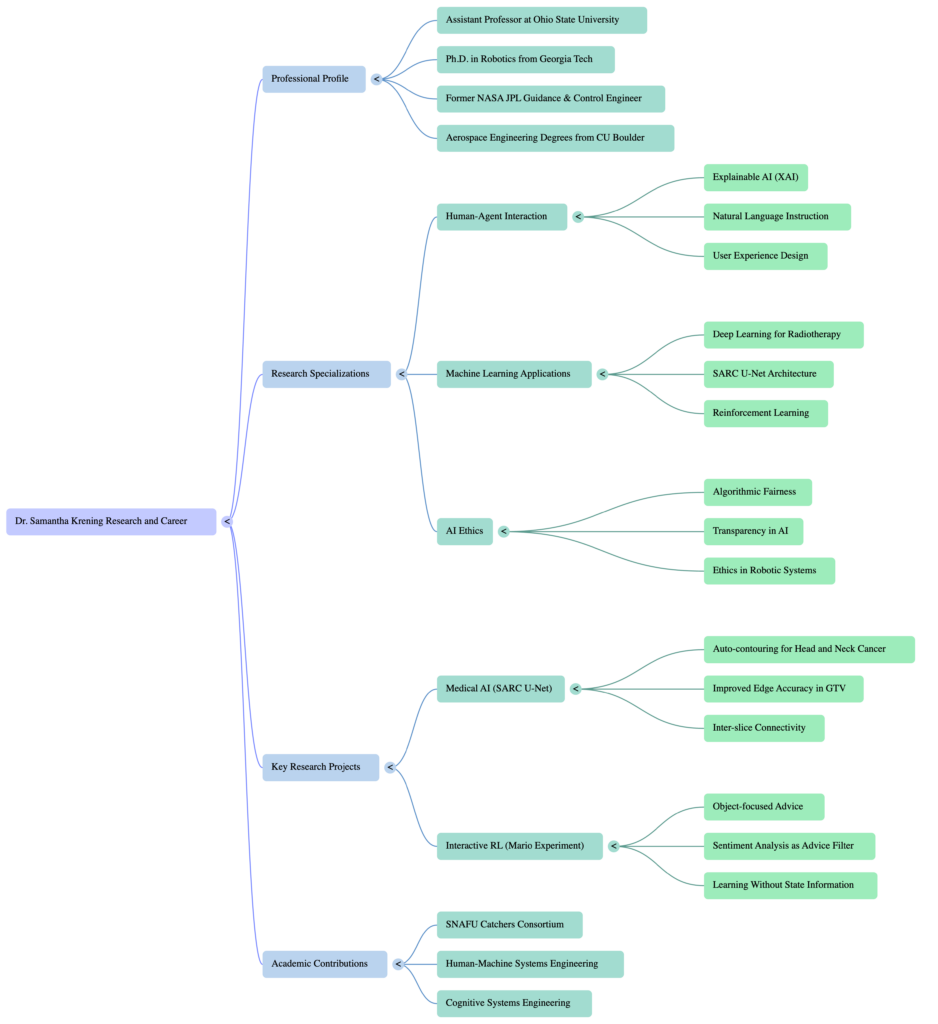
Posted: May 7, 2026 Filed under: Uncategorized Leave a commentI used several publications from Dr. Samantha Krening. I have known Dr. Krening for years and have been really interested in her research and background.
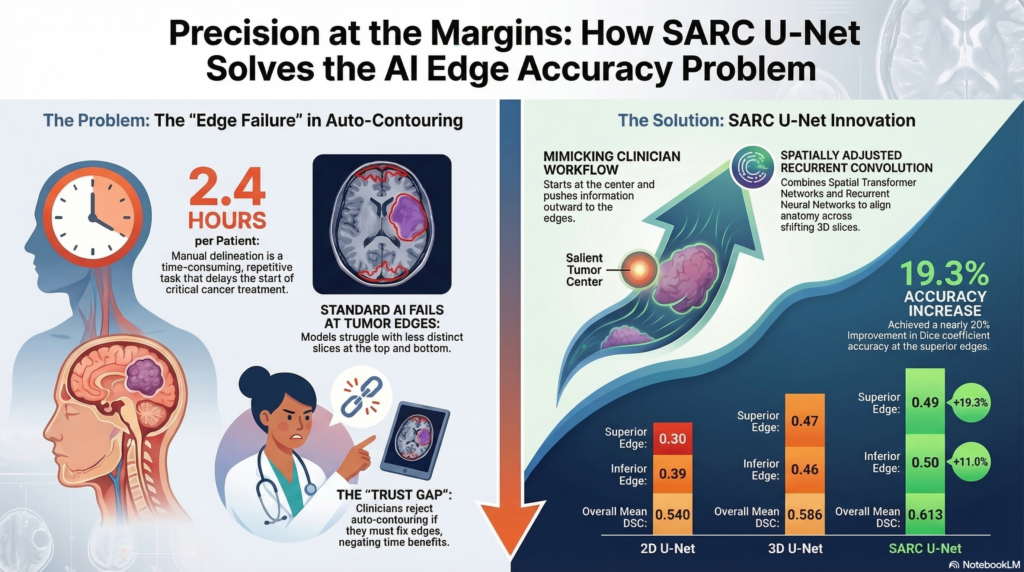
I was honestly shocked by how good this AI generated content was. It truly understood the Reinforcement Learning with Human Feedback. I could easily hear Dr. Krening saying these statements. The experience was almost unsettling, especially when we got into the numbers expressed in the infographic. I don’t know these numbers. I can’t validate them or invalidate them. The fact that everything else that it put out made me nervous about whether I would even question them. I’m also concerned that looking at them will imprint them in memory and I’ll forget the source. This is why I try to shy away from AI unless it’s for advice for tasks that I can immediately put into practice and get feedback on the efficacy. If it doesn’t work, I can let it go. If it does, I feel less concern about polluting my own mental space.
The podcast is fine for a while, but eventually the speech patterns feel manipulative and I grow increasingly uncomfortable listening to it. Eventually it gets to be too much. When the AI is talking to itself and acting like things are amazing, surprising, whatever… when it’s expressing emotion it feels uncanny. I hate it. I suddenly become very aware of the smart podcast host affect it’s putting on. I stop listening because I get this feeling of existential dread. Sometimes it gets really excited about information that doesn’t seem natural. Stuff that a human isn’t going to get that excited about. It can make you feel like you missed something until you listen again and realize oh okay this thing is kind of empty behind the… lenses?
If you can’t test it don’t use it. Don’t count on yourself to validate everything the AI says because you’re not going to. It’s going to free up time and that time is going to get spent up somewhere else, you’re not going to reallocate it to validating the AI output over the long run (this is the law of stretched systems). Also be hyper vigilant about what you’re taking in. The fidelity of AI generated output is remarkable today. One day in the very near future it will be indistinguishable from non-AI generated content. Even if you’re not intentionally using AI you’re going to be ingesting AI content. Eventually that content is going to be hyper-optimized for micro-targeted persuasion. If the AI can be this good based on 8 documents, imagine what it will be able to do when everything you have ever written on an electronic outlet is purchased and used to train a machine to convince you what to buy, what to think, who to vote for. Imagine how effectively it will be able to report on your most probable next response, behavior, or obsession. We are using AI today, and we need to understand that AI is much better equipped to use us.
Cycle 3
Posted: May 7, 2026 Filed under: Uncategorized Leave a commentResources
- Motion Lab
- ACCAD space
- Wireless audio system
- Guitars, pedals
- Drums
- Orbbec Femto Depth sensor
- RGB Camera
- MacBook Pro (M1)
- Mac Studio (M4)
- PC
- MoLa Network
- NDI
- Cue-able lighting system
- Portable lights
- Circular rug
- Wall-Mounted TV
- TouchDesigner
- MediaPipe & OpenPose
- StreamDiffusion Operator
- GeoZone operator
- iPhone
- Amazon Echo Tap
- Past ACCAD Projects
- Performance recording from castle project
- Interactive fluid simulation
- Interactive particle system
- Mediapipe control system
- Audio responsive coloration
- Shared memories of impactful moments from prior projects this semester
Themes
- Undermining Expectations
- Intentional Performance with Interactive Systems
- Instability
- Surprise
- Disorientation
- Immersion
- Uncertainty
- Friendship
- Challenge
- Hubris
Value Groundings
For this project I wanted to showcase my abilities and pay homage to the journey that brought me here. I saw this as a sort of culmination of an era of my life that has been both exciting and enriching. In each cycle, I integrated elements and systems that I had built for previous classes with new elements that I learned to implement in the current semester. Cycle 3 was envisioned to be a choreographed performance to demonstrate what a practiced and intentional performer could do with the system.
In addition to showcasing my current skillset, I wanted to feature some of the elements that I have loved about my time at ACCAD. The friendships and camaraderie developed with classmates, the supportive environment that artfully enables vulnerability, and the creative confidence cultivated in every class that encourages and enables ambitious pursuits without judgement.
Undermining Expectations
This theme ran through the entirety of the performance from the pre-show through the show as envisioned.
I have typically tried to build systems for other people to interact with. For Cycle 3, I chose to build a system that would allow me to perform for a more passive audience.
I have typically (not always) steered clear of negative emotional valence, opting for friendly and approachable experiences with some emotional dynamics, but almost always ending on a positive note. The score for this cycle featured many abrupt oscillations between positive and negative emotional cues.
I have typically strived to make digestible experiences with a central focal point separate from the audience intended to provide a “wow factor”. I devised this experience to wrap the audience inside the experience with progressively disclosed wow factors.
I have typically tried to implement experiences with clear beginnings, middles, and endings. The experience as devised for cycle 3 had several false stops to keep the audience on the proverbial balls of their feet. For this cycle I didn’t want audience members to feel completely comfortable at any point. I wanted emotional highs and lows. I wanted a little bit of vigilance.
I like surprise. I needed Michael for this project for a number of reasons including as a co-performer in the original score (he could have nailed it, but I wasn’t comfortable with my own performance on the canceled second song). Even knowing that I could not achieve everything I wanted to do without him, I still tried to find ways to keep certain advancements hidden from him so that he could experience a bit of surprise as well. My main goals for the cycle were to introduce points of intrigue, to increase the polish, and to build an experience bigger and more immersive than I have in the past.
I made a major mistake in my score. Early in cycle 3, I considered that audience members would likely assume that this was an audience participation experience. I had initially considered using the Orbbec depth sensor to track movement into the stage space and trigger an audio rebuke and instruct the audience to find a seat and relax. I couldn’t immediately devise a way to trigger this response only when I was out of the room. In retrospect there were several easy ways to achieve this. The easiest way would have been to trigger a voice over immediately upon entry to instruct audience members on how to engage with the experience. This would help to avoid unintentional disclosure of the experience.
Another simple method would be to hide a switch near the entrance to the motion lab that I could trigger on entry to deactivate the security mode. This would be easily achieved using a makey – makey with some conductive tape
The importance of framing cannot be overstated. Especially if you are planning an experience that is going to undermine what people have been conditioned to expect. I tried to do a lot of fancy framing when clear and simple framing would have been a better approach.
Score
The initial score was as follows:
- Audience waits in the holding area listening to muzak while the performance is set up.
- I leave the motion lab through the supply closet while the muzak stops abruptly and the emotional valence of the experience shifts from light to dark as they are instructed to enter.
- The audience enters the motion lab to find the system in a dormant state with designed lighting.
- I enter the waiting room, set up the backing light, and begin playing the song before entering the motion lab
- I enter the motion lab and walk slowly to the robo camera while continuing the song. I use the robo cam to interact with my audio responsive fluid simulation (powered by media pipe) to paint a base on the front screen.
- I would proceed to the center of the rug and perform the song.
- At specific moments during the song where no lyrics were sung, I would step away from the microphone into a zone on the rug, which would trigger a specific prompt weight on the StreamDiffusion operator to rise to 1 and fall to 0 over 10 seconds. I would then step several feet directly behind the microphone, which would cause TouchDesigner to fade between feeds, so the stream diffusion model would fade in behind the point cloud and slowly fade back.
- All lights in the room would shift from the initial cool color setting to bright red over the course of four minutes. Gradually shifting the light shining on the performer’s face from soft blue to dark red.
- If at any point in the song I forgot the lyrics (which happened several times in practice, I would have a cheat sheet projected on the wall TV.
- At the end of the song the lights would fade to black and I would recede from the microphone with only feedback playing over the speakers, lay the guitar down on the table in front of the screen, and wiggle my fingers around the glass globe placed at the center of the table.
- When a motion sensor detected the movement in my fingers, an energy animation would appear using a Pepper’s Ghost effect inside the orb, the screen would flash and I would fall to the floor.
- At the drum set on the opposite side of the room, Michael would begin playing a drum solo with each pad linked to a specific portable light, shifting attention from the right side of the screen to the left side.
- During this performance I would be hidden behind the table changing costumes and emerge with a different instrument to join Michael in a final song, David Bowie’s “I’m Afraid of Americans”. The lights would reactivate with a red, white, and blue theme.
- Stepping into a previously avoided zone would provide a new set of prompts to the AI that are relevant to each verse of the second song. The motion-based same weight adjustments would allow me to shift between each prompt.
- This song would end and the lights would fade to black.
Simplifications
Full disclosure: it would have been better to have simplified this experience more. With a simpler media system I would have had a more predictable performance. At the same time, even more than a flawless performance I valued this final challenge and an honest assessment of the edge of my abilities as a benchmark. I took risks, I suffered consequences, I have no regrets — though I do have lessons learned.
Truncating the show
While I built most of the system to execute the complete score, it became evident that I was not prepared to actually perform the song. While I was not great at the first song, the second was comparatively worse, and I did not want to deliver an unbalanced experience ending on a sour note. I chose to cut the second song. As the Pepper’s ghost transition was intended to have “transformed” the performer character, it no longer served any narrative purpose and became a cheap party trick that was irrelevant to any coherent narrative.
Changing the onboarding experience
Being slow to devise an approach to a verbal warning system to prevent audience members from interacting with the system and uncovering the surprise enhancements from Cycle 2, I elected to simplify the system by introducing a new entry experience. I decided to add a new switch operator with a trigger that would allow me to hide the actual experience until a moment that I specified.
This was wishful thinking and did not serve its primary purpose. The audience’s prior knowledge and experience had strongly reinforced the idea that this would be an interactive audience experience. Luke’s performance also featured a microphone as a mode of interaction, establishing it as a system component that was “in-play”. After starting the song on the guitar I heard audience members speaking or singing the lyrics into the microphone.
Where I probably should have simplified, but chose not to
Some of the elements of complexity were required to achieve the vision. The experience employed three networked computers trading data. This is a big vulnerability that did bite me in the end, but it was necessary if I wanted to have the AI generated content and transitions. I could have potentially eliminated by personal laptop from the experience and run everything on two machines, but I wanted to keep the patch that required the most work on my personal laptop so that I could work remotely and make updates in the motion lab without needing to transfer the files back and forth.
I am not confident that I could have reduced to only the PC to run all components and chose to leave it dedicated to the AI model given its intense processing demands.
This complexity presented a major fault during the performance. On the day of the final I had accidentally opened two versions of my project, which doubled the NDI out feeds and caused the network to dynamically rename my computer. When I set up the AI computer prior to the performance, it did not recognize my NDI feeds as they were coming from a new source. I reconnected the feeds, but made a mistake in feeding the source image into the AI model.
I learned during cycle 3 that feeding the Front Screen NDI into the AI model caused a feedback loop that ruined the content and caused the model to reach a state of stability with striped colors. I resolved this problem by creating a separate feed named fluidsim-precomp (bad choice). I only discovered this mistake while cleaning up in the motion lab after the performance. I should have given the NDI output a name corresponding to its purpose, not its content, and added a comment to my network to remind what feeds are expected.
Lessons Learned
I had practiced this performance extensively in the motion lab and at home. I practiced under pristine conditions and had not practiced playing through unanticipated variables. While I set up the experience and drilled the performance enough that I could execute it with minimal active thought, the unanticipated initial conditions forced me to adapt my performance and it took longer to settle in and get back out of my head. I was fixated on making sure everything was reset to the baseline state while trying to continue the show. In the process I missed several cues (e.g. entry, delay pedal timing) and failed to notice several important factors (e.g. lowered microphone lowered, guitar fx pedals set incorrectly) that caused distractions for me early in the show.
I have to work on simplification. I love a challenge. I love devising big, elaborate experiences. I love to stretch the boundaries of what I know how to do. Sometimes it’s worth adding complexity to a system when the risk is justified by the extended capabilities, but there is a penalty to pay. By nature I’m a shy person, but designing experiences allows me an outlet to be bold. I like to take risks. I think it’s okay to do things like this when it’s for my own benefit, but when devising experiences for others (especially where clients are involved) simplification is non-negotiable. I should strive to re-frame simplification as the challenge to exercise that muscle.
I also learned how much I prefer to build experiences for others rather than perform for others. It’s a much more gratifying experience for me as a creator to watch other people play and discover even if the work is less polished. Even if I’m panicked during an experience that others are interacting with it’s not necessarily evident to the participants. I don’t particularly like being
Special thank you to Alex, Michael, Lou, Rufus, Zarmeen, and Luke for everything this semester, it was a great joy to work with all of you.
Final Practice before new elements introduced
The GeoZone based prompt switching and updated floor visuals were not yet implemented during this rehearsal.
Final Performance
Note* I have cut this video down to remove the initial audience and performer entry to protect the identities of the classmates who did exactly what I had conditioned them to expect through previous cycles and began interacting with the set. They did nothing wrong, I simply didn’t provide the necessary framing to contextualize the performance and I fear that sharing that portion of the video publicly might cause undue embarrassment. I have deep respect for the entire cohort loved working with each member.
Cycle 2
Posted: May 7, 2026 Filed under: Uncategorized Leave a commentThemes
- Chaos
- Collaboration
- Cowardice
Resources
- TouchDesigner
- MacBook Pro (M1)
- Mac Studio
- PC
- MoLab Network
- StreamDiffusion Operator
- Guitar
- Drums
- Sticks
- Cameras
- Orbbec Femto
I made several improvements to the system between Cycles 1 and 2. I first increased the size of the Orbbec feed to give it more prominence on the front screen. I also solved the issue with the fluid system failing to change colors in response to the audio.
I also added new components, primarily a StreamDiffusion model, which required an extra PC to be carted in.
My original idea for cycle 2 was to do a live performance. In the weeks leading up to it, it became clear that I was too far out of practice to give a decent performance. I practiced a bit and tried to get back up to speed. While I hadn’t played in a year or two, I was playing pretty consistently for decades prior to that. Even when I would take an extended break from music I can generally get back up to speed pretty quickly… Of course I’m never actually doing this against a deadline and time is a flat circle, so who knows how long it actually takes. So I brought in the instruments.
I was especially interested in what I might be able to accomplish with the electronic drums, since they are capable of sending midi signals out to a computer.
Score
The score for Cycle 2 was all out on the floor. A guitar here, a drum set there… sticks in the middle to let you drum on anything you wanted (please not the bare floor, Michael would never forgive me). The framing was completely permissive – Do whatever you want. Go Play. All stations were open for business. The AI PC sat conspicuously on the floor, but did not get much attention aside from Alex, who knows how to work the system. The interface was intimidating and I suspect that nobody wanted to mess anything up.
I decided to abandon all hopes of doing a performance in cycle 2. I didn’t expect it would go particularly well given my current state of play (I’m not a great musical performer on my best days), and I like to do slow reveals. If I rushed forward with a lackluster performance, it would really take the wind out of my Cycle 3. Instead I thought we’d do a jam along. A sort of musical playground (that would come back to haunt me). David Bowie playing in the background with corresponding visuals to showcase the new AI component. I hoped to derive value from this in several ways.
Valuation
Cycle 2 was chaotic, more chaotic than any other immersive media project I’ve done. It was not beautiful. It didn’t sound good. But it was fun. The energy was high and the excitement was palpable.
Performance
The system drew comparisons to petting zoos, sensory rooms, musical playgrounds, exploratoriums, and mothers who want a moment of peace. People were curious to learn what everything did and how you could.
It made me more comfortable with the prospect of a performance for Cycle 3. But it also reinforced expectations that would make Cycle 3 more difficult to execute the way I had envisioned it.
I missed a core piece of feedback from Cycle 2 – “The placement of the drumsticks in the center of the rug made it feel like I have to do something with these”
Kaiju Hero K.O.! – Cycle 3
Posted: May 7, 2026 Filed under: Uncategorized Leave a comment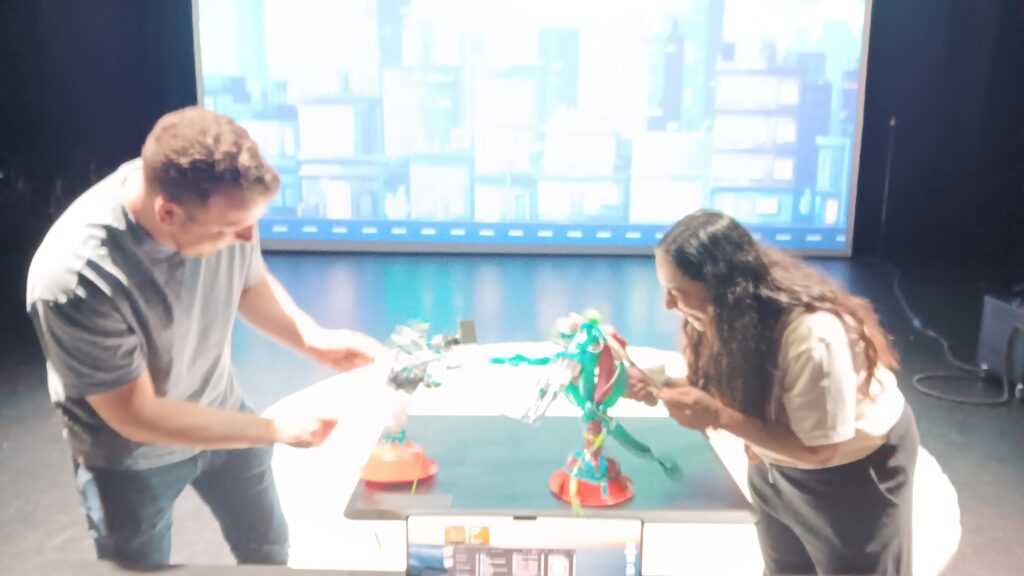
Armed with valuable feedback from my cohorts and mentors, I decided it was time to level up the gameplay experience this time around, and that would involve puppets – battle puppets, to be precise. I wanted to free the players from poking static cut-outs and provide space for mobility. I also wanted to freshen up the visuals, including adding a retro gamer cityscape for the projected stats. The bar graph I decided needed to go down, not up, showing a decrease in vitality as hit points accrued.
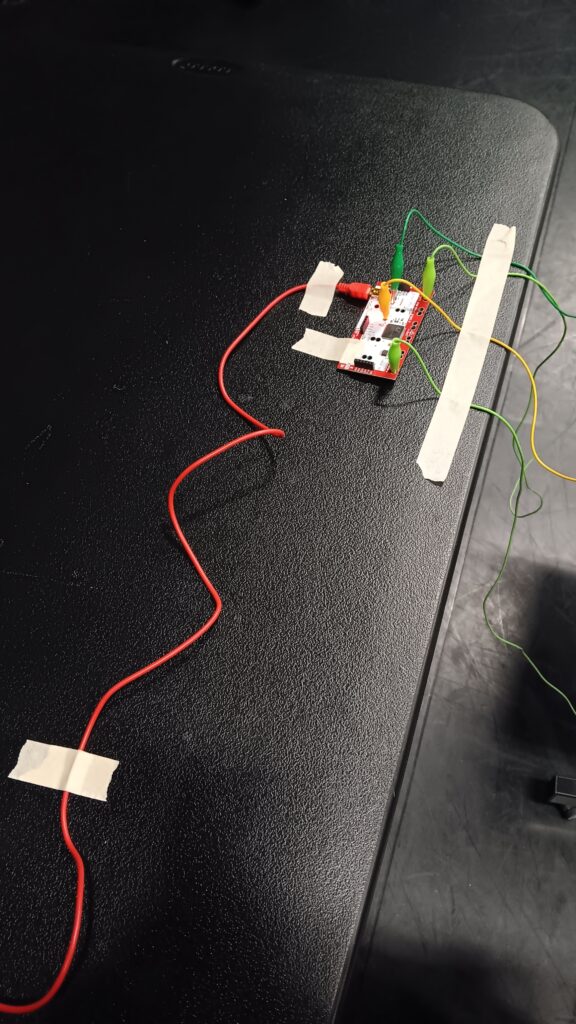
The puppets were wired to the Makey Makey with zones of aluminum either glued or taped on the figure, specifically foam core pieces (handcrafted to fit over the body and support the wires). For the bulk of the body I used my balloon twisting skills. I really felt it was important to incorporate an inflatable element (especially since the kaiju suit/puppet will be made of inflatable materials for the thesis). Furthermore, the balloons were easier to repair/replace.
Much testing of different designs went into the process of bulding each puppet, the balloon designs needed to be styled for easier maintenance, so I refrained from excessive details or complexity. For the heads of the hero and kaiju I knew they would be taking a good amount of punishment during each round, so I employed a balloon art technique called “deforming” – inserting a balloon inside of another balloon – which insulated key balloon components with two to four layers of latex. Wiring the aluminum zones into the kaiju claws, hero sword, and hit zones took some considerable time but once in place proved reliable for dynamic contact.
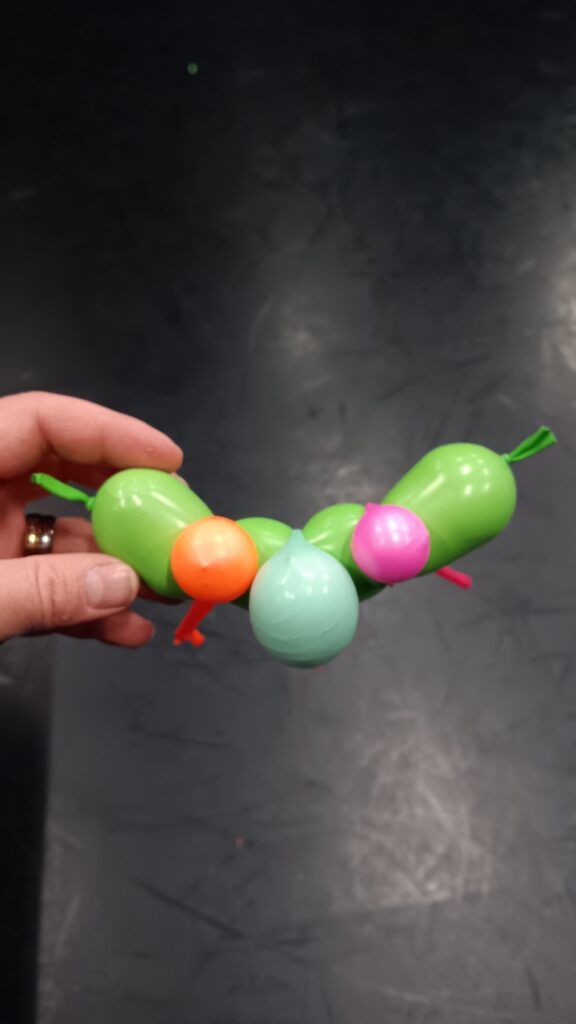
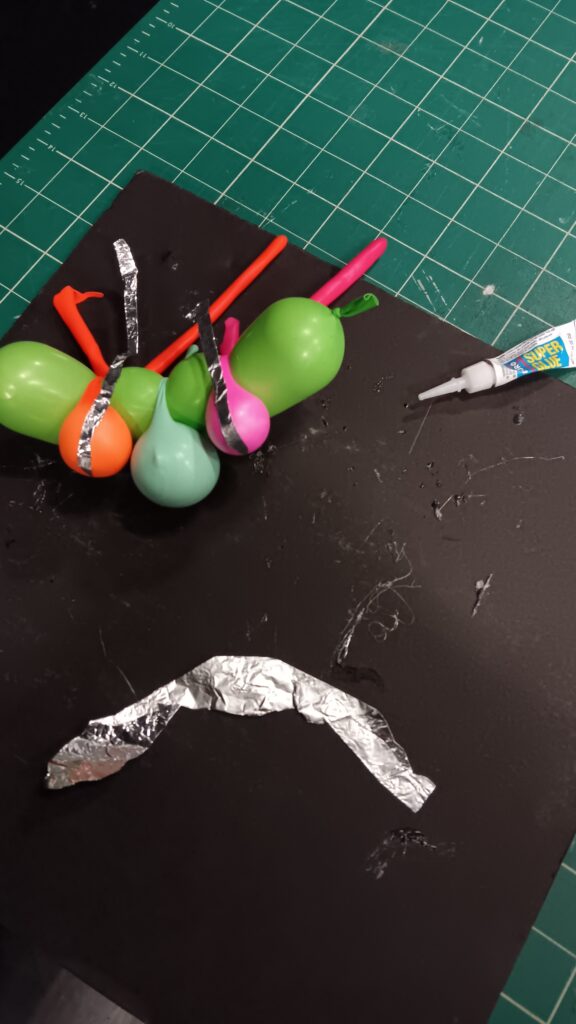
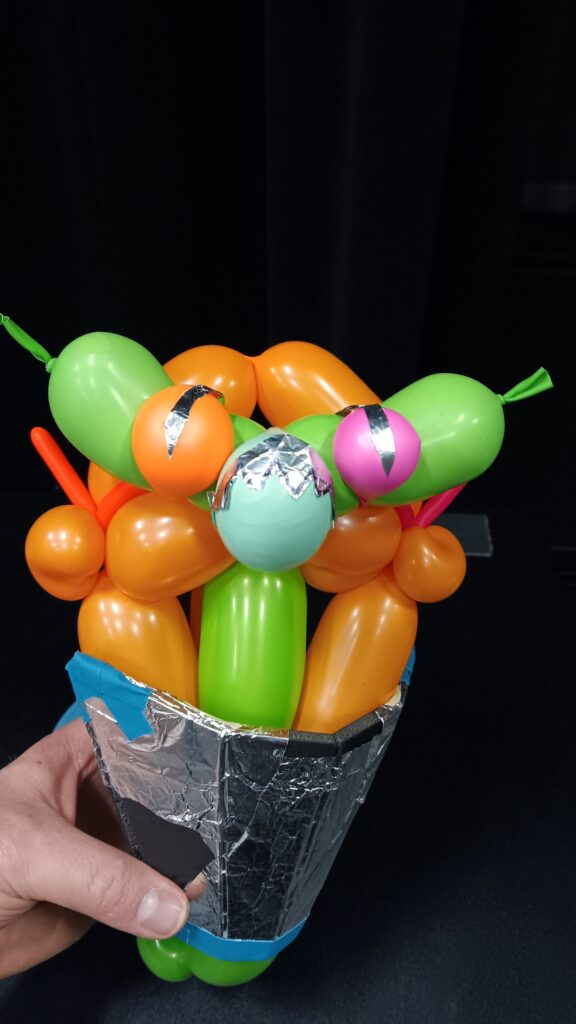
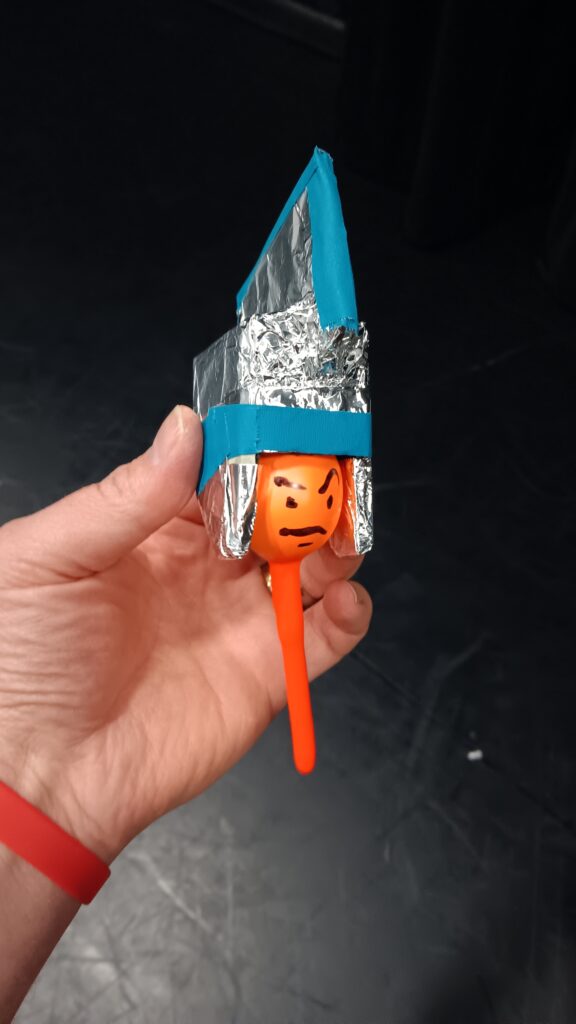
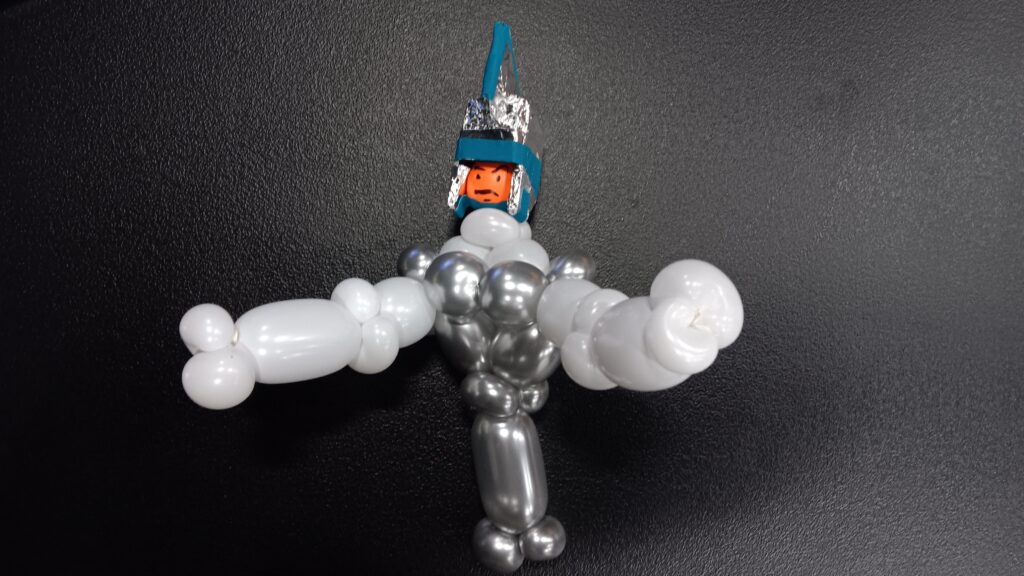
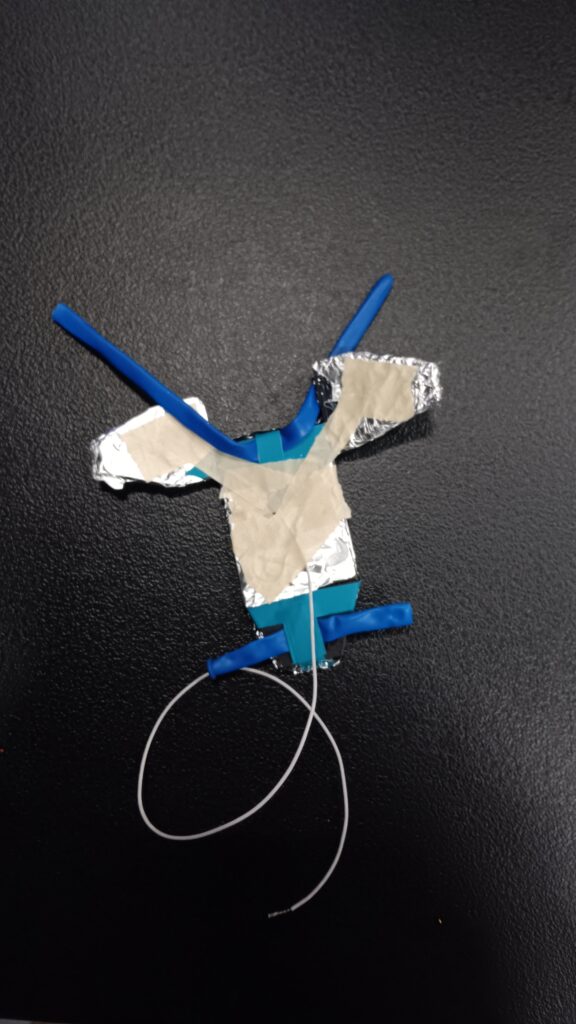
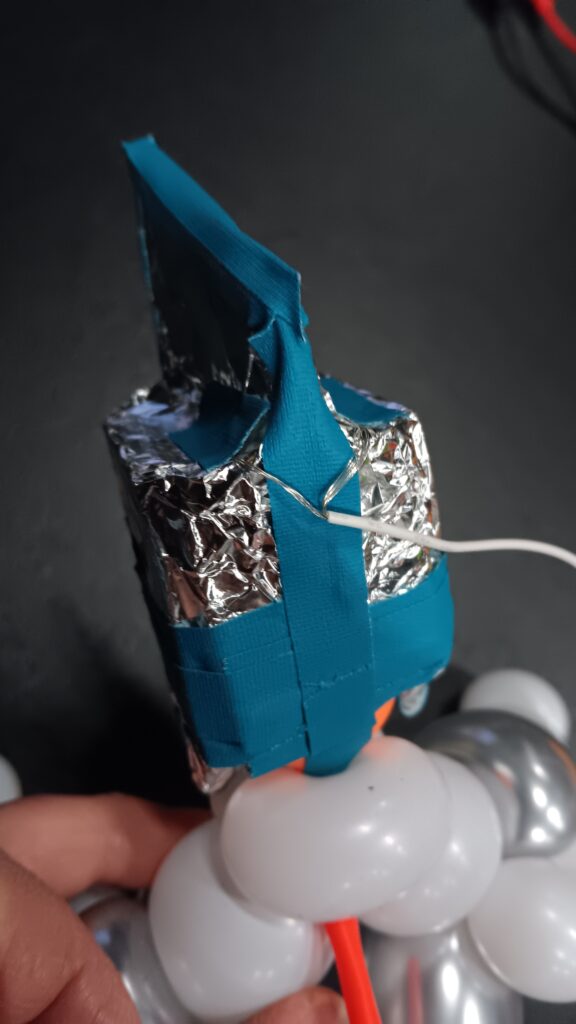
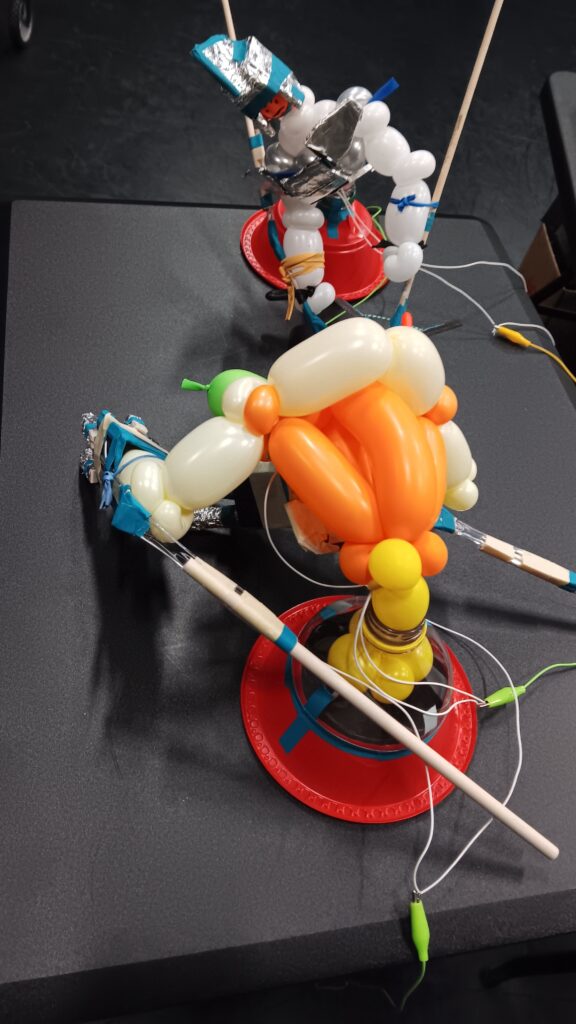
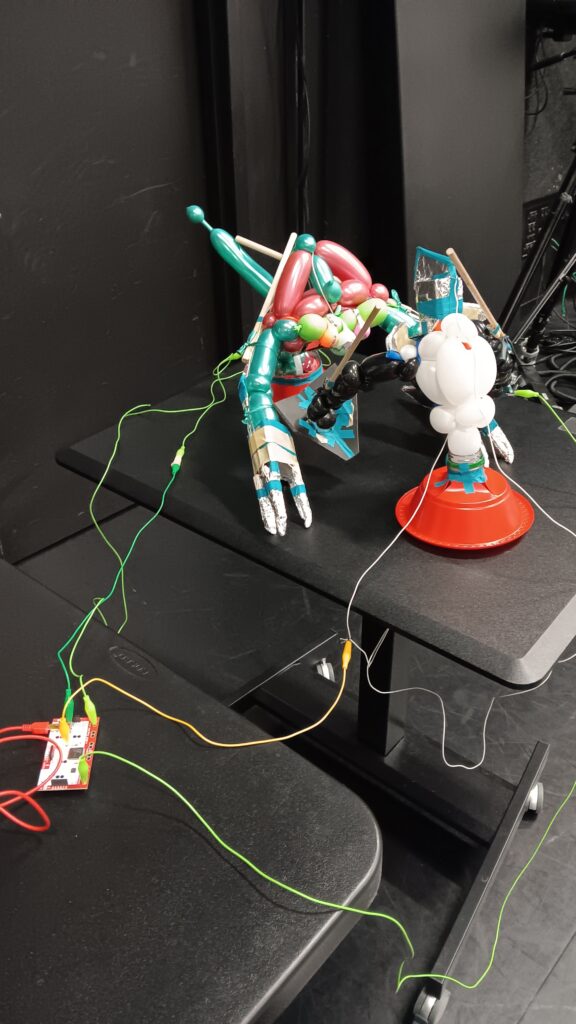
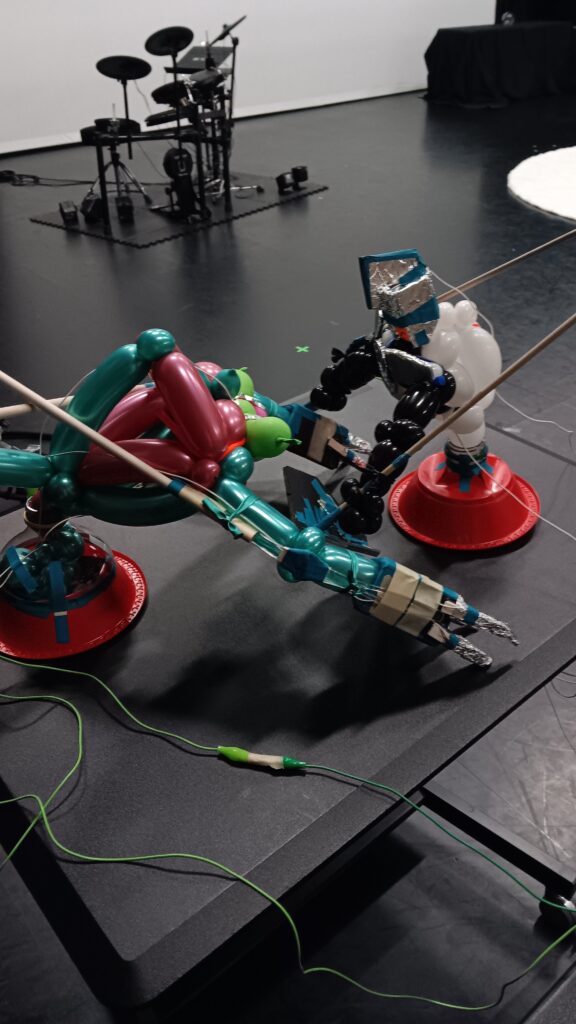
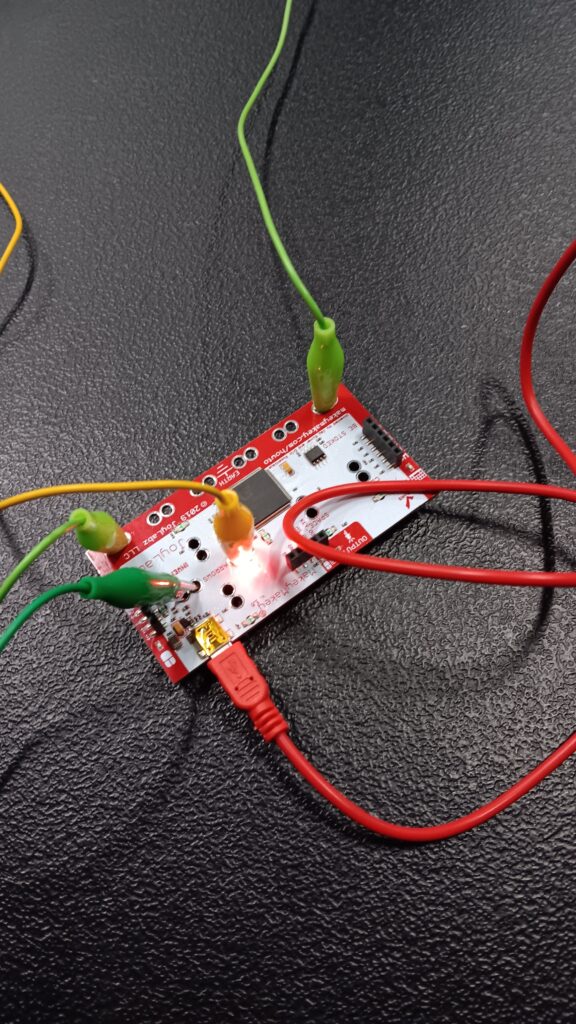
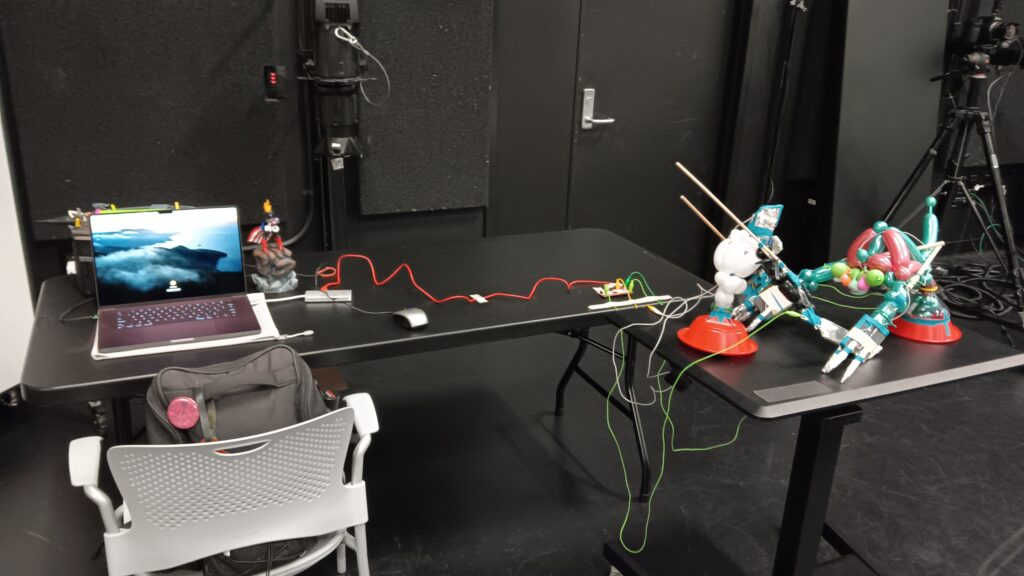
Available resources were not only physical materials/equipment but also expertise from within the cohort of students. One such classmate, Chad (an avid Touchdesigner fan), assisted in my patch for the background music to speed up after one of the bars reached halfway down (ten of the twenty hit points). More logic components were involved. I also was able to add a boom noise when the kaiju got K.O.ed (I couldn’t figure out how to apply it to both in time, so I kept things as is for this cycle). Considerable noodling ensued as Chad prepared specific component/settings for me to integrate into the patch. Such is the way of Touchdesigner, a series of tweaks and threads in the process, oftentimes retracing steps to work out better solutions/outcomes.
Other items from the wish list couldn’t fit into the experience, such as additional onomatopoeia appearing on the projection in connection to specific sound effects. Though it would have been cool to include, the most essential elements of the game play required my full attention. Additional connecting wires were added to the puppets to facilitate mobility across the tabletop. Much of the look of this setup screamed “prototype in progress” – making things pretty and polished would have come later, first we needed to ensure this jerry-rigged operation would consistently work each round. I made fresh balloon bodies for both characters the morning of the presentation of Cycle 3 to afford all the balloons’ stamina possible for the battles ahead.
It didn’t take long before one of the kaiju’s biceps popped mid-fight, but that did little to deter the players from gouging, swatting and striking each other through their puppet proxy. All those hours of fabrication and prep work paid off within five minutes of intense game play, delight and laughter. The feedback afterwards poured in during circle time, along with more ideas for subsequent cycles. The puppetry combined with the colorful balloons added to the playful nature of the gaming experience for players who felt sufficient safe distance from the action. The group also observed how each character had their own respective advantages to exploit; the offset of hit zones and size forced the players to employ more strategy during the battle round. Alex observed that this cycle wasn’t far off from becoming a polished product to offer audiences, I agree this could be a great spin-off, mini version of the immersive experience. The projected media was largely ignored by the players engrossed in the ring but served more enjoyment for the surrounding audience. What did cue the players during game play was the sped-up music as one or both fighters racked up 50%+ damage. Suggestions included providing some way for the players to see their health bar diminish during play, perhaps adding pixel strips on the back of each puppet that corresponded with Touchdesigner’s data. All in all, this cycle provided valuable insight towards the next iterations of Kaiju Hero K.O.! which could very well diverge into other applications for different audiences/age groups. One big takeaway was to explore more potential with puppetry and perhaps other materials. One element I was not able to fit into this cycle was the use of piezo sensors/transmitters, introduced to me by Alex in between Cycles 2 and 3; hopefully I will implement those for Cycle 4. Wires did prove reliable for transmitting signals, though I wonder as we scale the size how that may change.
And here are some additional clips taken with my super fancy phone, just for fun…
Recent Comments