GGEZ: An Audio-Reactive Visualizer
Posted: October 1, 2026 Filed under: Fall 2026, Isabella Lo | Tags: Pressure Project One Leave a comment »Description
For this project, I made a self-generating audio-reactive visualizer in TouchDesigner using the song “GGEZ” by Kaien Nuen, SUGAR (CNCA), and M.Sasuke. The visual includes 3D “GGEZ” text, and organic blob, particles, and different effects that react to the audio. Once the patch is started, it runs on its own and the audio continuously changes different visual parameters.
Process Reflection
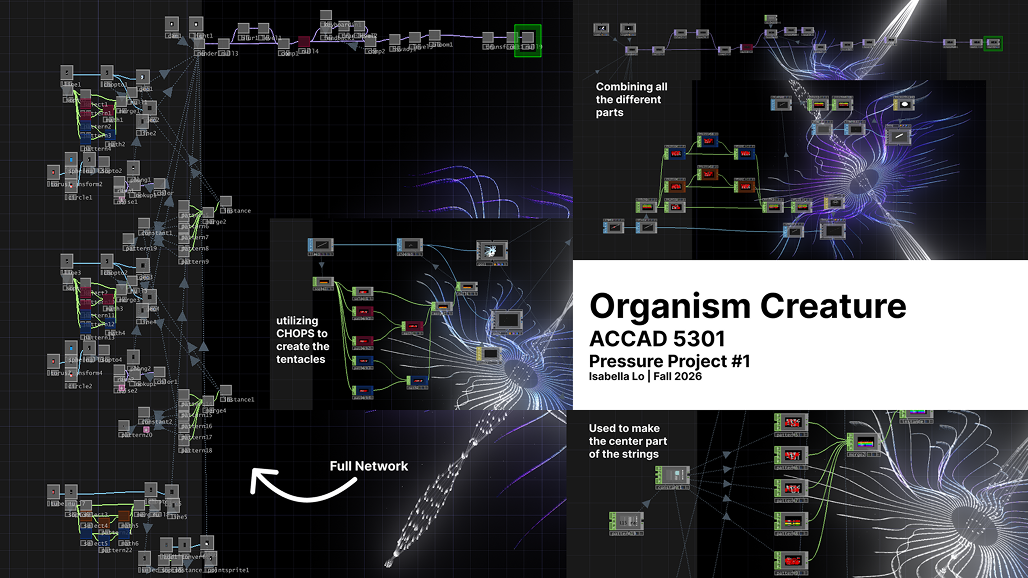
When I first started this project, I wanted to make a digital organism that woudl grow, change, and eventually die. Since I was getting comfortable with TouchDesigner, I started looking a tutorials to figure out how I could actually build something like that. I first followed Pao Olea’s Organic Creature tutorial, which helped me learn more about SOPs, CHOPs, instancing, geometry, 3D space, materials, feedback, and bloom. I ended up making a tentacle-like spiral while experimenting with these techniques, and this made me much more comfortable working with 3D geometry.
After that, I become more interested in audio reactivity, so I followed Nicholas P.J.M’s tutorials on audio-reactive particles and 3D text. I learned how to use POPs, Audio Analysis, Math, Transform, Noise, and Random, and then started combining those techniques with what I had learned from the first tutorial.
The five-hour limit definitely affected my process. I oiginally had a pretty specific plan, but ended up exploring two connected directions instead of spending the entire time on one organism. I think this actually helped me learn more becuase I was able to experiment with different parts of TouchDesigner and then bring them together in the final piece.
I originally planned to use “American Girl” by Tiffany Day, but I changed the song to “GGEZ” becuase I thought its recognizable and intentionally cringe quality would get more of a reaction from the class. I also added the 3D “GGEZ” text becuase I thoguht it would be funny to make the song itself part of the visual. Unfortunately, after listening to it for five hours, it definitely got stuck in my head.
One thing that suprised me was how much the different parts of TouchDesigner build on each other. TOPs, SOPs, CHOPs, and POPs initally felt very separate, but it started to understand how they can all work together. I also realized how much a small parameter change can completely hange the final visual.
For the presentation, the patch ran on its own and held the class’s attention for at least a minute. I also got a noticeable reaction from the class. If I had more time, I would turn the “GGEZ” text into a full lyric visualizer and return to my original organism idea to create a clearer growth adn death cycle.
Documentation
Pressure Project 1
View the final project release or explore the GitHub repository containing the TouchDesigner project and supporting files.
Answering Questions
What is causing the audio reactivity, and what is the input?
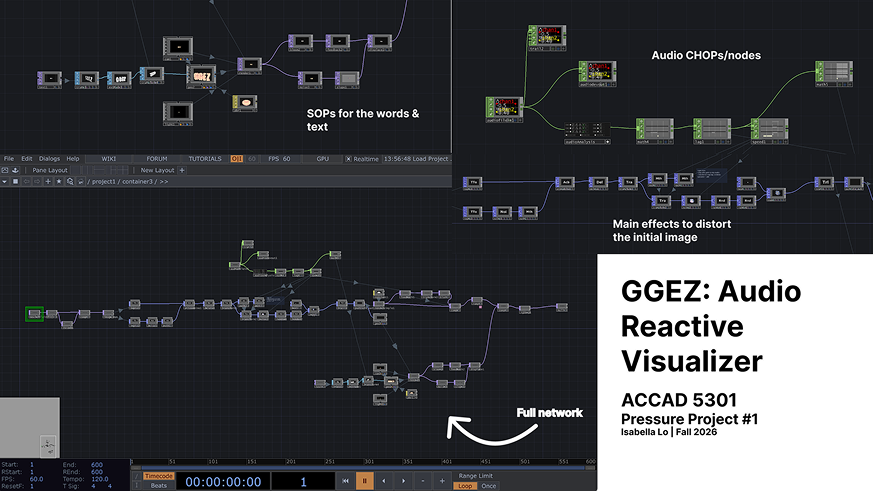
The main input is the song itself. I use an Audio File In CHOP to bring the song into TouchDesigner, which then goes into Audio Analysis. From there, I use Math and Lag to adjust and smooth the values before sending them into different parameters. Different parts of the audio control different parts of the visual, including the galaxy shape and the “GGEZ” text. This is what allows the visual to keep changing as the song plays.
How are the particles moving?
I used POP operators to create and control the particles. I used Math and Transform nodes along with Noise and Random to change their movement and make it less predictable. Originally, the particles looked more like little boxes, so I used a Trail to make their movement more continuous. This made them look more like particles flowing through the space instead of separate objects moving around.
How did you layer everything?
I started with the different visual elements separately and then combined them through different TOPs and a Geometry component. The galaxy image was converted into a 3D object, which gave me the main organic shape in the piece. I also created the “GGEZ” text as a 3D element and rendered it back into a TOP so I could keep manipulating it. From there, I layered things like Noise, Slope, Displace, Feedback, color effects, and Bloom to create the final look. The feedback helped create trails and build on previous frames, which made the visual feel more constantly in motion.
What is the organic shape, and how did I arrive at it?
The organic-looking shape is actually an image of a galaxy that I converted into a 3D object. I originally started the project wanting to make a digital organism that would grow and eventually die. I started by following Pao Olea’s Organic Creature tutorial, which taught me more about geometry, instancing, SOPs, CHOPs, and 3D space. I then experimented with a tentacle-like spiral before moving into the audio-reactive particle tutorial. While experimenting, I realized I could take an image and turn it into a 3D form, which is how I ended up with the galaxy shape in the final piece.
Where did I start, and how did I get here?
I definitely did not start with the final idea. I started with the organism concept, then went through a tentacle/geometry exploration, and eventually became more interested in audio-reactive visuals. I used a few tutorials to learn specific techniques and then combined parts of them into my own patch. The five-hour limit meant I had to experiment while I was learning, so the final piece became a combination of several things I learned rather than one idea that I had completely planned from the beginning.
I also originally planned to use “American Girl” by Tiffany Day, but switched to “GGEZ” because I thought the song would get more of a reaction from the class. I wanted the giant “GGEZ” text to make the piece a little funny instead of just being a serious audio visualizer.
What would I do with more time?
If I had more time, I would turn the “GGEZ” text into a full lyric visualizer instead of having the same word throughout the piece. I would also like to return to my original organism idea and make the galaxy/organic shape actually grow, change, and eventually break apart or die. I think that would make the piece feel more like the self-generating organism I originally imagined.
AI Expert Audit: Evaluating AI-Generated Materials for OpenCite
Posted: September 6, 2026 Filed under: Isabella Lo, Uncategorized Leave a comment »A. Source Material
For this audit, I used the Imageomics OpenCite GitHub repository, specifically the README documentation, as my source material. OpenCite is a web-based application that generates both CITATION.cff and .zenodo.json files from a single metadata form. It also allows users to import metadata from GitHub repositiories, validate metadata, and check for inconsistencies.
I chose OpenCite becasue I have worked directly on the project and am familiar with what it is designed to do and how it works. This gave me the ability to evaluate the AI-generated materials as someone with experience with the project rather than someone seeing the information for the first time. OpenCite is also meaningful to me becuase I have contributed to its developemnt and have been invovled with the project as it progressed toward its first release.
B. AI-Generated Materials
AI-Generated Podcast
AI-Generated Mind Map
C. Expert Audit
1. Accuracy Check
Overall, I found the AI-generated materials to be very accurate. The podcast provided detiled and correct context abotu OpenCite, and the Mind Map represented the main concepts and relationships correctly. The inforgraphic also included accurate information about the project. I did not notice any major factual errors or hallucinations.
However, there were some subtle issues that someone unfamilar with OpenCite might not notice. The AI somtiems used stronger or more polished language than the original documentation. For example, describing OpenCite as something that “ensures” consistency could make its capabilities sound more absolute than they are. OpenCite is deisgned to reduce metadata drift and provides validation and comparison checks, but users still need to review and adjsut the generated metadata.
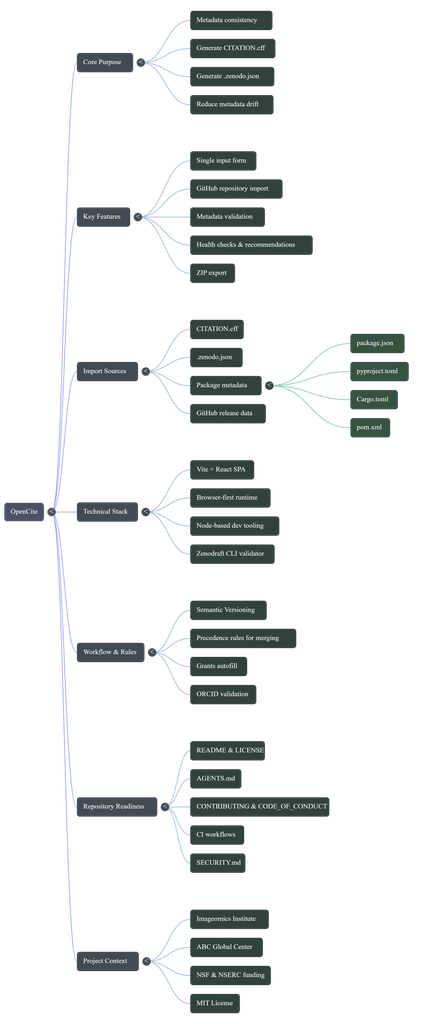
The mind map was also accurate, but it left out some fo the techcial details that would be more relevate to a developer. This was not necessarily incorrect, but it showed how the AI simplified the information based on the audience it seemed to be targeting.
2. Usefulness for learning
I think the podcast would be the most useful of the three materials for someone encountering OpenCite for the first time. It did a good job explaining ht eproject withotu relying heavily on techical jargon. The analogies and additioanl context made the project eaiser to understand for someone who does not have a techical background.
However, the podcast was also fairly fluffy and indirect. It spend a lot of time establishing context and explaining ideas through analogies. For someone who already understands OpenCite, this made the podcast feel longer and less direct than necessary.
The mind map was useful for understandign the overall purpose and structure of OpenCite. It gave a good hgih-level overview of the project and showed how the major concepts relate to each other. However, it did not contain as much detail as a devloper might want when trying to understand the actual implementation.
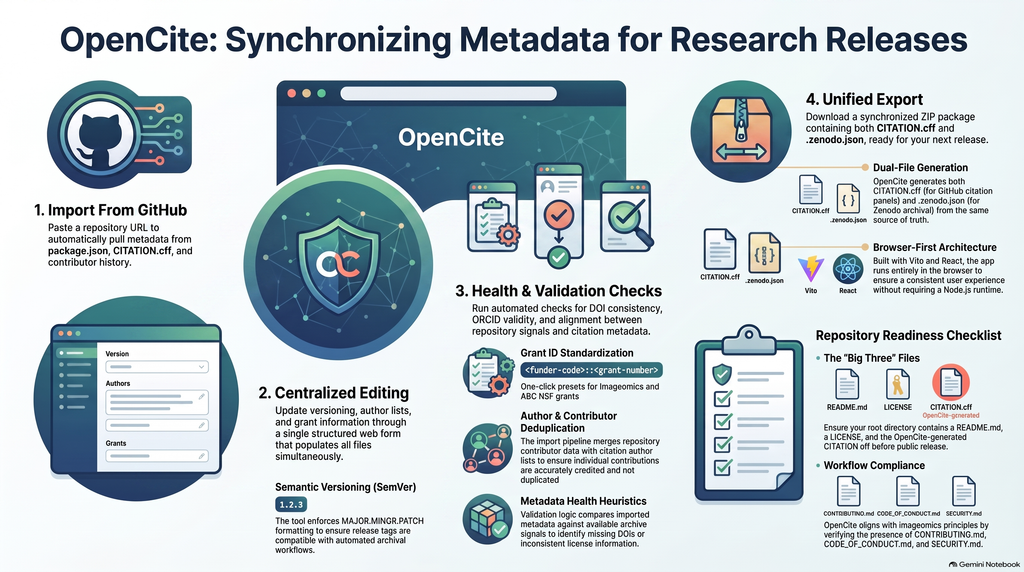
The infogrpahic was factually strong, but i found it less effective as an infographic. It included many different facts about OpenCite without having one especially clear central takeaway. Because of this it felt more like a condensed README rather than a visual resoruce designed around a specific learning goal.
3. The Aesthetic of AI
One of the biggest patterns I noticed across the mateirals was that the AI priorities accessibilitiy, comprehensiveness, and polish. The podcast had a conversational tone and used many analogies and contextual explanations. It also used some broad or buzzword-heavy language that made it sound polished but sometimes less direct.
The infographic had a similar quality. It looked polished, but the design seemed to priorirzed includign as much relevant information as possible rather than deciding what information as possible rather than deciding what information was most improtant to an audience. A human expedrt who knwos the project might be more likely to choose one speicifc takeaway and build the visual around that idea.
Overall, the AI seemed to interpret being “helpful” as providing more context and more information. This works well for a beginner who needs background information, but it can make the matieral feel overly simplfiied or unfocused for someone who already knows the subject.
4. Trust & Limitations
This experiment showed me that AI-generated educational materials can be useful without necessarily being completely trustworthy. The AI seemed msot reliable when summarizing, reoganizing, and explaining information that was already clearly stated in the source material. It was also effective at translating techical information into language that a general audience could understand.
I would be more cautious about trusting AI to decide what information is most important, simplify techical concepts, or describe the capabilities of a techical tool without checking the origianl documentation. An AI-generated resource can be factually correct while still being incomplete, oversimplified, or misleading in its emphasis.
Because of this, I think AI-generated educational materials are best treated as a starting point rather than a replacement for expert review. An expert can recognize when information has been simplfiied too much, when the AI has emphasized the wrong details, or when polished language makes a claim sound stronger than the original source actually supports.
Recent Comments