Pressure Project 1 – Music Visualization
Posted: October 2, 2026 Filed under: Uncategorized Leave a comment »Before starting this project, I spent a long time agonizing over what exactly to do. From my perspective—as someone who works very slowly—five hours is a very tight timeframe. So, after spending nearly an hour thinking about what to do, I decided I needed to pick up the pace. I’ve always been fascinated by music visualization, and I wanted to see if I could recreate it in Touch Designer.
My work primarily consists of several interconnected visual and audio systems. To begin with, I created small, constantly moving particles on the screen and used various motion parameters to make them rotate, move, and change size within the space. Rather than having all particles move in exactly the same way, I incorporated continuously varying values so that their movements would not repeat exactly. Next, I adjusted effects such as blur, displacement, and color, allowing the originally simple geometric shapes to gradually evolve into the organic forms seen today.
A key element of this project is the particle trail effect. I used a Feedback system so that the previous frame does not disappear immediately but instead re-enters the next frame. Then, using nodes such as Level, Blur, and Composite, I gradually reduced the intensity of the old image and recombined it with the new particle image. This way, when a particle moves, the position it previously occupied is briefly retained, creating a continuous trail. By adjusting the feedback strength and blur intensity, I can control how long the trail persists. If the feedback is too strong, the entire image gradually builds up; if it’s too weak, the trail disappears too quickly, so I spent quite a bit of time finding the right balance between the two.
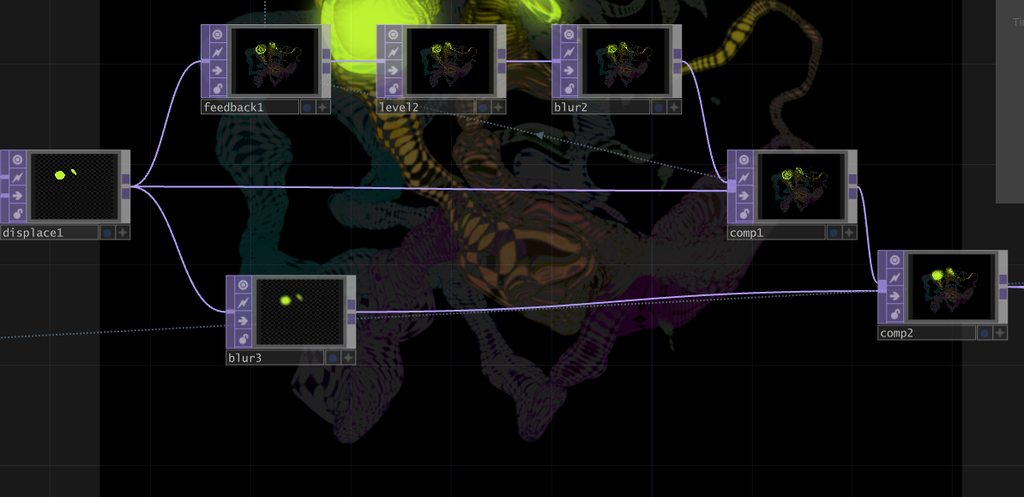
The integration of sound and visuals is one of the most important aspects of this work. I first imported the music into TouchDesigner, then used nodes such as Noise and Math to analyze the sound, converting the original music into data that could control visual parameters. As a result, sounds of different frequencies and intensities are no longer simply played back; instead, they directly influence changes in the visuals. I remapped and constrained this audio data so that it could be used to control visual effects, rather than using the raw audio data, which fluctuates too wildly.
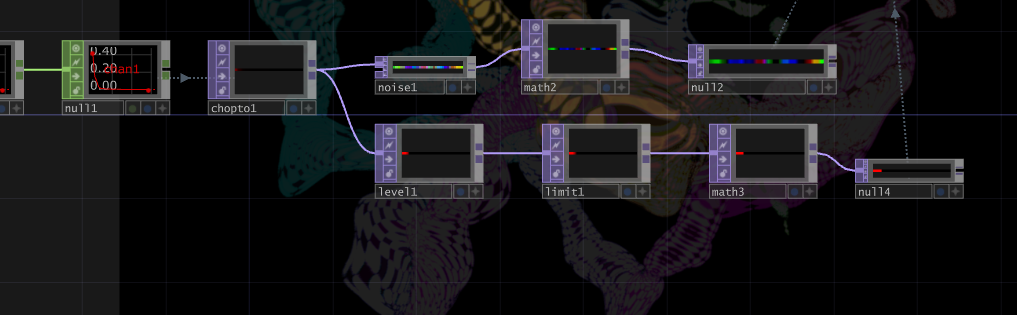
One of the most obvious visual responses is the variation in the number of particles. The intensity of the music is analyzed and converted into a numerical value, which is then used to control the number of particles generated on screen. When the music becomes louder, or when the rhythm or certain frequencies become more pronounced, the system generates more small particles; when the sound fades, the number of particles decreases. Consequently, particles do not appear in a fixed quantity but constantly fluctuate in response to the music. Since each newly generated particle enters the feedback loop, when the sound is louder, not only does the number of particles increase, but the motion trails and visual density in the image also become more pronounced.
My approach to creating this project is similar to many generative art projects: I start by building a simple system and then gradually increase its complexity. At first, I focused solely on making basic shapes move; then I added musical responses, followed by variations in particle count, feedback trails, blur, displacement, and color changes. During the production process, I experimented with many different connection methods; some feedback settings caused the visuals to disappear too quickly, while others made them too chaotic. Through constant adjustments, I finally found an effect that preserves the particles’ motion trails without completely obscuring the original shapes.
This project gave me a deeper understanding of the relationship between sound and visuals in TouchDesigner. In the past, I tended to view music and visuals as two separate elements, but this time I tried turning the sound itself into data that controls the visual system. The music determines when the number of particles increases or decreases, while the particles’ movement leaves trails through Feedback, and the colors and other automatic changes allow the system to continuously generate new visuals even without manual intervention. This also transforms the entire piece into a generative visual system that runs on its own while constantly evolving in response to the music.
Link to original work: https://github.com/HexisHere/ACCAD.git