Pressure Project 2 – A Mystery is Revealed
Posted: October 23, 2026 Filed under: Uncategorized Leave a commentMy original intention in creating this project was to develop an interactive visual experience that allows users to control flames with their hands. I drew inspiration from K/DA’s new song “Firestarter,” particularly the song’s energetic vibe and its flame-related visual effects. I wanted to create a sensation of manipulating flames or magical energy—not through a keyboard or mouse, but by interacting directly with hand gestures.
I first used MediaPipe to track the position of my hands via the camera, then wrote Python code in a Script CHOP to recognize different gestures. For example, making a fist makes the flames disappear, and clapping changes the color of the flames. I also designed a new gesture: when one hand is raised and the other is lowered, the flame transforms into a fireball. I used the Sphere SOP and Switch SOP to change the shape of the flame emitter, and then used the Transform SOP to make the fireball follow the position between my hands. At first, the fireball’s movement was very erratic, so I later added a Lag CHOP to smooth out the tracking data.
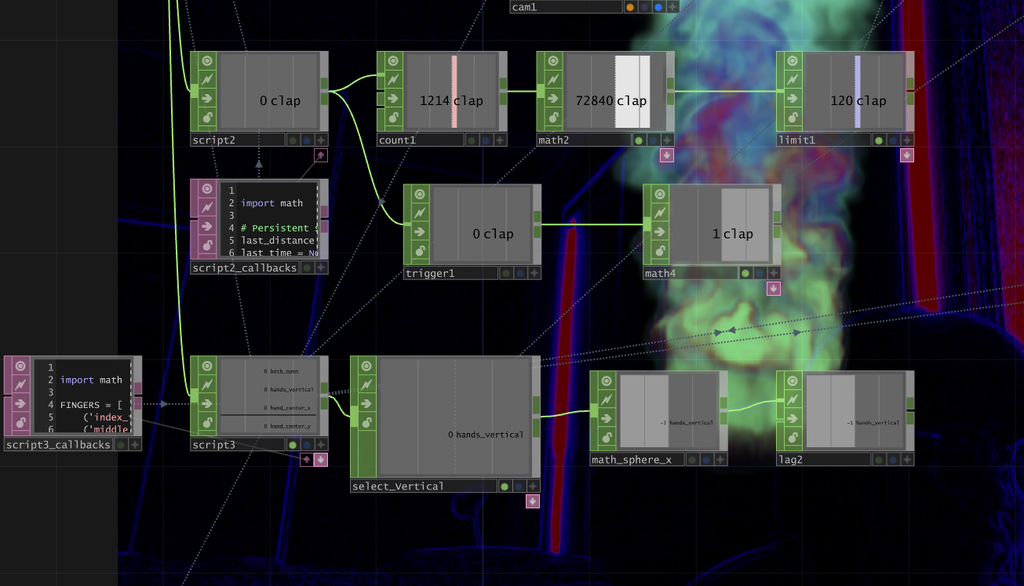
The flame itself was created using NVIDIA Flow. I adjusted parameters such as speed, smoke, temperature, and fuel in the NV Flow Emitter to achieve the effect I was looking for. I also used the HSV Adjust TOP to change the flame’s color. Rather than a completely realistic flame, I wanted it to have a colorful, energetic visual effect, since my inspiration came from musical performances.
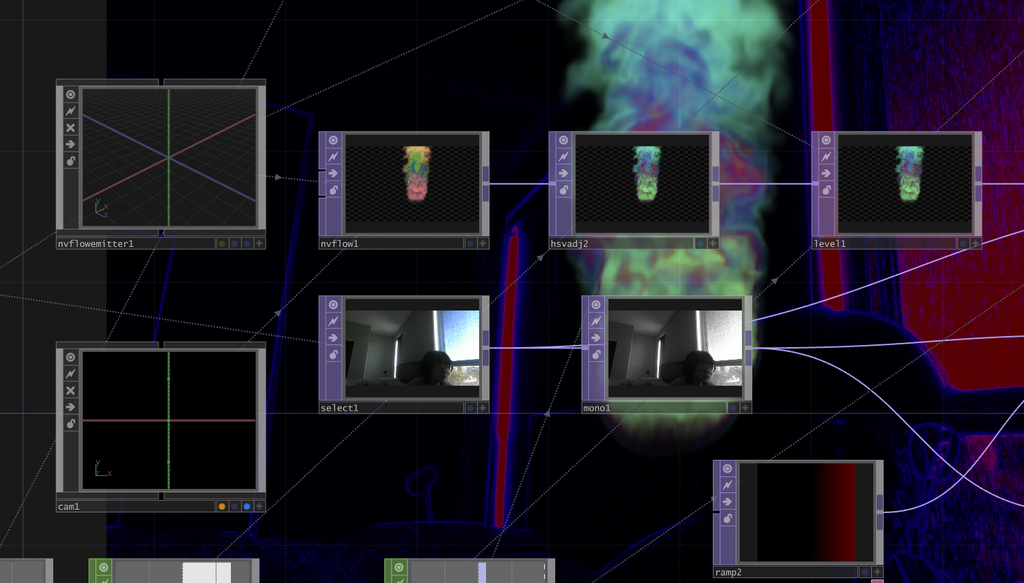
Another part of the project was creating a transformation effect. When the user holds both hands open for five seconds, a countdown starts, and the screen eventually changes into a thermal-camera-style view. I used Timer CHOP to control the timing and Python to make sure the interaction only triggers once. For the thermal effect, I combined Monochrome TOP, Lookup TOP, Ramp TOP, and Edge TOP, and used Switch TOP to change between the regular camera view and the thermal visualization. I also added music and fire sound effects using Audio File In CHOP and Audio Device Out CHOP.
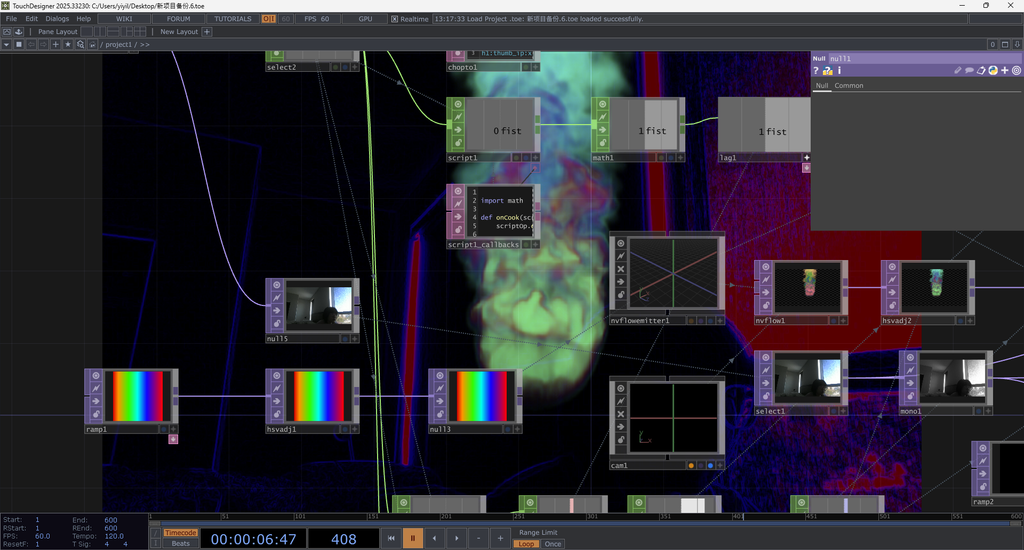
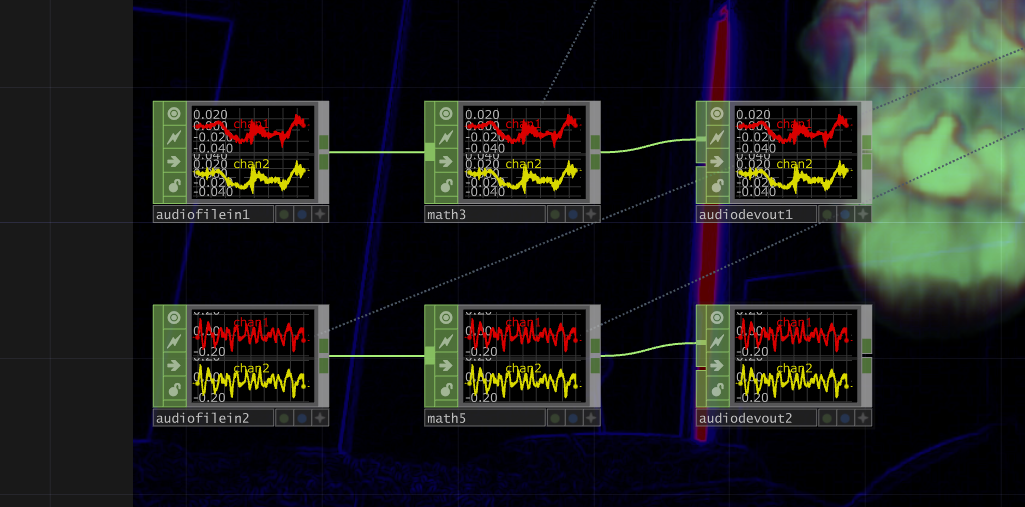
One of the biggest challenges was getting all the gestures to work consistently. Sometimes MediaPipe would incorrectly detect a hand movement, which caused the timers to restart or the fireball to jump around. I spent quite a lot of time adjusting the Python code and the tracking settings to make everything work together.
Overall, I had a lot of fun experimenting with this project. I especially liked seeing how a simple hand movement could create such a dramatic visual change. This project helped me understand how different TouchDesigner operators can work together to create an interactive experience, and it made me want to explore more gesture-based interactions in the future.
Pressure Project 1 – Music Visualization
Posted: October 2, 2026 Filed under: Uncategorized Leave a commentBefore starting this project, I spent a long time agonizing over what exactly to do. From my perspective—as someone who works very slowly—five hours is a very tight timeframe. So, after spending nearly an hour thinking about what to do, I decided I needed to pick up the pace. I’ve always been fascinated by music visualization, and I wanted to see if I could recreate it in Touch Designer.
My work primarily consists of several interconnected visual and audio systems. To begin with, I created small, constantly moving particles on the screen and used various motion parameters to make them rotate, move, and change size within the space. Rather than having all particles move in exactly the same way, I incorporated continuously varying values so that their movements would not repeat exactly. Next, I adjusted effects such as blur, displacement, and color, allowing the originally simple geometric shapes to gradually evolve into the organic forms seen today.
A key element of this project is the particle trail effect. I used a Feedback system so that the previous frame does not disappear immediately but instead re-enters the next frame. Then, using nodes such as Level, Blur, and Composite, I gradually reduced the intensity of the old image and recombined it with the new particle image. This way, when a particle moves, the position it previously occupied is briefly retained, creating a continuous trail. By adjusting the feedback strength and blur intensity, I can control how long the trail persists. If the feedback is too strong, the entire image gradually builds up; if it’s too weak, the trail disappears too quickly, so I spent quite a bit of time finding the right balance between the two.
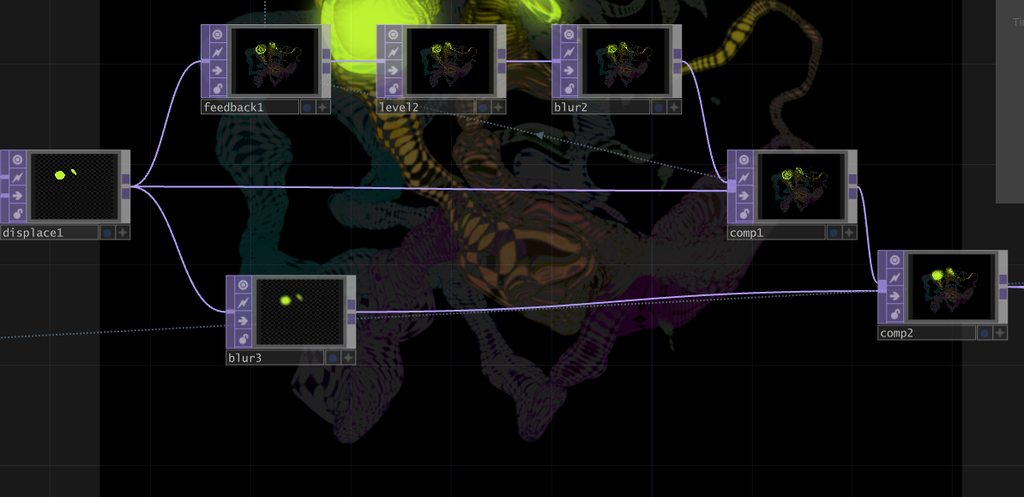
The integration of sound and visuals is one of the most important aspects of this work. I first imported the music into TouchDesigner, then used nodes such as Noise and Math to analyze the sound, converting the original music into data that could control visual parameters. As a result, sounds of different frequencies and intensities are no longer simply played back; instead, they directly influence changes in the visuals. I remapped and constrained this audio data so that it could be used to control visual effects, rather than using the raw audio data, which fluctuates too wildly.
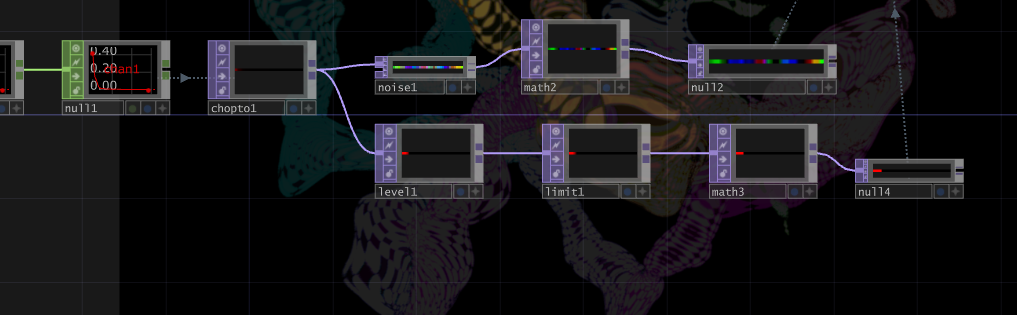
One of the most obvious visual responses is the variation in the number of particles. The intensity of the music is analyzed and converted into a numerical value, which is then used to control the number of particles generated on screen. When the music becomes louder, or when the rhythm or certain frequencies become more pronounced, the system generates more small particles; when the sound fades, the number of particles decreases. Consequently, particles do not appear in a fixed quantity but constantly fluctuate in response to the music. Since each newly generated particle enters the feedback loop, when the sound is louder, not only does the number of particles increase, but the motion trails and visual density in the image also become more pronounced.
My approach to creating this project is similar to many generative art projects: I start by building a simple system and then gradually increase its complexity. At first, I focused solely on making basic shapes move; then I added musical responses, followed by variations in particle count, feedback trails, blur, displacement, and color changes. During the production process, I experimented with many different connection methods; some feedback settings caused the visuals to disappear too quickly, while others made them too chaotic. Through constant adjustments, I finally found an effect that preserves the particles’ motion trails without completely obscuring the original shapes.
This project gave me a deeper understanding of the relationship between sound and visuals in TouchDesigner. In the past, I tended to view music and visuals as two separate elements, but this time I tried turning the sound itself into data that controls the visual system. The music determines when the number of particles increases or decreases, while the particles’ movement leaves trails through Feedback, and the colors and other automatic changes allow the system to continuously generate new visuals even without manual intervention. This also transforms the entire piece into a generative visual system that runs on its own while constantly evolving in response to the music.
Link to original work: https://github.com/HexisHere/ACCAD.git
AI Expert Audit
Posted: September 9, 2026 Filed under: Uncategorized Leave a comment1. Background and Source Material
For this assignment, I used a paper I wrote in the fall of 2024 for the course EDUTL 1902 as source material. This paper primarily explores the copyright issues raised by generative AI in the field of art and whether such use constitutes plagiarism. It explains how generative AI models deconstruct and reorganize unauthorized training data from the internet, as well as potential solutions for avoiding copyright issues in the future.
The main theme of this paper overlaps to some extent with the topic of our current assignment, and the issues it addresses remain relevant today. Having had some personal experience with the question of whether AI constitutes plagiarism, I decided to focus on this topic. This article means a lot to me not only because it addresses a topic relevant to me and to artists in general, but also because it is the first truly rigorous academic paper I have written—one that perfectly adheres to APA 7th edition formatting, something my previous papers failed to achieve.
Main Body of the Article:https://osu.instructure.com/courses/171009/assignments/4173950?module_item_id=12968769
2. AI-Generated Materials
2.1 Podcast
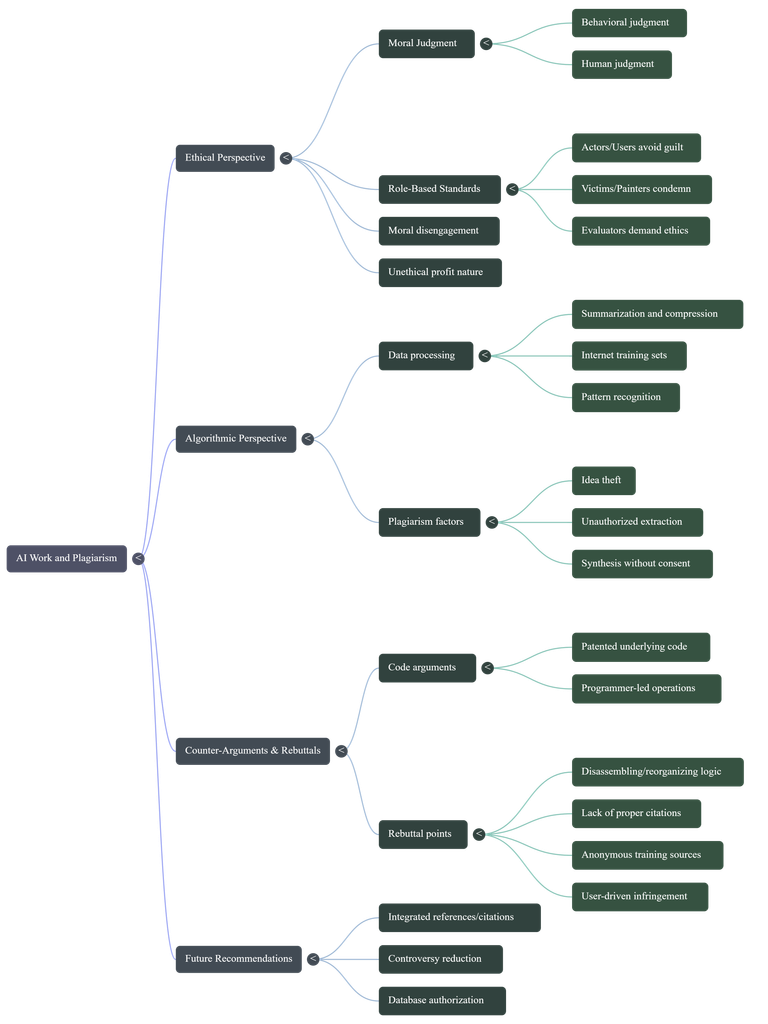
2.2 Mid Map
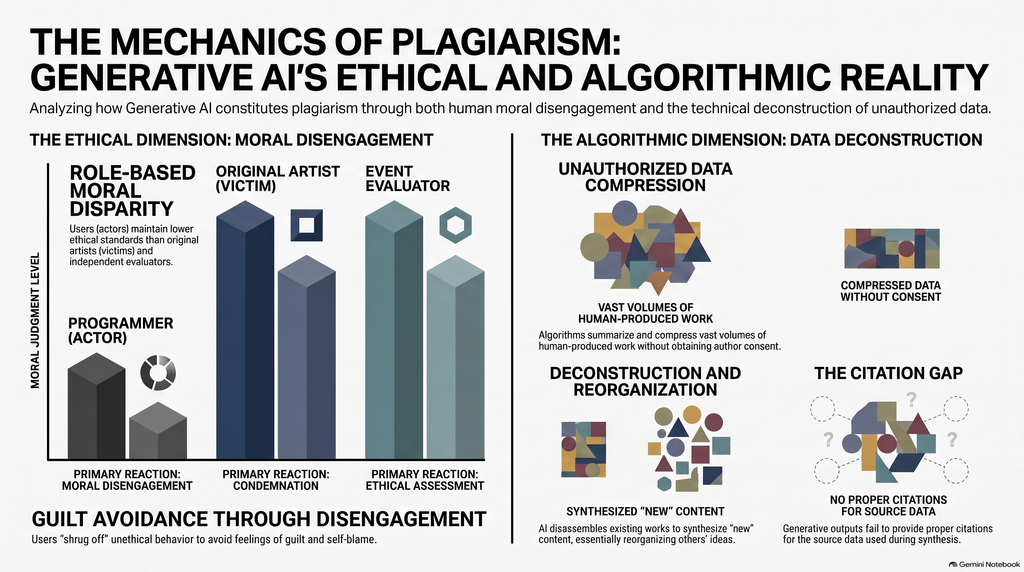
2.3 Infographic
3. Expert Audit
3.1 Accuracy Check
In general, the AI-generated content is quite accurate; it provided a perfect summary of the arguments in my paper—a level of summarization that humans rarely achieve. I admit that my arguments in this paper weren’t very clear, but the AI was able to distill the main points from the text, which is one of its strengths. My paper consists of two major sections, but the distinction between them was not clear; the AI clearly outlined the content of these two sections. The first section is the “ethical perspective,” and the second is the “algorithm perspective.”
The diagrams provided in the infographic are very helpful for people who are unsure whether AI constitutes plagiarism to understand how AI image generation works. This is much more intuitive than the paper itself. As for the mind map, I think it’s quite detailed; it highlights the specifics of most of the arguments in the article, as well as its causal structure.
So, to sum it up, when it comes to accuracy, I think AI performs quite well; it can perfectly summarize and synthesize the content of all articles and accurately present them in a different format.
3.2 Usefulness for learning
In my opinion, if I were encountering this material for the first time, I believe these AI-generated resources would be very helpful in understanding the main points of the topics I’m interested in. I find the infographics particularly intuitive, as they use images to illustrate the process of generating AI-created works. This is far more intuitive than having someone explain it through language or other means, because visual language is always the most accurate. Similarly, podcasts are an excellent format. I listened to the entire 20-minute episode, and I found the host’s narration very engaging. The way the topic was explored through a conversation between two people made it feel just like listening to two friends chatting. This approach to learning is a subtle and natural way to absorb knowledge.
I think mind maps were actually the least helpful for me personally. To be honest, I don’t like reading—just seeing text gives me a headache. So even though mind maps clearly outline the logical structure and causal relationships of an article, I still find that looking at them makes me feel bored. I believe that although this mind map has streamlined much of the content discussed in the paper, it remains, at its core, rather complex. It hasn’t been simplified enough to allow readers to grasp at a glance what the article is about, because the details included in the mind map are too exhaustive—it covers nearly every subtle point I, as the author, have raised.
3.3 The Aesthetic of AI
In fact, AI can also cause some problems; the content it generates does not always fully reflect what the author intended to convey. One obvious issue is that AI tends to present a person’s arguments as established facts.
AI presents the more complex and controversial viewpoints in the original paper with excessive certainty. For example, the infographic uses very strong terms such as “Unauthorized Data Compression,” leading readers to easily assume that AI’s use of training data necessarily constitutes plagiarism. However, the original paper actually distinguishes between AI algorithms, training data, and users, pointing out that the real problem does not necessarily lie in the AI algorithms themselves, but rather in unauthorized data and the ways in which humans use that data and AI systems.
Therefore, while the AI did not completely alter the author’s core arguments when reorganizing the paper, it did downplay the qualifying conditions and complexities involved. Furthermore, the AI-generated content links concepts such as plagiarism, unauthorized data use, and copyright too closely together, making a complex issue involving multiple layers—including ethical, technical, and legal dimensions—appear as a simple cause-and-effect relationship. This fallacy is particularly difficult for non-experts to detect, as these claims sound very reasonable on the surface and employ a wealth of academic-sounding terminology.
3.4 Trust & Limitations
Through this learning experience, I’ve come to realize that people should maintain a certain level of caution when it comes to AI-generated educational materials. However, this doesn’t mean that AI has no educational value. When AI generates mind maps, infographics, and podcasts, these formats serve as effective tools for facilitating human learning. At the same time, AI’s greatest strength lies in its ability to organize, summarize, and restructure existing information. Although it has these advantages, it does not mean it can achieve 100 percent accuracy. When AI addresses complex ethical, legal, and technical issues, it tends to present controversial viewpoints as if they were proven facts. Anyone who isn’t particularly sensitive to such issues would easily believe what it says. Thus, the most dangerous error AI can make isn’t outright misinformation or fabricated facts, but rather information that may be broadly correct yet sounds extremely accurate because it omits context and qualifying conditions. Once this information enters a person’s mind, it leads them in the opposite direction of what the original knowledge provider intended to convey.
Therefore, AI is best utilized for simple organization and reference—sifting through fragmented information so people do not lose sight of the big picture, while also serving as a straightforward guide to help them determine their next steps. AI tools should be viewed as resources to assist us, rather than as the ultimate authority for determining academic facts.
Recent Comments