Echo Void: A Mystery Is Revealed
Posted: October 23, 2026 Filed under: Fall 2026, Isabella Lo, Uncategorized | Tags: Pressure Project 2 Leave a commentDescription
Echo Void is an interactive experience built in TouchDesigner that transforms spoken words into a field of glowing particles. Using OpenAI Whisper for speech-to-text transcription and MediaPipe for hand tracking, the project lets viewers speak into a microphone and manipulate the resulting text with their hands. They can use their index finger to interact with the particles, pinching to bring them together and spreading their fingers to disperse them.
As new speech is transcribed, words appear, overlap, and become harder to distinguish. What begins as a reflection of the viewer’s own voice gradually becomes something less predictable, blurring the line between what they said and what they think they see.
Concept and Interaction
Originally, I was thinking about filling the user’s body with the words they say, based on the idea that we are partly made up of what we say. As I developed the project, though, I ended up liking the particle-based approach more. Words appear as glowing particles that people can interact with using their index finger. Pinching and spreading their fingers changes how dispersed the particles are.
I wanted the visuals to feel a little mysterious and whimsical, so I used glowing lights and particles against a dark background. I ended up calling the project Echo Void because the computer reflects what you say back to you, but with a delay and sometimes in a slightly different form.
I also liked how the words could overlap, become difficult to read, and eventually disappear. Instead of representing speech as something that fills and defines a person, the project shows words as something that is constantly changing. Once something is said, it can be repeated, misheard, or mixed together with something else. I did not necessarily plan for all of this when I started, but it became part of the experience as I worked on the project.
Technical Process and Challenges
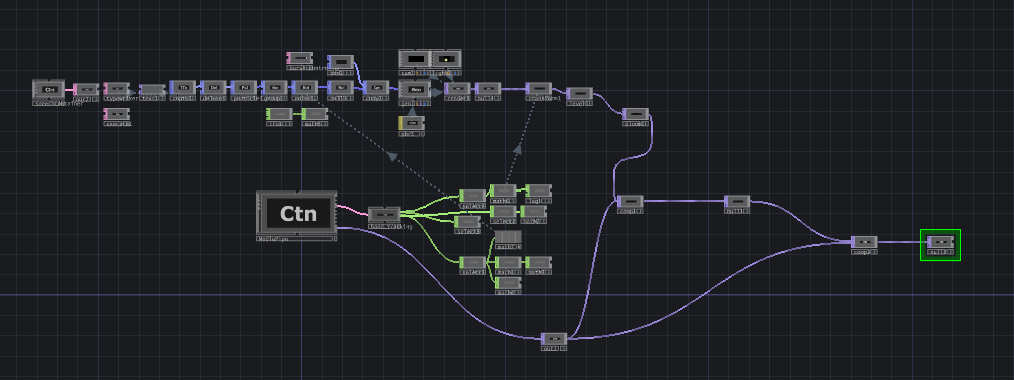
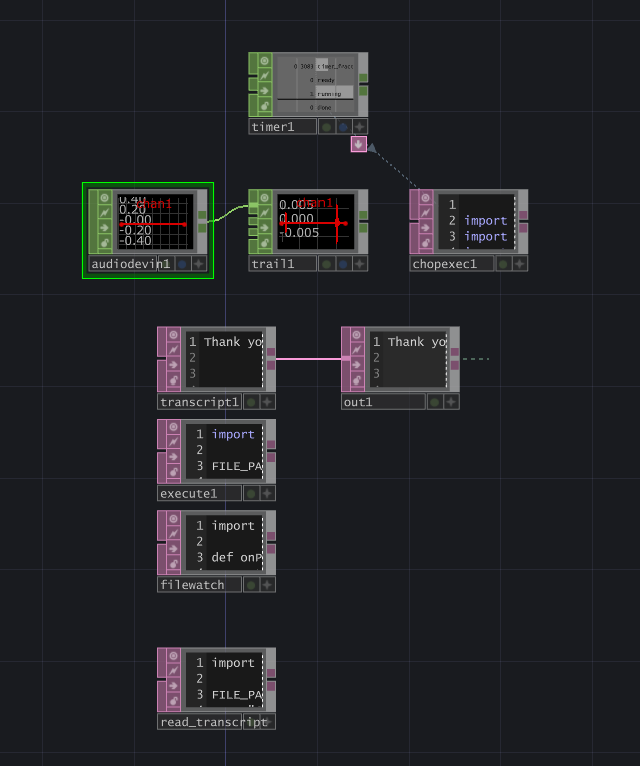
ne of the main things I wanted to learn from this project was how to use DATs in TouchDesigner. I wanted to get more comfortable writing code to achieve something specific, rather than always trying to find a pre-existing node that could do it. I had also wanted to experiment with OpenAI Whisper for speech-to-text transcription for a while, so this felt like a good opportunity to finally try it.
The coding part was frustrating at times because there were not many tutorials for the specific things I was trying to do. A lot of the process involved figuring out how to get different systems to communicate with each other, including what kinds of data each node could accept, how that data needed to be formatted, and what functions were needed to make everything work. It was not just a matter of writing code that worked on its own. I also had to make sure it worked within TouchDesigner’s structure. It took some trial and error, but I eventually figured it out.
I also got to reuse things we had learned earlier in class, like transforming objects and working with MediaPipe. It was fun combining those techniques with Python and Whisper and going beyond what we had covered in class. One thing I appreciated about TouchDesigner was its modularity. There are built-in nodes for a lot of things, but you can also write your own code and connect it to the rest of the system when you need more control.
Getting everything to work together was probably the most challenging part. There was a noticeable delay between the speech being transcribed, the text appearing, and the particles updating. The Whisper model also did not always recognize the words correctly. When someone spoke a lot, the text could overlap and become difficult to read. Generating the particles also seemed to put a lot of strain on the computer.
Feedback and Reflection
People seemed to like the glowing particles and described the visuals as mysterious and whimsical. Some people also thought the computer was generating its own words rather than reflecting their speech. I think the delay in transcription and occasional inaccuracies from Whisper contributed to that impression. I found it interesting that people could interpret the same system differently depending on how they understood what was happening.
Several people also mentioned that using the index finger to interact with the particles was interesting. I had not necessarily expected that to stand out, but it made me think more about how the specific way someone interacts with a project affects their experience. Other feedback included making the interaction more intuitive, such as displaying an initial instruction like “Speak” or “Talk” and adding a slider to control particle dispersion.
Overall, I enjoyed combining coding with the visual and interactive parts of TouchDesigner. The project gave me a reason to learn DATs, experiment with Whisper, and figure out how to connect different systems. It also reminded me that the technical process can influence the creative direction of a project. Some of the things that were frustrating to implement, like the delays and overlapping words, also became part of what made the project interesting.
If I continued developing it, I would focus on improving the transcription and particle update performance, making the text easier to follow, and making the interaction clearer for someone experiencing it for the first time. I would want to keep the parts where words overlap and disappear, though, because that ended up being one of my favorite aspects of the project.
Documentation
Recent Comments