Between the Signal
Posted: October 21, 2026 Filed under: Uncategorized Leave a commentIn this project, I used webcam cameras and MediaPipe hand tracking technology to create an interactive TouchDesigner experience. The main limitation is that it’s not possible to use a keyboard or mouse; therefore, I decided to use the participants’ hands as the interface. Different hand movements trigger visual changes, and the participants gradually realize that their own bodies are actually controlling the entire environment, thereby revealing another layer of meaning associated with that environment.
Concept and Mystery
The core idea of this project is that the cameras are not merely used to display the participants themselves, but act like a damaged communication system that attempts to connect with another space. Initially, participants cannot fully understand the effects of their hand movements. As they continue to experiment with different gestures, the visual effects change, and those hidden digital worlds begin to become visible.
Therefore, this puzzle isn’t presented in the form of a traditional puzzle; instead, it allows participants to learn about this system through their own bodies. Their hands become the bridge between the physical world and the hidden digital world.
I chose to use hand tracking technology because I wanted this interaction to be more immersive. Clicking the mouse feels like controlling software, while moving hands in front of the camera makes the interaction more direct. Participants can immediately see the impact of their actions on the system, thereby making this process more personal.
Story and Audio
The atmosphere was inspired by Hideo Kojima’s Death Stranding 2: On the Beach. I was especially interested in its themes of connection, isolation, and uncertainty about whether connecting two different places is always a positive thing.
I used music from Death Stranding 2 because I wanted the sound to make the experience feel like the participant was discovering an unfamiliar space rather than simply testing a hand-tracking program. The slow and atmospheric music also helped connect the different visual transformations into one continuous experience.
Reflection
During the demonstration, people were particularly interested in how gestures control various changes. They also asked about the stories behind this experience. These feedbacks made me realize that the interaction itself is understandable, but the descriptions of the related stories can be conveyed more clearly.
If I continue to develop this project, I will add more demonstration elements, so that each gesture can reveal different aspects of the hidden world. Additionally, I will make the sounds more directly related to the participants’ movements, so that both visual and auditory systems can respond together to body movements.
TrajectoryPressure Project 1 – Automatically Generated Trajectories
Posted: October 1, 2026 Filed under: Uncategorized Leave a comment“Trajectory” is a sound and video work created using TouchDesigner. A group of black birds fly around a red bird; their numbers increase and decrease, until they finally disappear. The music influences their movement patterns, while the fading traces on the screen show both past and present positions simultaneously.
Reflection on Creation
When creating “Trajectory”, I didn’t follow a pre-designed visual plan. Instead, I tried different approaches to improve the work step by step. I used a bird model from my own resources, adjusted its structure and flying behavior, and then tried to create repeating animation effects in TouchDesigner. As I worked on this, the first question that arose was: What would happen when these birds gather together?
It wasn’t enough just to have the birds appear on the screen. When they moved together, their movements seemed mechanical. So I tried different speeds of movement, paths, and wing animations to make their behavior more varied. I wanted them to belong to the same system, but also maintain some independence. For me, this approach was more interesting than simply adding more birds.
Over time, an atmosphere began to form. A smaller number of birds creates a sense of openness, but when there are more birds, the same movements become crowded and tense. The fading traces make this effect even more noticeable. Each bird leaves behind traces, and these traces accumulate, making it difficult to distinguish individual birds. That’s why I named this work “Trajectory” – I’m interested not only in the direction of the birds’ movement, but also in the traces they leave behind.
I chose white as the background color because I wanted the sense of tension to come from the birds themselves. White highlights the outlines of the birds and the fading traces. This reminds me of a blank page gradually filled with various ideas. When the birds disappear, the background becomes empty again, but the feeling of emptiness after being crowded is completely different. The red bird in the center becomes the visual focus of these changes. I want it to stand out, but I don’t want the audience to have to interpret what it represents. But at the same time, a bold and fitting image came to mind: the scene from “Odyssey” where the bowing test takes place. It covers all the main themes: Odysseus returns to his hometown to prove himself and kills all the intruders. So I incorporated the sound effects from that scene into the control system as one of the chaotic elements.
During the five hours of creation, I focused on how the birds move, their relationship with music, and the contrast between accumulation and disappearance. I chose to keep the environment simple, rather than creating complex scenes. I also used pre-made flying actions instead of developing more complex animation systems. This allowed me to focus on the overall experience.
Many useful discoveries came from mistakes. The birds flew in the wrong direction, their bodies turned over, and sometimes the screen became dark for a moment. To solve these problems, I had to observe more carefully. I kept thinking “let’s try again”, so I almost forgot to check the time.
Feedback from class helped me explain the process from random attempts to deliberate choices. Before having clear results, I wouldn’t claim to have achieved any specific outcome. I can describe how this project changed my attention: initially, I just checked if it worked properly, but later I started paying attention to the experience during use.
Materials and Thanks
– Software: TouchDesigner.
– Bird models: From my personal resources; skeletal binding and flying actions were created by me.
– Music: “The Trail”, taken from the music in “Odyssey”, obtained from Bilibili.
AI Expert Audit: The Vanishing Art of Taohuawu Woodblock Prints
Posted: September 9, 2026 Filed under: Uncategorized Leave a commentA. Source Material
For this task, I used a previous project – a study on the phenomenon of the gradual disappearance of traditional Chinese culture, with a focus on Taohuawu Woodblock New Year Prints. I chose this project because I am very familiar with the relevant data. Before researching this topic, I conducted extensive investigations to find ways to document and study these traditional crafts, and to pass them on to future generations.
To me, this topic is very meaningful, as I am interested in the relationship between design and culture, as well as history. I believe it’s also important to understand what happens when traditional crafts become less common in modern life. Since I am already familiar with the content of the raw data, I think this is an excellent topic for testing whether artificial intelligence can accurately summarize and reinterpret this information.
B. AI-Generated Materials
- I used Google NotebookLM to generate three different materials from my source:
- Audio Overview: Digital Muscle Memory of Taohuawu Prints
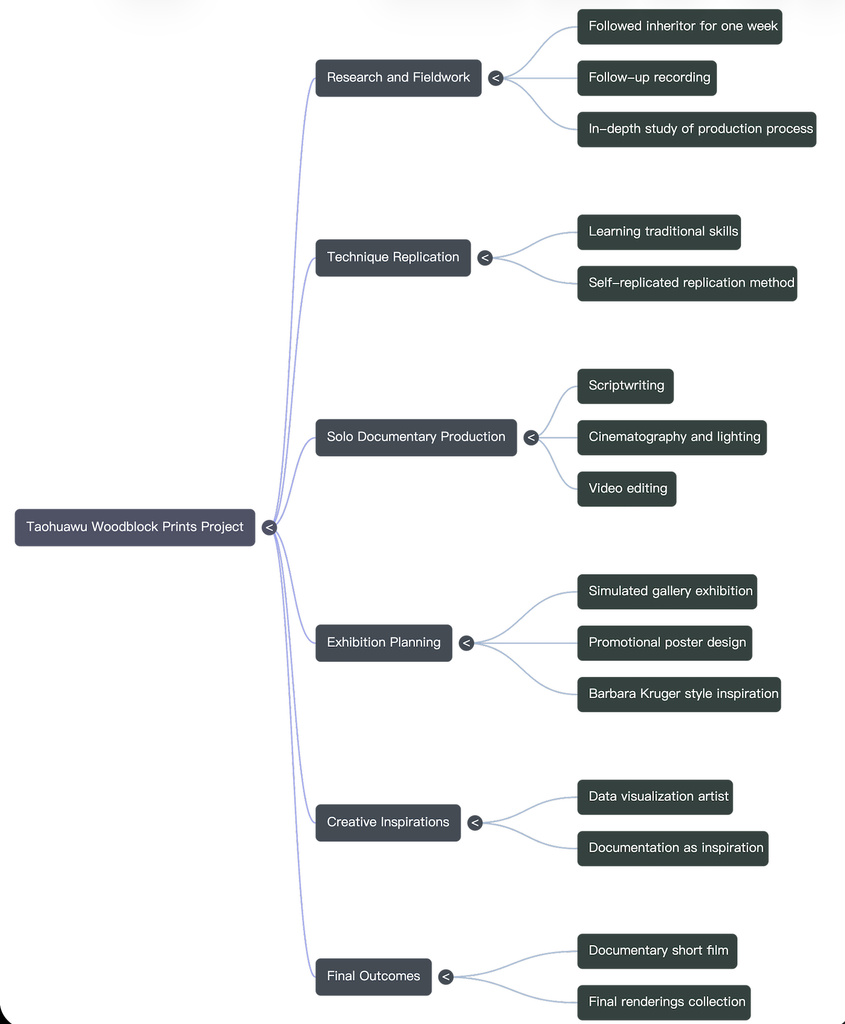
- Mind Map: Woodblock Mindmap
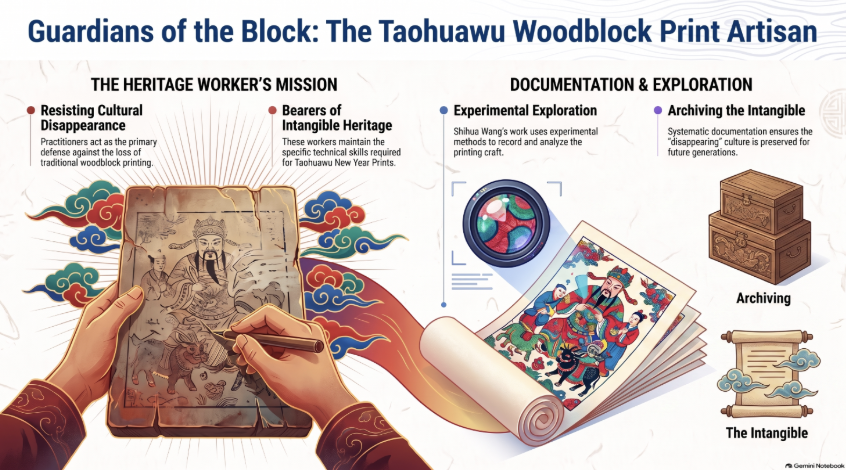
- Infographic: The Taohuawu Woodblock Print Artisan
Audio Overview
C. Expert Audit
- Accuracy Check
Overall, I believe NotebookLM has correctly understood the core direction of my project. The topics listed in the mind map include concepts such as the disappearance of traditional cultures, intangible cultural heritage, recording and preservation, exploration, and cultural continuity. These concepts align well with what my original project aimed to explore.
However, I also noticed that AI has simplified these topics considerably. For example, it often reduces the content of the project to statements like “protecting culture” or “maintaining traditions”. While these statements are correct, they are too broad. My original project included more personal observations, design decisions, and questions regarding how to experience traditional cultures in a modern context.
Non-experts may not be able to notice this difference, as the information generated by AI sounds very confident and well-organized. This makes the topics seem simpler and more complete than they actually are.
The podcast also showed a similar problem. It explained the topic clearly, but some ideas were repeated several times, especially the importance of preserving traditional culture. Because of this, the 20-minute audio felt a little longer than necessary. It was easy to understand, but the Mind Map was more useful for quickly understanding the main ideas.
2. Usefulness for Learning
If this is my first time learning about this topic, I believe all three methods can be helpful, but in different ways.
Mind maps are particularly useful for me, as they allow me to quickly understand the relationships between various concepts. It’s possible to grasp the information easily without having to read a large amount of text.
Infographic diagrams also make it easy to understand information visually. They effectively convey information related to craftsmen, documents, and cultural traditions. However, they also simplify complex cultural topics into simpler parts.
Audio presentations are better suited for longer explanations, as they give listeners more time to process the content. But compared to using mind maps or infographics, audio presentations require more time.
For quick understanding, I think mind maps are the most effective option. For deeper learning, I would prefer to refer back to the original sources.
3. The Aesthetic of AI
I noticed that the most obvious “characteristic of artificial intelligence” is that everything becomes very organized and clear. Artificial intelligence tends to categorize items into different categories and provide clear descriptions for each one.
For example, the infographic uses terms like “the mission of inheritors of heritage” and “the preservation of intangible things”. These descriptions sound professional, but they seem too generic and lack uniqueness. Human designers might use more specific or more personalized language to describe such projects.
I also noticed this in the visual style of the infographic. It uses symbols such as clouds, scrolls, and traditional patterns, which immediately convey a sense of “Chinese culture”. Although these elements are attractive, some of them are merely symbols of Chinese culture, rather than elements that are closely related to the core content of the project.
This makes me realize that artificial intelligence is indeed good at quickly creating works that appear correct, but “appearing correct” does not mean that the works have any real meaning or depth.
4. Trust and Limitations
From this experiment, it can be seen that educational materials created by artificial intelligence can serve as a starting point. However, I do not fully trust them; it is necessary to carefully verify their sources.
When artificial intelligence is responsible for organizing information, identifying main themes, and establishing the basic structure of the content, its reliability is highest. But when the content involves cultural details, personal experiences, or complex concepts, its reliability becomes lower.
The biggest risk is that even if artificial intelligence manages to simplify the content effectively, those who do not understand the subject matter may not be able to identify the elements that have been overlooked.
For me, the best way to use these tools is to let artificial intelligence help organize and present the information, while still relying on human knowledge and original sources to determine which aspects are important.
Recent Comments