AFTERIMAGE-A Fully Functional MIDI-Controlled DJ Deck & Audiovisual Performance System
Posted: November 6, 2026 Filed under: Uncategorized Leave a commentOverview
For this project, I created a fully functional digital DJ deck combined with a real-time visual performance system using TouchDesigner and a KORG nanoKONTROL2 MIDI controller. My goal was to create an interactive audiovisual experience where I could mix music, manipulate visual effects, and control the entire performance through a single physical controller.
I selected three songs by aespa: LEMONADE, Whiplash, and Armageddon, and connected them into a continuous DJ set. Instead of simply playing music alongside prerecorded visuals, I designed a system that allows me to control both audio and visuals in real time.
Inspiration
My inspiration came from aespa’s concerts. I have always been interested in how their performances combine electronic music, futuristic visual design, lighting, and digital effects to create a strong audiovisual atmosphere. I especially enjoy how the visuals change with the music, making the entire performance feel more immersive.
I wanted to recreate this sense of energy through my own interactive system, rather than copying the original concert visuals. Since I am interested in both music performance and interactive design, I decided to combine the functions of a DJ deck with a generative visual system, allowing me to perform the music and visuals at the same time.
I named the project AFTERIMAGE because the feedback and particle effects create visual trails that remain briefly on the screen, forming constantly changing layers of movement.
System Design
I divided my system into two main parts: audio mixing and visual control, both operated through the KORG nanoKONTROL2.
For the audio system, I used Audio File In CHOPs to load the three songs and Math CHOPs to create separate audio channels. I built a crossfading system controlled by MIDI sliders, allowing me to smoothly transition between tracks by adjusting their volume levels. I also incorporated playback triggers, bass adjustment, and a DJ-style siren effect to make the mixing process more flexible.
For the visual system, I created a generative particle environment with adjustable turbulence, force, noise, and feedback. I mapped MIDI knobs, sliders, and buttons to different parameters, allowing me to manipulate the direction and intensity of particle movement, as well as the persistence of visual trails. I also connected audio analysis to the particle system so that the visuals could react dynamically to the music.
One of my main design decisions was to make the audio and visual systems work together without making everything automatic. While the music influences the particle behavior, I can still manually change the visuals and control the transitions. This allows me to improvise during the performance and create different results each time.
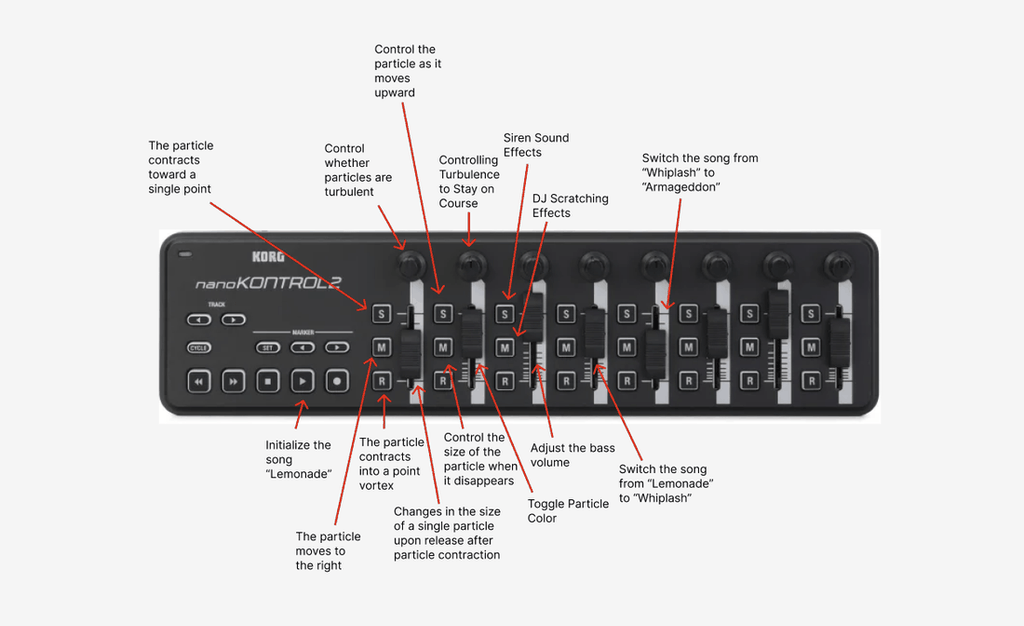
For the visual system, I can control particle turbulence, upward and horizontal movement, and particle contraction into a single vortex. I also added controls for changing particle size during contraction and release, adjusting the size of disappearing particles, and switching particle colors. For the audio system, I mapped the controller to initialize the first track, LEMONADE, and transition between LEMONADE, Whiplash, and Armageddon. I also incorporated bass volume adjustment, a DJ scratching effect, and a siren sound effect. By combining these functions within one MIDI controller, I can manipulate particle behavior, create visual transitions, and perform live audio mixing without switching between different interfaces.
Reflection
One of the biggest challenges I faced during this project was integrating audio mixing and visual control into a single MIDI controller. Since I wanted to build a functional DJ deck rather than a simple music visualizer, I had to spend a lot of time experimenting with audio transitions, MIDI mappings, and the relationships between different parameters in TouchDesigner. I also realized that creating interesting visual effects was only part of the process. Making those effects easy to control during a live performance was equally important. Sometimes, even a small change in the particle system could produce an unexpected result, which made the process both frustrating and exciting. Through this project, I learned more about how to balance technical functionality with creative expression. If I continue developing AFTERIMAGE, I would like to improve the audio mixing features, add more visual effects, and make the transitions between different visual states smoother. Overall, this experience helped me understand how TouchDesigner can be used not only to generate visuals, but also to create an interactive instrument that combines my interests in music, performance, and digital design.
Recent Comments