The Integration of Traditional Culture and Modern Technology
Posted: October 23, 2026 Filed under: Uncategorized Leave a commentFor Pressure Project 2 — A Mystery Is Revealed, I created an interactive experience that combines traditional Chinese shadow puppetry with a story from Journey to the West. My inspiration came from the classic episode Sun Wukong (The Monkey King)and the White Bone Demon. By combining traditional Chinese storytelling and art with modern interactive technology, I wanted the audience to experience the fun of controlling shadow puppets themselves rather than simply watching a performance.
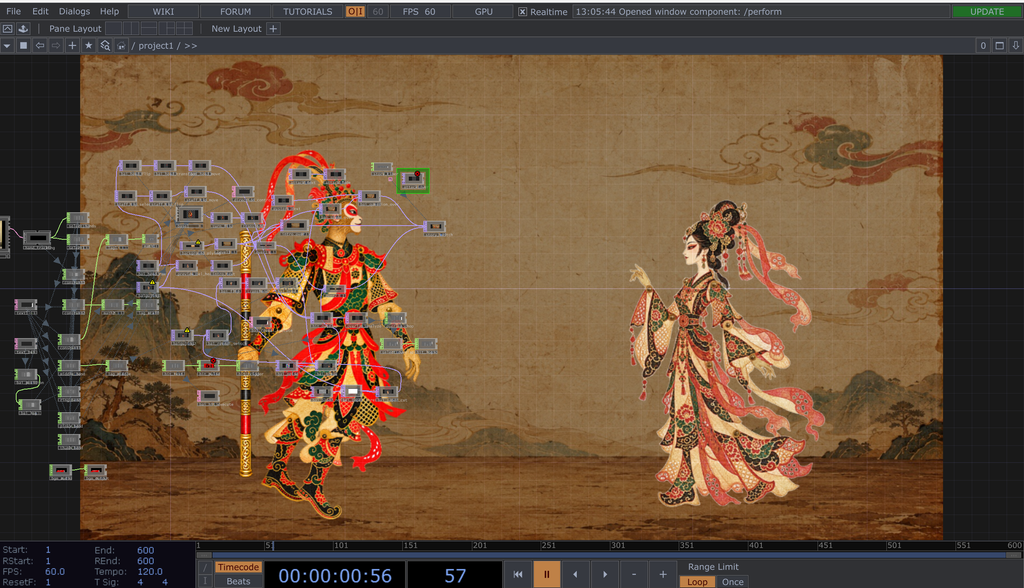
My project focuses on revealing the hidden identity of a mysterious woman. At the beginning of the experience, the audience first sees a landscape inspired by traditional Chinese art. A mysterious woman then appears, followed by Sun Wukong, the Monkey King. The audience can control Sun Wukong and try to uncover the woman’s secret. At the same time, another participant can control the mysterious woman, so the experience can be played by either one or two people. When Sun Wukong’s golden staff strikes the woman’s head, her human appearance gradually breaks apart, revealing the skeletal form hidden beneath her disguise. At that moment, the audience discovers that the seemingly ordinary woman is actually the White Bone Demon, and the mystery is finally revealed.
Process and Challenges
During the development process, the first problem I needed to solve was how to make the static shadow puppet characters move. To recreate the movable joints of traditional Chinese shadow puppets, I separated Sun Wukong’s character image into different parts, including his head, body, two arms, and two legs. I then imported these parts into TouchDesigner and used Transform TOPs to adjust their positions, sizes, and pivot points before putting them back together as a complete character. This step was more complicated than I originally expected. If the pivot points were not positioned correctly, the arms and legs would separate from the body when they rotated. I spent quite a lot of time making adjustments until the character’s movements looked more natural.
After assembling the character, I used MediaPipe hand tracking to create the interaction. Participants can control Sun Wukong with their left hand and the mysterious woman with their right hand. By bending different fingers, they can also control Sun Wukong’s head, arms, and legs. Both characters can move around the screen and automatically turn to face different directions based on hand movements. However, I encountered some unexpected challenges while developing these interactions. First, the hand-tracking system was very sensitive to small finger movements. Even when I tried to keep my fingers still, the character’s joints would continue shaking. Another problem was that MediaPipe did not always detect the two hands in the same order, which sometimes caused the characters controlled by the left and right hands to get mixed up. To solve these problems, I adjusted the hand recognition logic and used Lag CHOPs to smooth the characters’ movements, making the controls more stable.
Another major challenge was detecting collisions between Sun Wukong’s golden staff and the White Bone Demon. At first, I tried to detect attacks based on the distance between the characters and the rotation angle of Sun Wukong’s arm. However, this method was not very accurate. Sometimes, simply raising Sun Wukong’s arm would trigger the transformation, even when the staff had not actually touched the woman. To fix this, I redesigned the collision detection system by creating separate collision areas for the tip of the golden staff and the woman’s head. The transformation is now triggered only when these two areas overlap. When the staff successfully hits her head, her human appearance gradually distorts, revealing the skeletal form hidden underneath.
Through this project, I realized that interaction design is not just about making a computer recognize human movements. More importantly, the system needs to respond to those movements in a clear and meaningful way. I also learned that even small details can have a big impact on the user experience. Because of this, I had to keep testing and adjusting my project to reduce errors and make the interaction feel smoother.
Another thing I had to think about was how to make a simple character transformation feel like a moment when a mystery is truly revealed, rather than just another animation effect. To achieve this, I added opening subtitles, a question about the mysterious woman’s identity, and background music. I wanted these elements to create a sense of mystery and make the audience curious at the beginning, so they could eventually discover the truth through their own actions.
In traditional Chinese shadow puppetry, the audience usually watches performers control the puppets. However, in my project, the audience can become the puppeteers themselves. I think this change from watching to actively participating shows how modern interactive technology can bring a new kind of experience to traditional art forms. At the same time, I hope my project can encourage people who are unfamiliar with Journey to the West to become interested in Chinese traditional stories and culture, and perhaps learn more about them.
Pressure project1-Geometric Starfield
Posted: October 2, 2026 Filed under: Uncategorized Leave a commentBrief Description
I used simple geometric shapes such as circles, rectangles, and triangles in TouchDesigner and combined them with movement, feedback, noise, and other visual effects. Once the program starts, the shapes continue to move and change without requiring any interaction. I also added audio to the project so that the movement and visual effects of the shapes develop along with the sound, creating an audiovisual piece that can run and loop on its own.
Process Reflection
My original idea was to create something similar to the game Snake, where a shape would continuously move around the screen and create new changes after touching or “eating” other shapes, such as changing its size, movement, or visual effects. However, once I started working on the project, I realized that creating a complete game system with too many interactions would be difficult to finish and polish within five hours, especially based on what I currently know about TouchDesigner. Because of this, I changed my direction and started with simple geometric shapes, focusing more on their movement and visual relationships with each other.
I used LFOs to create continuous movement and connected different values to Transform parameters to control the position, size, and movement of the shapes. One of the visual elements I created was a small white ball with a trailing effect that moves along an equilateral triangular path. I then duplicated it and reversed the direction of the path. When the two triangular paths overlapped, they created the appearance of a six-pointed star. I also experimented with Feedback, Noise, Level, and Composite to create more visual changes. At first, I considered adding more shapes, interactions, and colors, but I realized that too many elements would not only be difficult to complete within five hours, but could also make the visuals feel too busy. My first version used mostly rainbow colors. Although it looked colorful, the overall result felt messy and even a little cheap. I eventually changed to a simpler color palette so that the movement of the shapes could become the main focus. I also added particle effects in the background to create an atmosphere that feels like a starry sky.
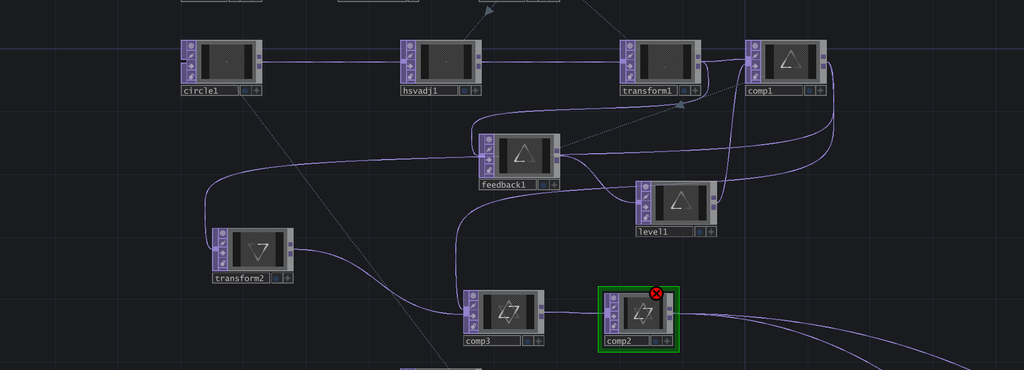
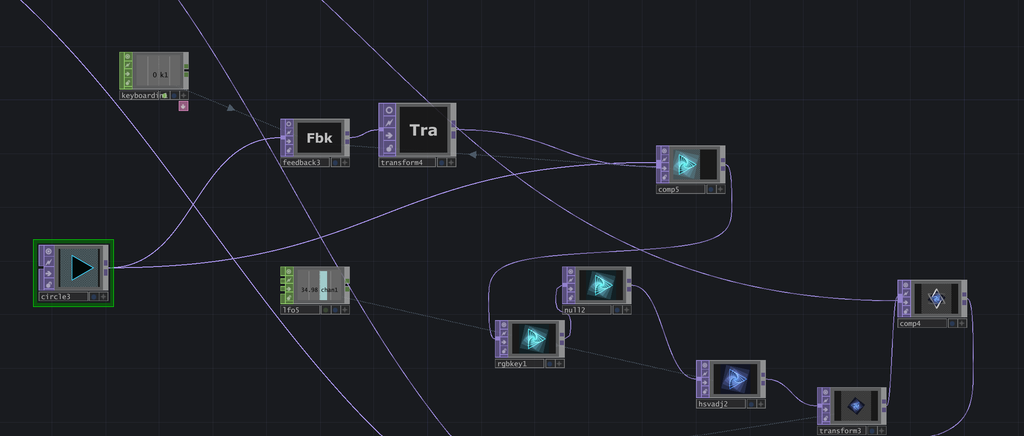
While learning TouchDesigner and working on this project, I was surprised by how much a small change in a parameter could affect the final result. For example, changing the speed of an LFO or adjusting the position, size, and movement range of a shape could completely change the rhythm and feeling of the composition. Combining different nodes also gave me a lot of flexibility to create different effects. Compared with After Effects, which I have used before, I found that I prefer TouchDesigner for creating this kind of looping animation. Its real-time workflow allows me to adjust parameters and immediately see the results, which makes the experimental process more direct.
During the in-class presentation, I felt that most of my classmates watched at least one full cycle of my piece. Although I did not achieve the “make someone laugh” achievement, I still received some positive feedback. The presentation also gave me a chance to see how other people responded to the pacing and visual changes in my work. Overall, this project helped me become more familiar with TouchDesigner and gave me my first experience creating a visual system that can continuously run on its own. In the future, I would like to experiment with more complex systems and audio controls to make the work more dynamic and engaging.
AI Expert Audit: The Lord of the Rings Film Trilogy
Posted: September 9, 2026 Filed under: Uncategorized Leave a commentSource Material and My Familiarity
I chose Peter Jackson’s The Lord of the Rings film trilogy as the subject of my AI expert audit. I used a SparkNotes plot summary of the trilogy as my source material in NotebookLM. I chose The Lord of the Rings because it has been one of my favorite film series for a long time, and I have watched the films many times. I have also read part of Tolkien’s original novels. I am very familiar with the main characters, their relationships, major events, and many of the details throughout the story. Because of this familiarity, I feel that I can recognize not only obvious mistakes made by AI, but also information that may be technically correct while still being incomplete or oversimplified.
Accuracy and Missing Details
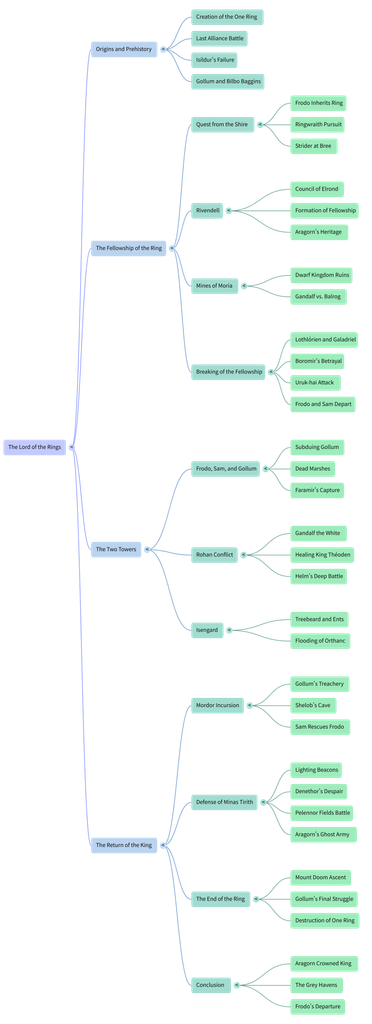
Overall, NotebookLM accurately described the major events of the trilogy. For example, the Mind Map correctly included important events such as the Council of Elrond, the Battle of Helm’s Deep, the defense of Minas Tirith, and the destruction of the One Ring. However, I noticed that the AI focused more on “what happened” and left out a lot of character development. Aragorn is a good example. The Mind Map summarizes his story through a few points, such as his heritage, the Army of the Dead, and his eventual coronation as king. These details are not wrong, but they do not fully show his doubts and struggles, his relationship with the Elven princess Arwen, or the process of gradually accepting his identity and responsibility as the future king. Someone who has never seen the films might understand the basic plot from these AI-generated materials, but they could easily miss an important part of Aragorn’s character development.
Usefulness for Learning
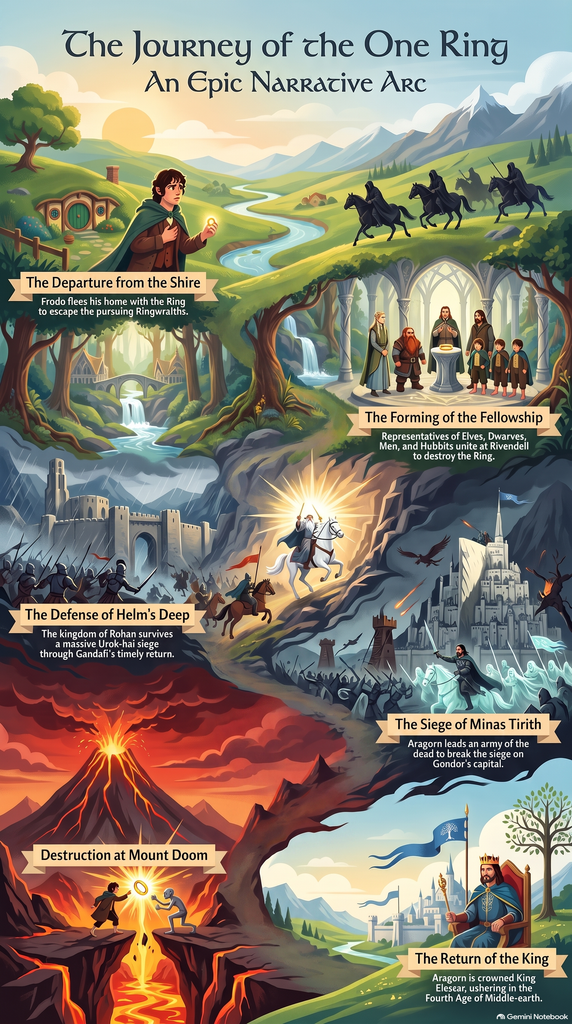
If I were learning about The Lord of the Rings for the first time, I think all three materials would be useful, but for different reasons. The Mind Map was the most useful to me because the trilogy contains many characters, locations, and connected events, and the map makes those connections easier to follow. The Infographic is better for getting a quick overview, but it removes even more detail. The Audio Overview is more engaging because it does not simply repeat the entire plot and instead develops a specific idea about mercy. However, audio also makes it harder to quickly return to a specific character or event. I would therefore use these materials as introductions rather than replacements for watching or closely studying the films.
Trust and Limitations of AI
AI is relatively reliable when it comes to organizing basic facts, timelines, characters, and major events. However, it becomes less reliable when it comes to understanding character motivations, emotional development, or more subtle themes. Therefore, I think these AI-generated materials are useful as a starting point for quickly learning about a topic, but if we really want to understand a work in depth, we still need to return to the original material and form our own interpretations and judgments.
Recent Comments