Pressure Project #2: Playlist
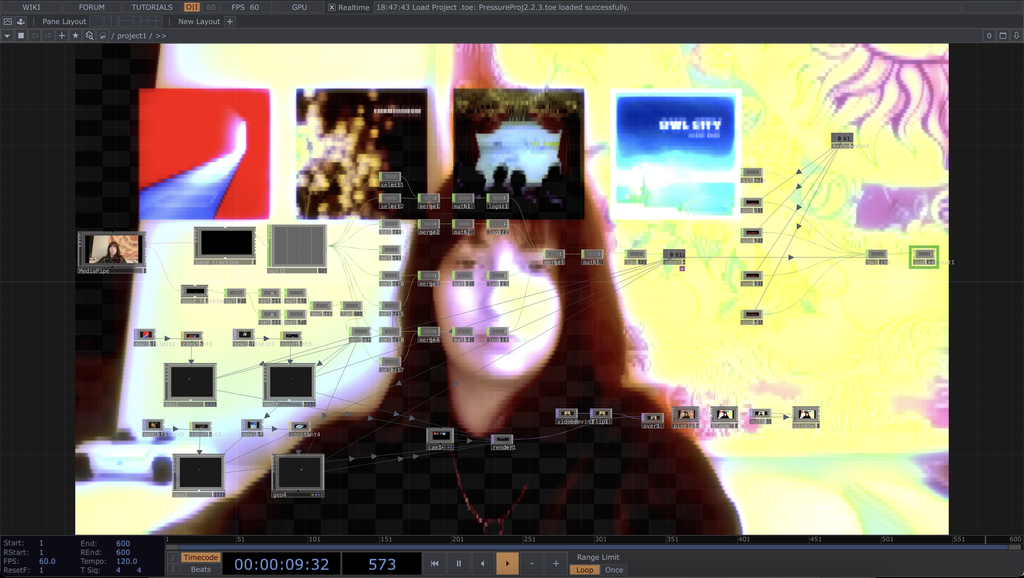
Posted: October 23, 2026 Filed under: Uncategorized | Tags: Pressure Project Leave a commentFor this pressure project, I decided to make a hand-controlled playlist. Upon loading into the patch, the user is faced with themselves, with a pixelated filter on top and four album covers floating above their head. If the user holds up 1 to 4 fingers, a song will play for each respective finger. When a song is selected, the album art for that song will come to the center, spin, and bob up and down to signify that it is selected.
The songs used, in order from left to right: Backseat by Balu Brigade, When I’m Small by Phantogram, Sugar We’re Going Down by Fall Out Boy, Fireflies by Owl City
When I first started brainstorming for this assignment, I knew I wanted to keep doing stuff with music. My first struggle was thinking of something that could be done entirely without touching the computer. My first idea was for a song to play just when a person looked at the screen. I created a patch that played Sexyback by Justin Timberlake whenever both my eyes were visible on screen. While I thought it was funny, the experience was very short, and there was no real mystery revealed.
The mystery aspect came second to me in my thinking overall since my first concern was getting my ideas to work. When I came up with the finger-selected song idea, it felt possible but still challenging. With some Google searches on “How to trigger audio file when putting up finger MediaPipe TouchDesigner,” I was able to get a basic system set up with a base null, then two selects (one for finger tip, one for knuckle), a merge, then a logic. With that, I copied it for all four fingers, then merged them all together again. Long story short, I got the finger song system to work. That was honestly the easy part. The albums were the more confusing part. After a lot of trial and error, I decided to keep the albums visible the whole time to give a hint to the user that the patch was song-based and there were four options. The mystery aspect was discovering what triggered which song.
I was asked during my presentation, “Why is it pixelated?” and there isn’t really a cool answer. After a couple of hours of just staring at myself, I got annoyed with picking apart my appearance and thought overall the patch would look cooler with a filter over it. The filter is a pixelation filter with the bloom filter on top.
Pressure Project 1 – Particles
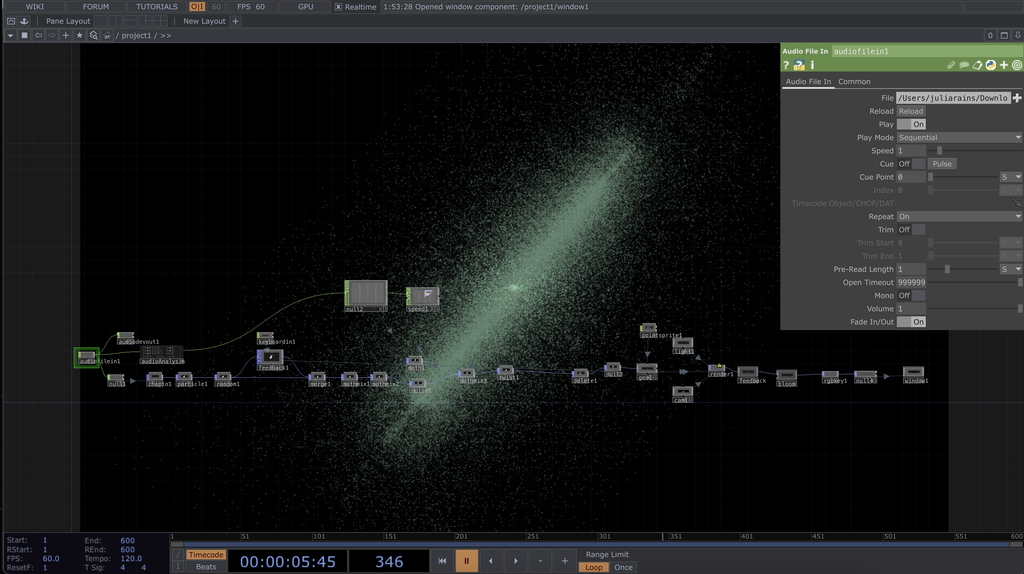
Posted: October 3, 2026 Filed under: Uncategorized | Tags: Pressure Project, touchdesigner Leave a commentFor my auto-generating patch, I decided to make an audiovisualizer using primarily POPs to generate a particle system. The patch is audio-reactive and was tested with multiple songs that fall under the EDM genre.
I approached the 5-hour time limit optimistically, knowing I could at least make something in that time. My first instinct was to search for a tutorial to follow since I didn’t want to just make a repeat of one of our practice patches from class. I knew from the jump that I wanted to make an audiovisualizer for the song Scream Saver by Subtronics. To find inspiration, I first went on TikTok and searched “Touchdesigner audio visualizer”. I found some really cool stuff, but a video that used a particle system really stood out to me, and it just so happened to be made by a guy who had a tutorial for it. The tutorial was “Audio Reactive Particles using Pops! – Touchdesigner Beginner Friendly Tutorial” by nicholaspjm on YouTube.
In my process of working from the tutorial, I ended up messing with a parameter by accident that led to my program crashing before I could even name the project, so I had to start over pretty late into the game. But when I restarted, I ended up fixing a problem my first patch was having, which led to a better outcome. In the end, I got to a point I liked after about 4 hours, then messed around with music for the remaining hour.
Most of the POPs-related elements of the patch, like the maths, went over my head, so I didn’t change them much from the tutorial. But when it got to the end, I started to customize more. I linked and relinked audio components to get the effects I wanted and messed with the color of the particles. The glow effect when the particles get close together is from a filter called bloom, and the color of the particles was edited by using a point sprite. Both the point sprite and filter came from the tutorial, but I edited them to look different from the guy in the video.
My biggest surprise during this process was at the end, when things all came together. Once I connected the audio to the math and things started moving, I got really pumped. From there, everything new I tried just added to the experience. I changed the song from Scream Saver to Falling Flying by Griz, and I felt the song fit the composition so much more. I feel like this is just the start of what I want to make potentially with audio reactivity. Seeing my favorite songs move and breathe was very gratifying to me.
#2 AI Audit
Posted: September 8, 2026 Filed under: Uncategorized Leave a commentFor my AI audit, I chose to have Gemini scan and generate study materials concerning Danny Gonzalez’s video “Speedrunning Conspiracy Theory Rabbit Holes with Drew Gooden”. I have seen this video many times from start to finish, and it is one of my comfort videos. I have a lot of other in-depth hobbies and interests I could have done this assignment about, but I fear that most media I enjoy is very vast and complicated, so even I am not an expert on them. This video is one of the only things I can quote, possibly start to finish.
MIND MAP
PODCAST
VIDEO OVERVIEW (It wouldn’t let me make an infographic 🙁 )
ACCURACY
After reviewing the generated materials, I am not shocked to see that it got most of the facts from the video correct. Though, in the podcast, it did get a fact wrong about the alien story told in the video. In the video, the alien story is told by a guy, supposedly named Clifford, who ran into an alien while fighting in Vietnam, and the alien says his name and warns him against fighting. But the podcast says that the alien is Clifford, which is just plain wrong. Also, in the video overview, it portrays the bent part of the dowsing rods in the wrong orientation in some clips.
I thought it was odd that in the podcast, the “hosts” go on a weird AI tangent at the end; it seems disingenuous for the robot to be talking about the future negative effects of robots.
USEFULNESS
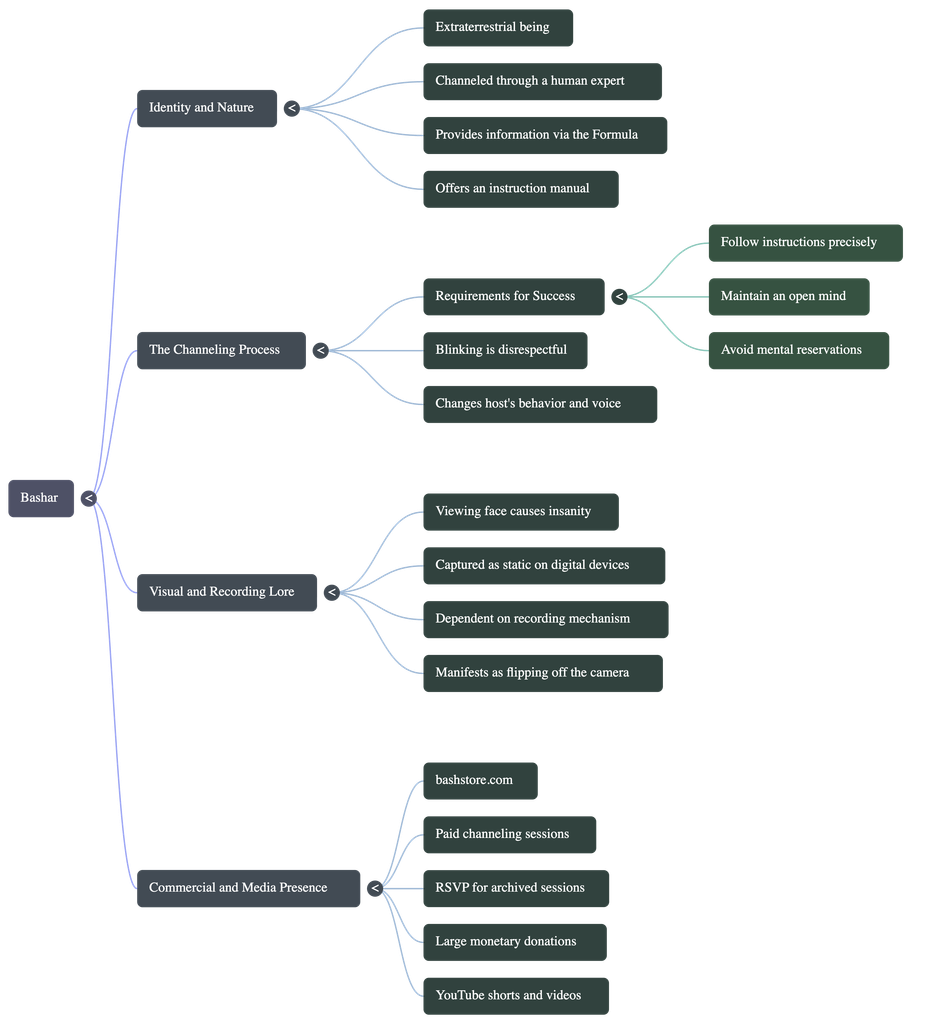
Well, neither the mind map nor the video overview is even about the video, really. They are both made of the conspiracies talked about in the video; actually, they almost display the conspiracies like they are facts, and not humorous like in the actual video. The podcast does, however, speak about the source video as a whole, so I think it was the most effective medium. But I don’t think it helps me understand the source any more than just watching it. I think it was the most effective because it was the only medium that acknowledged that the information from the video is based on conspiracies.
AI WEIRDNESS
The most notable hints given that the materials were AI-generated were the art style and the voice cadence. There isn’t much to say about the mind map because I do believe a real person could make a mind map and have it look like that. The only odd part is that someone would make a mind map about this video at all.
The podcast doesn’t sound like your usual monotone AI voice, but there are still stumbles. The male voice was less authentic-sounding, more robotic, and both voices had the noticeable “AI tone”.
The video overview is OBVIOUSLY AI. The art style used in the video is almost synonymous with AI now. Also, the subtitles included in the video are not accurate to what is being said.
Overall, AI voice and art style are very noticeable to anyone who cares to know the difference. AI prioritizes what is most common in existing media to make something that looks the most “real”. But humans can’t scan through everything on the internet like AI, so humans don’t make all of the most common choices. AI uses the most commercial voice, the most used motion graphics, and the most common art style.
TRUST
Based on this experiment, I would warn people against using AI to summarize or go in depth on comedic YouTube videos, or anything with any level of sarcasm or satire. I can imagine these tools being helpful when consuming actual academic material. But I think it would only be trustworthy with topics that have little discrepencies and are not too complicated. When the AI is faced with differing opinions on one topic, it tends to get confused, which I have noticed in past experiences. Overall, I wouldn’t trust AI any more than you trust a friend who is a little bit smarter than you.
Recent Comments