AI Expert Audit: The Lord of the Rings Film Trilogy
Posted: September 9, 2026 Filed under: Uncategorized Leave a commentSource Material and My Familiarity
I chose Peter Jackson’s The Lord of the Rings film trilogy as the subject of my AI expert audit. I used a SparkNotes plot summary of the trilogy as my source material in NotebookLM. I chose The Lord of the Rings because it has been one of my favorite film series for a long time, and I have watched the films many times. I have also read part of Tolkien’s original novels. I am very familiar with the main characters, their relationships, major events, and many of the details throughout the story. Because of this familiarity, I feel that I can recognize not only obvious mistakes made by AI, but also information that may be technically correct while still being incomplete or oversimplified.
Accuracy and Missing Details
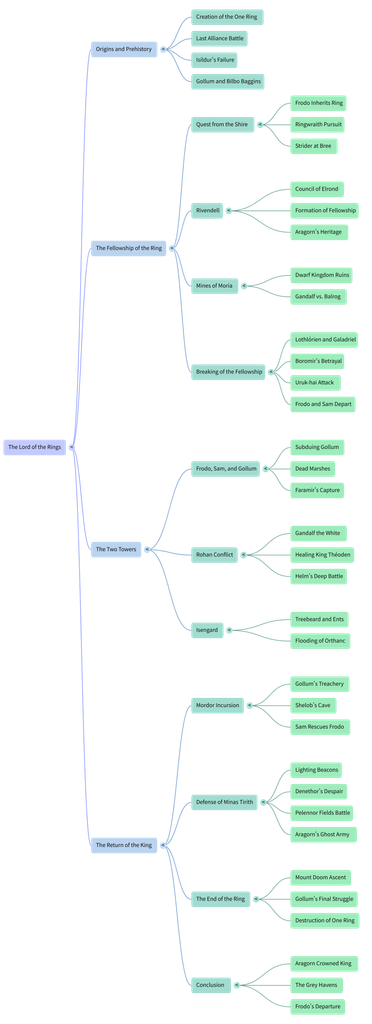
Overall, NotebookLM accurately described the major events of the trilogy. For example, the Mind Map correctly included important events such as the Council of Elrond, the Battle of Helm’s Deep, the defense of Minas Tirith, and the destruction of the One Ring. However, I noticed that the AI focused more on “what happened” and left out a lot of character development. Aragorn is a good example. The Mind Map summarizes his story through a few points, such as his heritage, the Army of the Dead, and his eventual coronation as king. These details are not wrong, but they do not fully show his doubts and struggles, his relationship with the Elven princess Arwen, or the process of gradually accepting his identity and responsibility as the future king. Someone who has never seen the films might understand the basic plot from these AI-generated materials, but they could easily miss an important part of Aragorn’s character development.
Usefulness for Learning
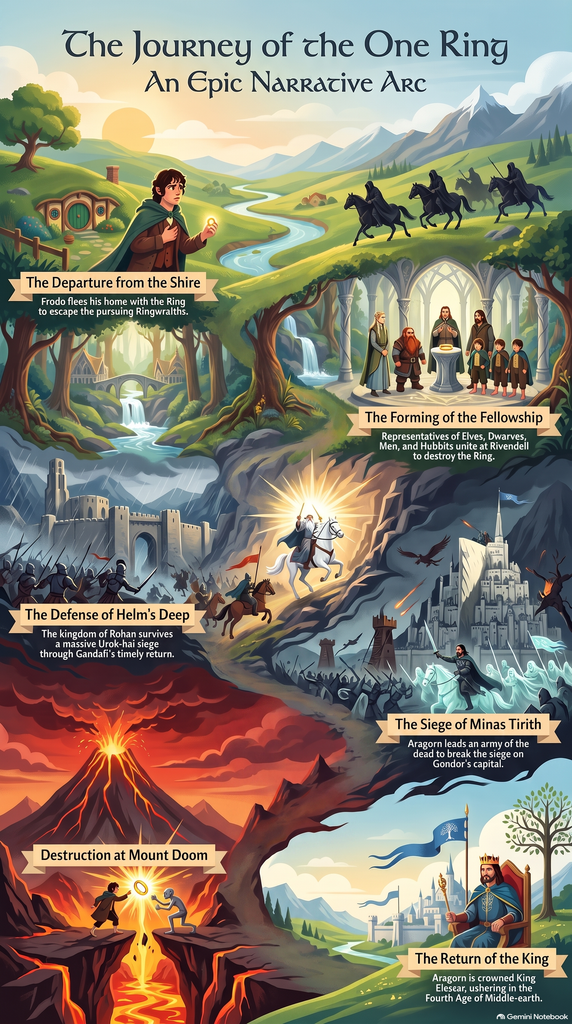
If I were learning about The Lord of the Rings for the first time, I think all three materials would be useful, but for different reasons. The Mind Map was the most useful to me because the trilogy contains many characters, locations, and connected events, and the map makes those connections easier to follow. The Infographic is better for getting a quick overview, but it removes even more detail. The Audio Overview is more engaging because it does not simply repeat the entire plot and instead develops a specific idea about mercy. However, audio also makes it harder to quickly return to a specific character or event. I would therefore use these materials as introductions rather than replacements for watching or closely studying the films.
Trust and Limitations of AI
AI is relatively reliable when it comes to organizing basic facts, timelines, characters, and major events. However, it becomes less reliable when it comes to understanding character motivations, emotional development, or more subtle themes. Therefore, I think these AI-generated materials are useful as a starting point for quickly learning about a topic, but if we really want to understand a work in depth, we still need to return to the original material and form our own interpretations and judgments.
AI Expert Audit
Posted: September 9, 2026 Filed under: Uncategorized Leave a comment1. Background and Source Material
For this assignment, I used a paper I wrote in the fall of 2024 for the course EDUTL 1902 as source material. This paper primarily explores the copyright issues raised by generative AI in the field of art and whether such use constitutes plagiarism. It explains how generative AI models deconstruct and reorganize unauthorized training data from the internet, as well as potential solutions for avoiding copyright issues in the future.
The main theme of this paper overlaps to some extent with the topic of our current assignment, and the issues it addresses remain relevant today. Having had some personal experience with the question of whether AI constitutes plagiarism, I decided to focus on this topic. This article means a lot to me not only because it addresses a topic relevant to me and to artists in general, but also because it is the first truly rigorous academic paper I have written—one that perfectly adheres to APA 7th edition formatting, something my previous papers failed to achieve.
Main Body of the Article:https://osu.instructure.com/courses/171009/assignments/4173950?module_item_id=12968769
2. AI-Generated Materials
2.1 Podcast
2.2 Mid Map
2.3 Infographic
3. Expert Audit
3.1 Accuracy Check
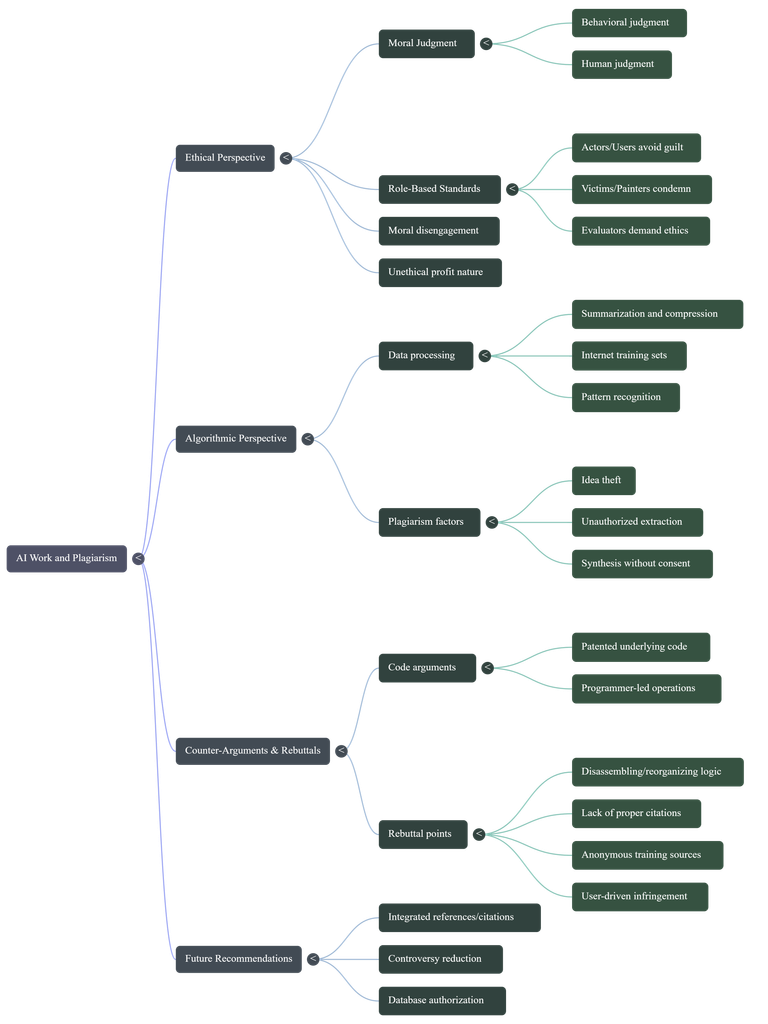
In general, the AI-generated content is quite accurate; it provided a perfect summary of the arguments in my paper—a level of summarization that humans rarely achieve. I admit that my arguments in this paper weren’t very clear, but the AI was able to distill the main points from the text, which is one of its strengths. My paper consists of two major sections, but the distinction between them was not clear; the AI clearly outlined the content of these two sections. The first section is the “ethical perspective,” and the second is the “algorithm perspective.”
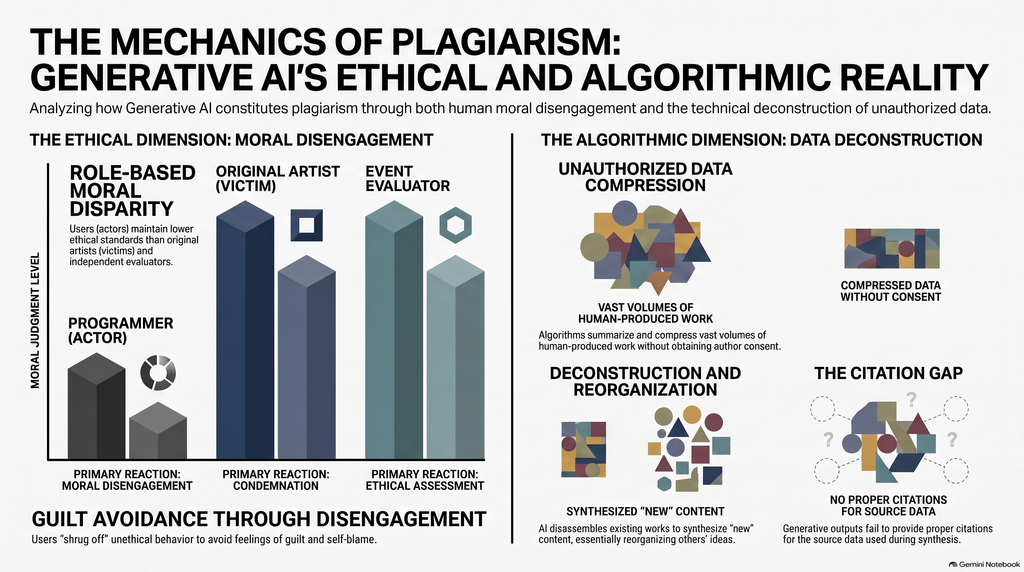
The diagrams provided in the infographic are very helpful for people who are unsure whether AI constitutes plagiarism to understand how AI image generation works. This is much more intuitive than the paper itself. As for the mind map, I think it’s quite detailed; it highlights the specifics of most of the arguments in the article, as well as its causal structure.
So, to sum it up, when it comes to accuracy, I think AI performs quite well; it can perfectly summarize and synthesize the content of all articles and accurately present them in a different format.
3.2 Usefulness for learning
In my opinion, if I were encountering this material for the first time, I believe these AI-generated resources would be very helpful in understanding the main points of the topics I’m interested in. I find the infographics particularly intuitive, as they use images to illustrate the process of generating AI-created works. This is far more intuitive than having someone explain it through language or other means, because visual language is always the most accurate. Similarly, podcasts are an excellent format. I listened to the entire 20-minute episode, and I found the host’s narration very engaging. The way the topic was explored through a conversation between two people made it feel just like listening to two friends chatting. This approach to learning is a subtle and natural way to absorb knowledge.
I think mind maps were actually the least helpful for me personally. To be honest, I don’t like reading—just seeing text gives me a headache. So even though mind maps clearly outline the logical structure and causal relationships of an article, I still find that looking at them makes me feel bored. I believe that although this mind map has streamlined much of the content discussed in the paper, it remains, at its core, rather complex. It hasn’t been simplified enough to allow readers to grasp at a glance what the article is about, because the details included in the mind map are too exhaustive—it covers nearly every subtle point I, as the author, have raised.
3.3 The Aesthetic of AI
In fact, AI can also cause some problems; the content it generates does not always fully reflect what the author intended to convey. One obvious issue is that AI tends to present a person’s arguments as established facts.
AI presents the more complex and controversial viewpoints in the original paper with excessive certainty. For example, the infographic uses very strong terms such as “Unauthorized Data Compression,” leading readers to easily assume that AI’s use of training data necessarily constitutes plagiarism. However, the original paper actually distinguishes between AI algorithms, training data, and users, pointing out that the real problem does not necessarily lie in the AI algorithms themselves, but rather in unauthorized data and the ways in which humans use that data and AI systems.
Therefore, while the AI did not completely alter the author’s core arguments when reorganizing the paper, it did downplay the qualifying conditions and complexities involved. Furthermore, the AI-generated content links concepts such as plagiarism, unauthorized data use, and copyright too closely together, making a complex issue involving multiple layers—including ethical, technical, and legal dimensions—appear as a simple cause-and-effect relationship. This fallacy is particularly difficult for non-experts to detect, as these claims sound very reasonable on the surface and employ a wealth of academic-sounding terminology.
3.4 Trust & Limitations
Through this learning experience, I’ve come to realize that people should maintain a certain level of caution when it comes to AI-generated educational materials. However, this doesn’t mean that AI has no educational value. When AI generates mind maps, infographics, and podcasts, these formats serve as effective tools for facilitating human learning. At the same time, AI’s greatest strength lies in its ability to organize, summarize, and restructure existing information. Although it has these advantages, it does not mean it can achieve 100 percent accuracy. When AI addresses complex ethical, legal, and technical issues, it tends to present controversial viewpoints as if they were proven facts. Anyone who isn’t particularly sensitive to such issues would easily believe what it says. Thus, the most dangerous error AI can make isn’t outright misinformation or fabricated facts, but rather information that may be broadly correct yet sounds extremely accurate because it omits context and qualifying conditions. Once this information enters a person’s mind, it leads them in the opposite direction of what the original knowledge provider intended to convey.
Therefore, AI is best utilized for simple organization and reference—sifting through fragmented information so people do not lose sight of the big picture, while also serving as a straightforward guide to help them determine their next steps. AI tools should be viewed as resources to assist us, rather than as the ultimate authority for determining academic facts.
#2 AI Audit
Posted: September 8, 2026 Filed under: Uncategorized Leave a commentFor my AI audit, I chose to have Gemini scan and generate study materials concerning Danny Gonzalez’s video “Speedrunning Conspiracy Theory Rabbit Holes with Drew Gooden”. I have seen this video many times from start to finish, and it is one of my comfort videos. I have a lot of other in-depth hobbies and interests I could have done this assignment about, but I fear that most media I enjoy is very vast and complicated, so even I am not an expert on them. This video is one of the only things I can quote, possibly start to finish.
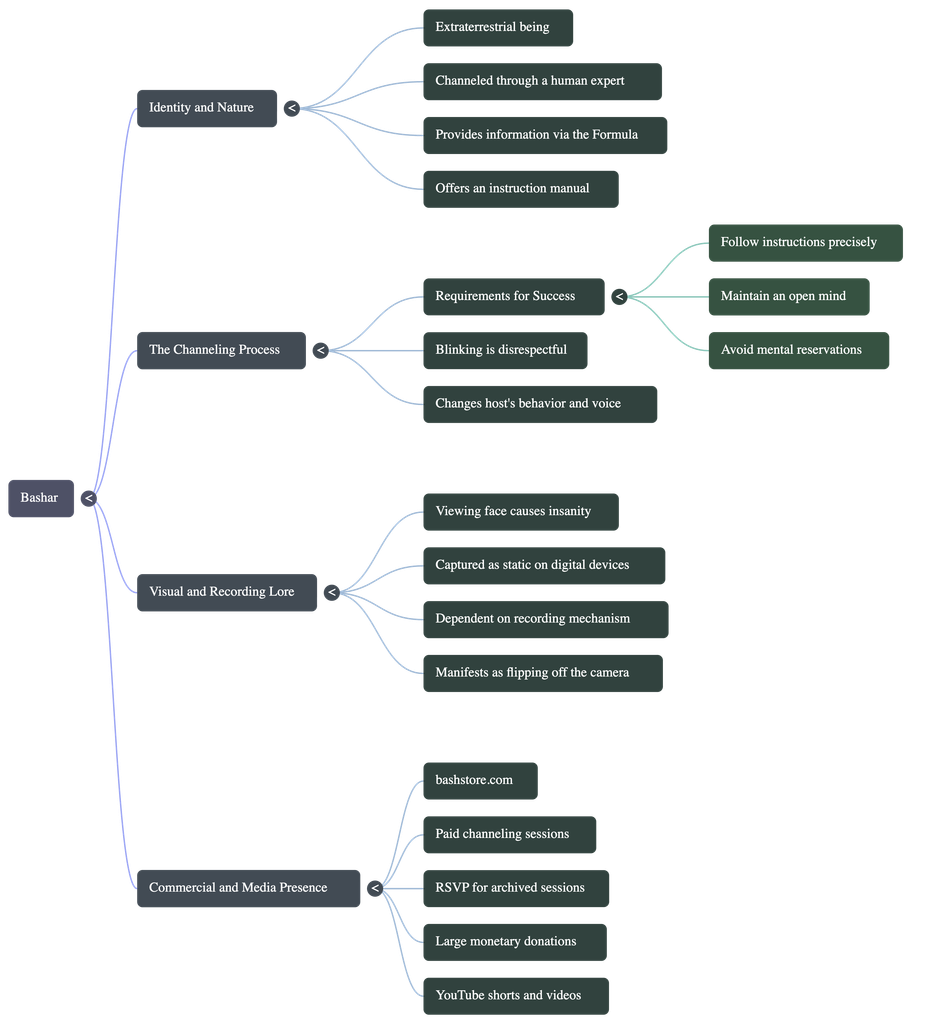
MIND MAP
PODCAST
VIDEO OVERVIEW (It wouldn’t let me make an infographic 🙁 )
ACCURACY
After reviewing the generated materials, I am not shocked to see that it got most of the facts from the video correct. Though, in the podcast, it did get a fact wrong about the alien story told in the video. In the video, the alien story is told by a guy, supposedly named Clifford, who ran into an alien while fighting in Vietnam, and the alien says his name and warns him against fighting. But the podcast says that the alien is Clifford, which is just plain wrong. Also, in the video overview, it portrays the bent part of the dowsing rods in the wrong orientation in some clips.
I thought it was odd that in the podcast, the “hosts” go on a weird AI tangent at the end; it seems disingenuous for the robot to be talking about the future negative effects of robots.
USEFULNESS
Well, neither the mind map nor the video overview is even about the video, really. They are both made of the conspiracies talked about in the video; actually, they almost display the conspiracies like they are facts, and not humorous like in the actual video. The podcast does, however, speak about the source video as a whole, so I think it was the most effective medium. But I don’t think it helps me understand the source any more than just watching it. I think it was the most effective because it was the only medium that acknowledged that the information from the video is based on conspiracies.
AI WEIRDNESS
The most notable hints given that the materials were AI-generated were the art style and the voice cadence. There isn’t much to say about the mind map because I do believe a real person could make a mind map and have it look like that. The only odd part is that someone would make a mind map about this video at all.
The podcast doesn’t sound like your usual monotone AI voice, but there are still stumbles. The male voice was less authentic-sounding, more robotic, and both voices had the noticeable “AI tone”.
The video overview is OBVIOUSLY AI. The art style used in the video is almost synonymous with AI now. Also, the subtitles included in the video are not accurate to what is being said.
Overall, AI voice and art style are very noticeable to anyone who cares to know the difference. AI prioritizes what is most common in existing media to make something that looks the most “real”. But humans can’t scan through everything on the internet like AI, so humans don’t make all of the most common choices. AI uses the most commercial voice, the most used motion graphics, and the most common art style.
TRUST
Based on this experiment, I would warn people against using AI to summarize or go in depth on comedic YouTube videos, or anything with any level of sarcasm or satire. I can imagine these tools being helpful when consuming actual academic material. But I think it would only be trustworthy with topics that have little discrepencies and are not too complicated. When the AI is faced with differing opinions on one topic, it tends to get confused, which I have noticed in past experiences. Overall, I wouldn’t trust AI any more than you trust a friend who is a little bit smarter than you.
#2: AI EXPERT AUDIT
Posted: September 8, 2026 Filed under: Uncategorized Leave a commentMaterials
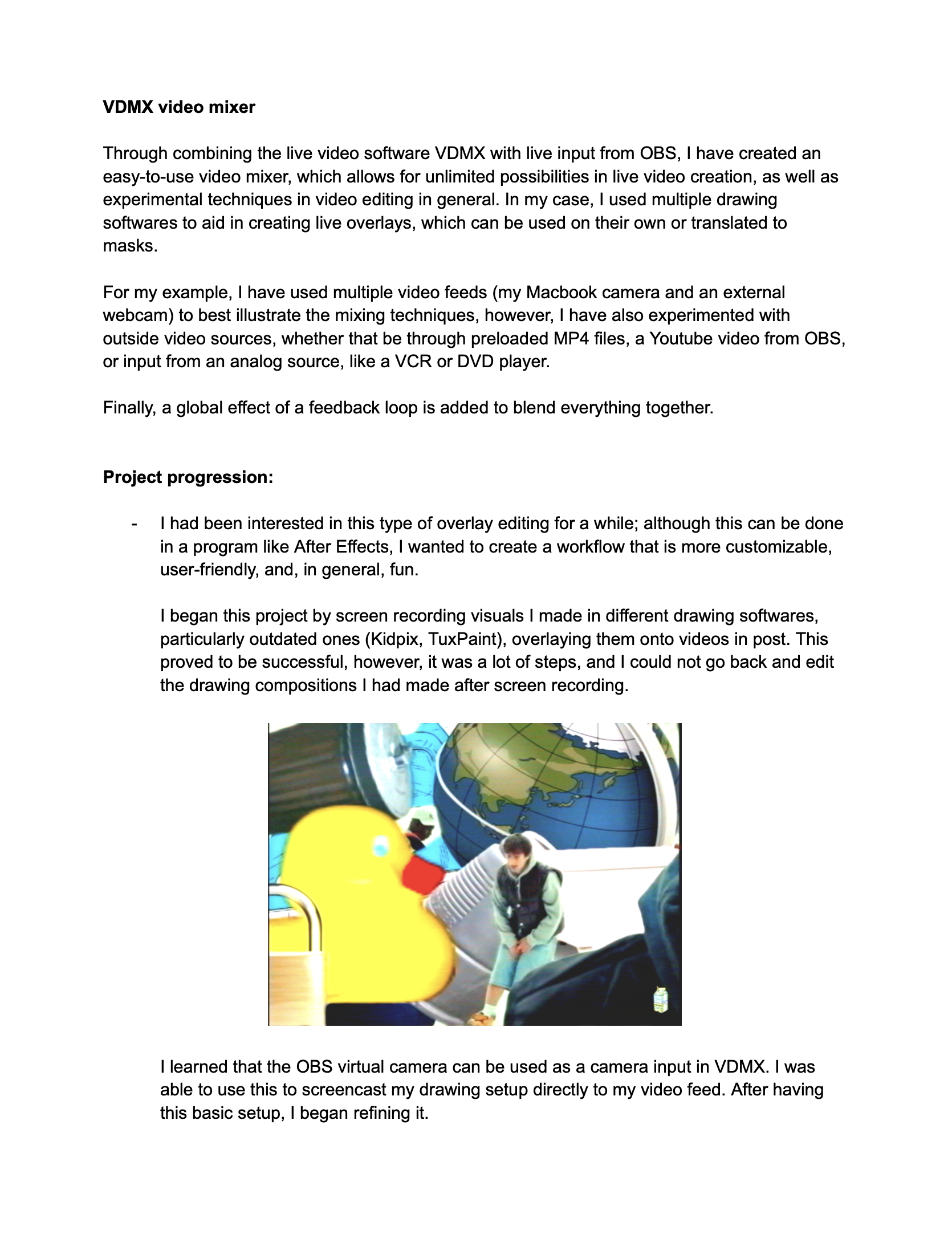
Last semester, I applied to Siggraph with a visual system I had created using multiple programs (VDMX, OBS, and Tux Paint). Although it lacked the complexity to get accepted, I still found it incredibly useful in my editing workflow, and it is important to me because it is catered to how I create. The document detailing the system is what I submitted to the Gemini notebook (it is four pages long, but I included the intro page in this post, which has mosts of the relevant details).
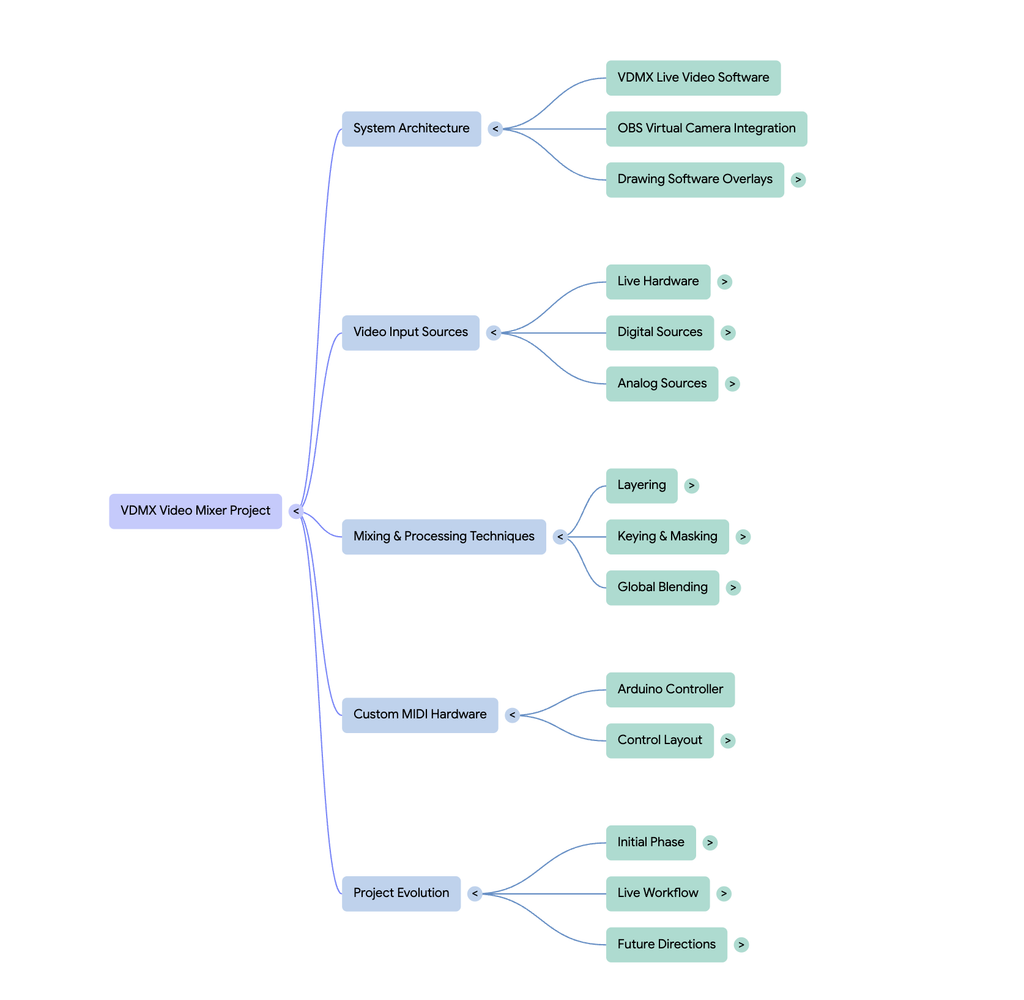
Generated Materials
Accuracy Check
The AI did a good job of understanding all the base components. It clearly understood the workflow, and nailed down the reason why I wanted to create the project in the first place (to speed up my editing workflow). However, I feel Gemini gave me too much credit in some aspects, saying that I built the video mixer “completely from scratch,” when in reality I just combined various tools.
The “AI” Look
It is pretty obvious that what has been generated is AI. This can be seen with the audio overview, specifically with the monotone cadence. What I did notice, however, is that the more detailed the audio overview is, the more realistic it seems. I generated a deep dive and a brief, with the deep dive coming out on top in terms of realism. When it comes to the graphics (besides looking very AI), what I noticed is that AI treats a lot of systems linearly. Someone that would find this tool useful understands the importance of modularity and its place in live video, something that the AI fails to cover. In my workflow, a lot of elements can be swapped and routed back to each other, making it a more complex system than what the AI has outlined. Gemini has outlined its basic functionality pretty well, but it lacks the expertise of seeing the potential of the system, and all the possible effects that can be done.
AI as a Learning Tool
I would say that the AI resources are pretty helpful in getting a grasp of the project, with each resource being helpful in their own right. The audio overview, which I deemed to be the most helpful, gives a straightforward overview, while also outlining the intent of the project. I found this useful, because when I am trying to understand something I also like to know the why behind it. I also found the mind map to be fairly helpful, as it gives a good framework for the different elements of the workflow. This is not the most beginner friendly method, however, as the map only contains terms rather than a description of each element. Then comes the infographic, which is a double-edged sword. On the positive side, it adds the description for each element that I wanted in the mindmap, making it easier to understand each part of the workflow. On the contrary, the layout of the infographic is difficult to grasp, and I think it could have been arranged in a more digestible manner. It also completely disregards or jumbles some of the tools that I used: I used a computer and a very simple breadboard MIDI controller, however, the infographic displays this as multiple iPads and a super sleek controller that somehow connects to the iPad. All in all, each resource was helpful in its own way, but each one also has its downsides.
Final Statement + Trusting AI
From what I have seen, AI is really good with breaking down systems to be easily understood. However, especially in a creative field, it is important to use AI as a reference and not as an end all be all, as it lacks human creativity to see beyond basic limitations. AI serves as a rule follower, so if you want to stay in a linear, basic line of thinking, I would highly recommend using AI. If you want more complexity, use AI as a jumping off point.
AI EXPERT AUDIT
Posted: September 7, 2026 Filed under: Uncategorized Leave a commentby Ella Neiderer
Twilight: AI vs. Expert
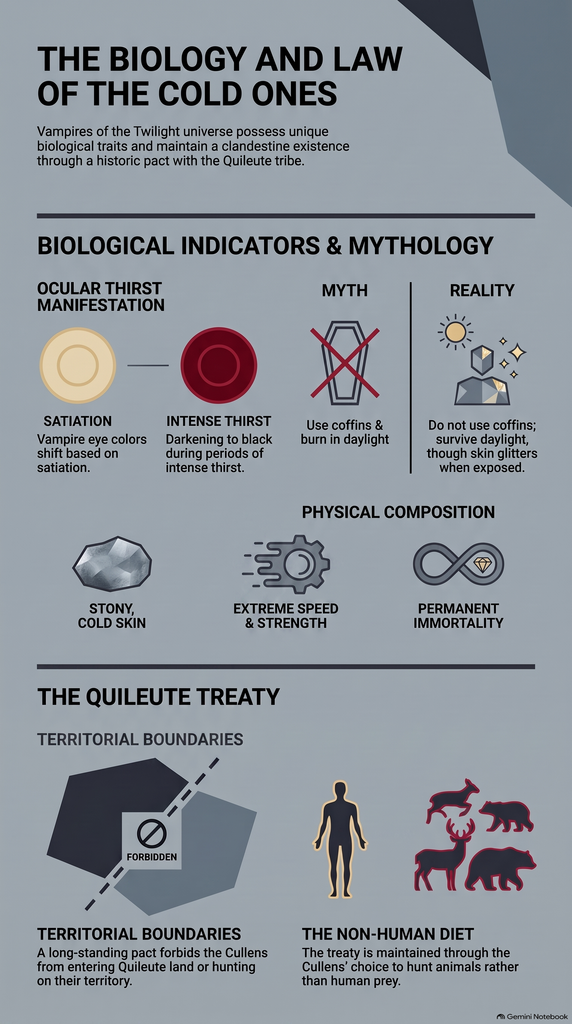
AI Materials…
Why_Bella_Swan_Chose_the_Monster.m4a
AI Podcast ^
My Thoughts…
For this project, I used a PDF of the entire Twilight book. I am well-versed in this content as I have not only read the entire Twilight series, but I have watched the movies and continuously engage in and consume Twilight-related content. This material is meaningful to me as I enjoyed the books and have become obsessed with the story as a whole. I grew up watching the movies with my mother and am overall very acquainted with everything Twilight related.
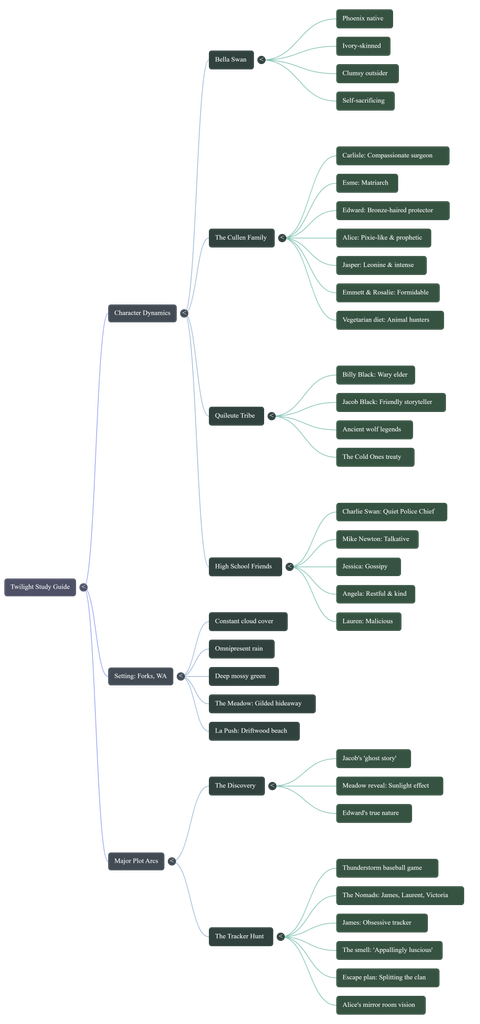
The AI got most of the source material correct, and in certain aspects it would pull direct quotes from the book. It was correct in explaining things such as details regarding the setting, how Bella felt during the events of the story, and facts about how the vampires in the story function. However, there were parts that it would get wrong, such as in the mind map it listed Bella’s dad under her “high school friends” instead of just listing her general relationships. It also oddly simplified the FAQ infographic sheet by listing aspects of the vampires as if they were biological facts. Overall, though, the entire project was quite accurate and listed the most important aspects of the book.
If I were encountering this material for the first time and knew nothing about Twilight, I do believe that these resources would somewhat help to gather a basic understanding of the general storyline. Each material, however, does tend to oversimplify things and leaves out certain deeper aspects of each character’s dynamic. If I were cramming for a test about this material, though, I think that the sources did well at easily and succinctly putting all of the most important aspects of the book together.
The most effective tool was the podcast, as it was not only interactive and engaging, but it also did well at delving into the environment and key plot points in the novel.
The most noticeable “AI weirdness” in the materials was in the podcast. There were two voices interacting with each other, but in multiple different parts of the whole audio there were weird noises or random words spoken that didn’t make sense in any context, almost as if one of the voices was trying to interrupt but couldn’t finish a thought. The AI sounded like AI, but had a human-like inflection of words and would even pause or say interjections like “like”. Towards the end of the podcast, though, I did notice a weird robotic aspect to the voice as they slowly started to sound less human. The AI overall seemed to prioritize just about the same aspects that a human would, and wasn’t particularly impressive when it came to noticing details to express.
I would warn people about trusting anything remotely AI-generated because there is always a chance of false information as well as the general fact that AI is very bad for society and the environment. AI can easily pass up important information and focus on less important things or even spread information that isn’t true. While AI can be a handy tool to summarize things and make someone’s life easier, it is always better to rely on yourself and your own ability to dissect media. We as a society are getting more and more stupid because people idiotically want to make AI do everything for them.
AI Expert Audit – Evaluating AI-Generated Multimodal Materials
Posted: September 7, 2026 Filed under: Uncategorized Leave a commentAI Expert Audit on The Devil Wears Prada
My Source Material
For this project, I used the script of The Devil Wears Prada as my source material. I chose this movie because I have watched it many times and it is my favorite movie since being a kid. I know the characters, storyline, and major scenes very well. Because I am already familiar with the movie, I was able to compare what NotebookLM created with what actually happens in the story instead of assuming that its interpretation was correct. I also chose this movie because I think it is more meaningful than just being a fun rom com movie about fashion. It shows ambition, relationships, pressure, and what someone is willing to sacrifice to be successful.
AI-Generated Materials
NotebookLM Podcast:
NotebookLM Mind Map:
NotebookLM Infographic:
My Expert Audit
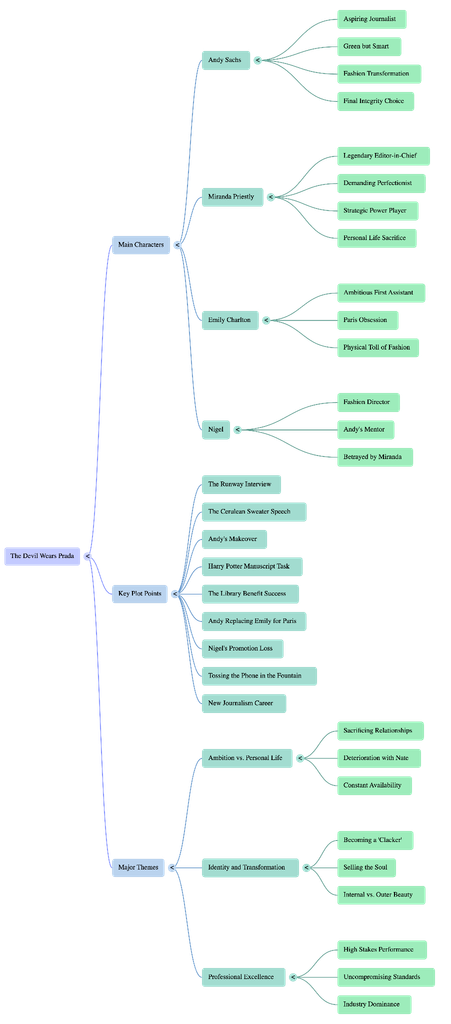
Overall, NotebookLM did a good job identifying the major characters, events, and themes in The Devil Wears Prada. The mind map focuses on Andy, Miranda, Emily, and Nigel and includes important moments such as Andy’s makeover (which is my favorite scene), the Harry Potter manuscript, the Paris trip, and Andy eventually leaving Runway. It also correctly identifies themes like ambition versus personal life and identity and transformation.
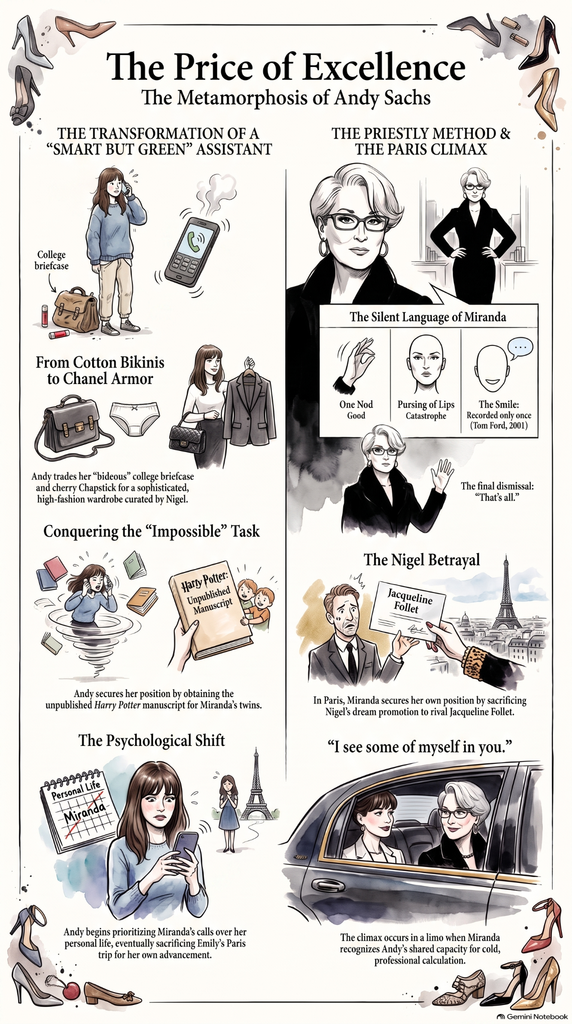
Some of the information was oversimplified. For example, the mind map describes Andy’s transformation as “selling the soul,” which makes her character development seem more negative than it really is. Andy does become more involved in Miranda’s world, but she also becomes more confident and capable professionally. The infographic also describes Andy as “sacrificing” Emily’s Paris trip, which makes the situation sound more intentional and cruel than it actually is. The small differences could be missed by someone who had never seen the movie.
Usefulness for Learning
If I had never seen the movie before, I think these resources would definitely help me understand the basic story. The podcast is useful because it turns the information into a conversation and makes it easier to follow the overall storyline and themes. The mind map is probably the most useful for quickly seeing how the characters, events, and themes connect. The infographic is the most visually interesting and makes the major points easy to remember, especially Andy’s transformation and the Paris storyline.
For me, the mind map was the most effective because it organized so much information in one place. I believe the infographic was the least effective because the visual was strong, but some of it is dramatic wording which makes the story seem more simple than it is.
The Aesthetic of AI
One thing I noticed was how confident and dramatic AI sounds. The infographic uses phrases like, “The Price of Excellence,” “The Psychological Shift,” and “The Priestly Method,” which make the movie sound like a business study. The AI also complicates character’s decisions into simple lessons. It focuses on ambition, sacrifice, and professional excellence, while a human viewer might spend more time thinking about the emotional relationships and whether Andy’s choices were actually right or wrong.
The AI’s language was also very polished and sometimes felt generic. It sounded intelligent, but some of the phrases apply to many movies about career success.
Trust & Limitations
This experiment showed me that AI can be very useful for organizing and summarizing information, but can not automatically be trusted. The biggest problem is that AI can interpret content with confidence that a person may not realize it has been oversimplified. I would trust AI more for identifying bigger events and organizing information, but I would be more cautious with specific character developments and themes. Knowing the movie very well myself made it easier to notice differences. Overall, this assignment showed me that AI is a helpful learning tool, but it should support human thoughts and not replace them.
AI Expert: AI vs Caraval
Posted: September 7, 2026 Filed under: Uncategorized | Tags: AI Expert Leave a commentMy Background
For most of my life I have enjoyed reading. The genre I read the most is fantasy because it allows me to escape reality for a little while. Over the years I have read several books of varying stories and types of writings. I have also read best sellers and books that no one else has even heard of. Out of all the series I have read my favorite has been Caraval by Stephanie Garber released in 2017. I revisit this book every so often because it has intrigued me. It is a trilogy but the first book has its own story line. Everytime I reread it I discover something new. The book has a mystery to it and at first I couldn’t figure it out but now when I go back through I find new clues hidden inside. Since I discover something new everytime I am not 100% an expert but I can tell you everything that happens in the book, all the details and different clues I’ve picked up on after reading the book 5 times. After the first time reading I was able to read it more slowly to really engage with the reading. I always read books fast the first time because I’m too excited to know what happens. The book entails two sisters trapped in a normal for the time tough situation of being married off to god knows who and not having much say because they are women. Due to the younger sisters disobedience the sisters go off with a man on the wonderful adventure of Caraval where twists and turns change their whole world but in the end allow them to find love and happiness away from their controlling father.
The material is important to me because a part of the story relates to my own life with sisterly love and troubled home problems, but the fantasia of the story allows me to be fully engulfed in another’s journey of a downfall and reawakening. For the most part I feel resonant with the main character Scarlett and her journey to protect her sister but living out her dream of seeing Caraval like her grandmother wanted. That is why I love rereading this book and why I chose it for Ai to analyze.
Ai Right/Wrong
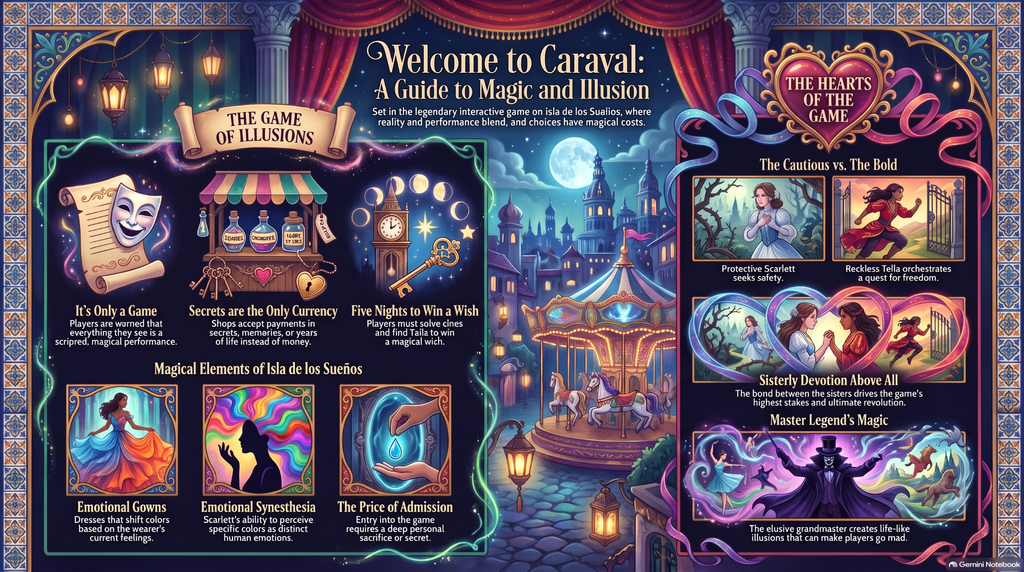
While listening to the podcast the two “people” get a really good base of the sisters’ relationship and what drives Scarlet through the whole book. They really talk about how Scarlet’s home life of a prison she tries to trade for another prison with “softer bars” and how it affects her. It also talks extremely of the similarities in the sisters home life “torture” and how Caraval puts her in the same mental state of having to protect her sister. The podcast constantly brings up the sisters’ love for each other which is the best thing it could do. The sister’s love is the one thing in this book that drives every decision. Especially at first, Scarlett will literally do anything to protect her sister and make sure she is ok. The last thing they beautifully bring up is Scarlett’s relationship with the character Julian. At first he was just the guide but he turns into so much more. This really starts to impact Scarlett’s decisions at the end of the book and her mental state especially when he dies which the podcast talked about. The biggest thing the podcast got right was Donatella’s role(Scarlet’s sister), she was the true mastermind behind everything. Donatella worked alongside Legend(the game master) to plan the whole adventure. Donatella had been writing legend for years to orchestrate the whole thing to save her sister and allow her to live her dream at Caraval.
While the podcast was very well done and touched on so many important themes of the book I feel as if some topics were only barely touched and should have been pushed further. At the beginning of the podcast they mention their grandmother and how she told them stories of Caraval, but their grandmother had such a larger part to play than that. She didn’t just tell the girls stories she wished they could see Caraval as well, the grandmother also wished for the girls to be happy. Throughout the book the grandmother is brought up, Scarlet constantly talks about her in her inner monologues and sometimes her grandmother’s stories influence Scarlett’s decision so I feel this is one thing that needed more attention. Another thing it failed to bring up was Legends’ role, it may have all been Donatella’s idea but legend did so much more than anticipated, which the podcast didn’t talk about at all. The Ai did a good job of telling the story and most themes but for someone who hasten read the book at all or only once or twice wouldn’t pick up on all the little things it missed.
The_Deadly_Cost_of_Tella’s_Secret_Game.m4a
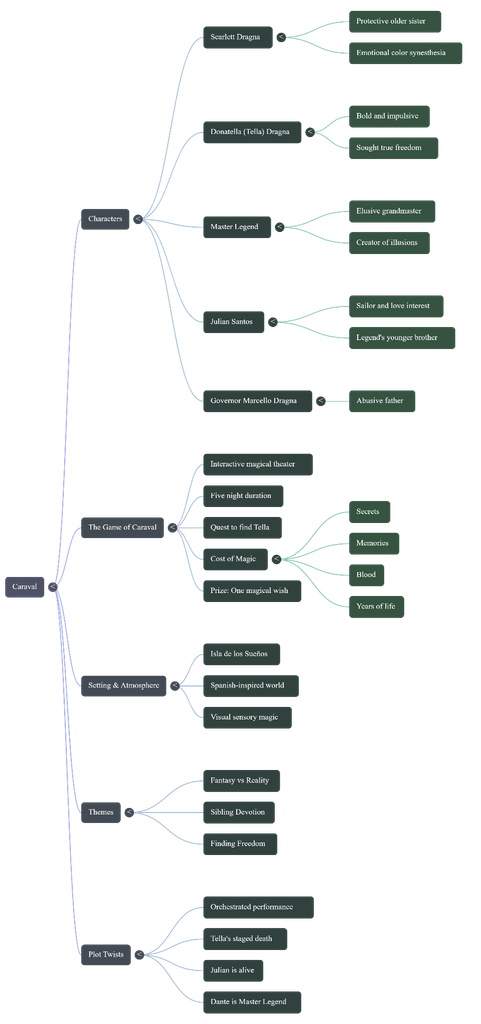
I was very surprised with the mind map, I would have thought that the AI would have shortened it more. The fact that it covers pretty much all the things you would need from the story makes me happy. I personally would have made a very similar mind map so I have some hope for Ai nit all being slop.
Finally the infographic was the most exciting thing, I love the visualization it gives. Overall the Ai did a decent job of describing all of the main points in the story and had some good image representations. The voices didn’t sound fake, the infographic you can tell is Ai but I personally like the way it looks. Overall I would tell others to just read the book. You miss so much by just using Ai to learn about things like this. Plus by using Ai you are learning the vast majority of opinions and insights instead of what you could discover yourself.
AI Expert Audit: Evaluating AI-Generated Materials for OpenCite
Posted: September 6, 2026 Filed under: Isabella Lo, Uncategorized Leave a commentA. Source Material
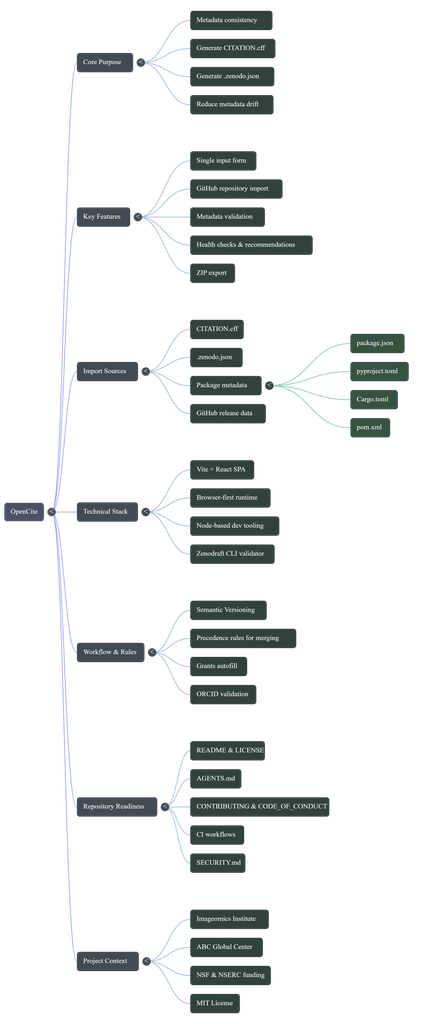
For this audit, I used the Imageomics OpenCite GitHub repository, specifically the README documentation, as my source material. OpenCite is a web-based application that generates both CITATION.cff and .zenodo.json files from a single metadata form. It also allows users to import metadata from GitHub repositiories, validate metadata, and check for inconsistencies.
I chose OpenCite becasue I have worked directly on the project and am familiar with what it is designed to do and how it works. This gave me the ability to evaluate the AI-generated materials as someone with experience with the project rather than someone seeing the information for the first time. OpenCite is also meaningful to me becuase I have contributed to its developemnt and have been invovled with the project as it progressed toward its first release.
B. AI-Generated Materials
AI-Generated Podcast
AI-Generated Mind Map
C. Expert Audit
1. Accuracy Check
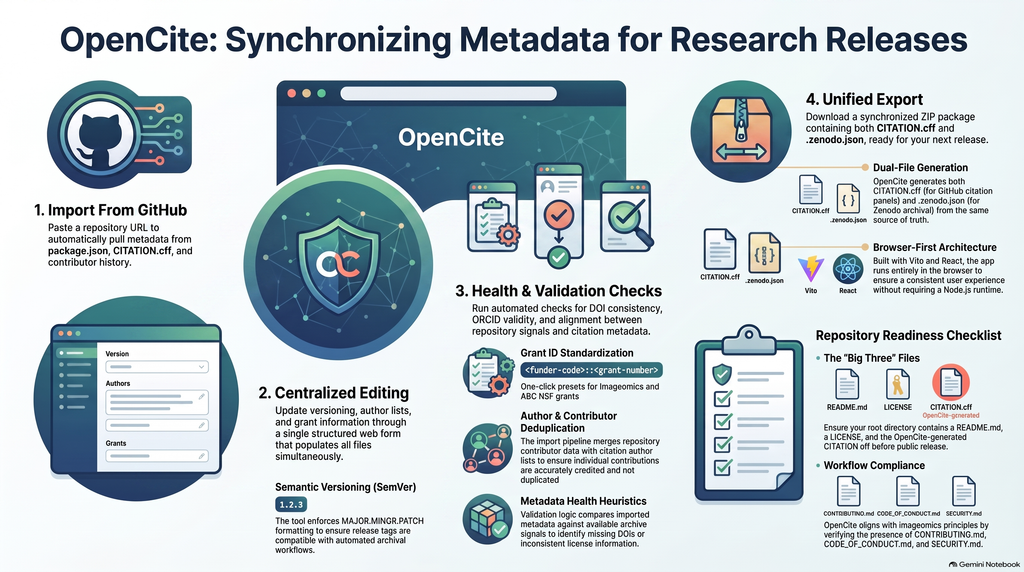
Overall, I found the AI-generated materials to be very accurate. The podcast provided detiled and correct context abotu OpenCite, and the Mind Map represented the main concepts and relationships correctly. The inforgraphic also included accurate information about the project. I did not notice any major factual errors or hallucinations.
However, there were some subtle issues that someone unfamilar with OpenCite might not notice. The AI somtiems used stronger or more polished language than the original documentation. For example, describing OpenCite as something that “ensures” consistency could make its capabilities sound more absolute than they are. OpenCite is deisgned to reduce metadata drift and provides validation and comparison checks, but users still need to review and adjsut the generated metadata.
The mind map was also accurate, but it left out some fo the techcial details that would be more relevate to a developer. This was not necessarily incorrect, but it showed how the AI simplified the information based on the audience it seemed to be targeting.
2. Usefulness for learning
I think the podcast would be the most useful of the three materials for someone encountering OpenCite for the first time. It did a good job explaining ht eproject withotu relying heavily on techical jargon. The analogies and additioanl context made the project eaiser to understand for someone who does not have a techical background.
However, the podcast was also fairly fluffy and indirect. It spend a lot of time establishing context and explaining ideas through analogies. For someone who already understands OpenCite, this made the podcast feel longer and less direct than necessary.
The mind map was useful for understandign the overall purpose and structure of OpenCite. It gave a good hgih-level overview of the project and showed how the major concepts relate to each other. However, it did not contain as much detail as a devloper might want when trying to understand the actual implementation.
The infogrpahic was factually strong, but i found it less effective as an infographic. It included many different facts about OpenCite without having one especially clear central takeaway. Because of this it felt more like a condensed README rather than a visual resoruce designed around a specific learning goal.
3. The Aesthetic of AI
One of the biggest patterns I noticed across the mateirals was that the AI priorities accessibilitiy, comprehensiveness, and polish. The podcast had a conversational tone and used many analogies and contextual explanations. It also used some broad or buzzword-heavy language that made it sound polished but sometimes less direct.
The infographic had a similar quality. It looked polished, but the design seemed to priorirzed includign as much relevant information as possible rather than deciding what information as possible rather than deciding what information was most improtant to an audience. A human expedrt who knwos the project might be more likely to choose one speicifc takeaway and build the visual around that idea.
Overall, the AI seemed to interpret being “helpful” as providing more context and more information. This works well for a beginner who needs background information, but it can make the matieral feel overly simplfiied or unfocused for someone who already knows the subject.
4. Trust & Limitations
This experiment showed me that AI-generated educational materials can be useful without necessarily being completely trustworthy. The AI seemed msot reliable when summarizing, reoganizing, and explaining information that was already clearly stated in the source material. It was also effective at translating techical information into language that a general audience could understand.
I would be more cautious about trusting AI to decide what information is most important, simplify techical concepts, or describe the capabilities of a techical tool without checking the origianl documentation. An AI-generated resource can be factually correct while still being incomplete, oversimplified, or misleading in its emphasis.
Because of this, I think AI-generated educational materials are best treated as a starting point rather than a replacement for expert review. An expert can recognize when information has been simplfiied too much, when the AI has emphasized the wrong details, or when polished language makes a claim sound stronger than the original source actually supports.
Cycle 3 – Solo+ (the plus is that it is DDR now)
Posted: May 12, 2026 Filed under: Uncategorized Leave a comment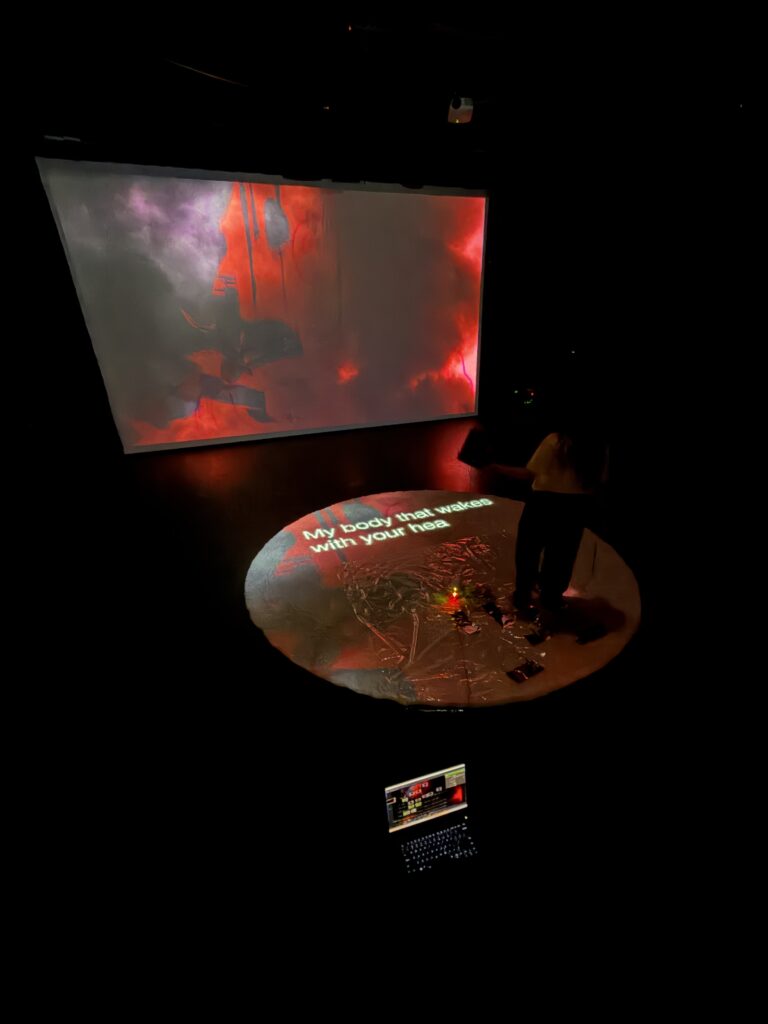
If you have been keeping track of the last two posts, you will know I set out in the cycle to make a new control scheme for this iteration of Solo. So I made a dance pad. I also projected the lyric translations onto the circular rug beneath the user. The lyrics are in real time, thanks to the translated and timed captions on the official Zutomayo movie video for the song. I used the footage of the captions as a reference to time them out myself, then overlaid them onto the user-controlled imagery. I mapped out the tap inputs (3) onto a drum, which the user held, and hold inputs (5) on a shower liner. The shower liner was to ensure the user could see the lyrics while they navigate the inputs below them. This was in an effort to force the user to stare at the floor, hopefully at the lyrics. The user is not only curating visuals for their audience but also doing a little dance in the process.
The user rarely saw the main screen, and the audience saw the lyrics less often than the performers did… Both experiences were meant to be separate. One party was receiving direct guidance on what to produce, while the audience was left to process the user’s creation… Theatretically
So how did it go?
Well, we ran into a few bumps. It’s quite hard to read while jumping around on a map… and in my case, trying not to trip. I was caught up in trying to make cool visuals for the audience, and when I lost myself in the music a bit, I snapped out of it, worried I wasn’t making interesting visual combinations. Users reported similar feelings, only picking up some lyrics here and there. I don’t want users to just stand and read, and it’s okay to pick up only some of the lyrics for this project. This is a processing and meaning-making project; it’s okay if the users differ in interpretations.
One suggestion that stood out to me most was to possibly involve a second player: one player sits on the side with the bucket, while the other uses the step controls.
I was also asked whether I wanted the footage to be a “story machine” in future iterations… if the footage I said I wanted to animate the majority of could go with any song (the anwser is yes). And in my brain, I was like “holy shit, I made my capstone sort of”.
I was making a version of my initial idea for my senior Capstone Project (in undergrad). I had taken an alternative controller/programming course in my junior year, and I fell in love. So much so that I drummed up the idea of making a game/interactive experience. It would be an audio production app with simplified, visualization-based control schemes. It was inspired by an app I played with as a kid during the dawn of the iPod Touch; however, I haven’t been able to find it to this day, and it haunts me. From what I remember, there are three different categories of audio libraries you can access: bass, melody, and percussion. You pick from those libraries and place them into an “orbit” centered around a sphere. Moving the tracks (also sphere-shaped) around the orbit changes the tempo (and maybe other things), and the closer they are to the center sphere, the louder that audio element is… I love that app, and if you know what it is, I’ll give you $10.
So basically, I wanted to make that, but what if those audio elements and their placement were connected to animations that could be pieced together into a story? Any story.
I emailed the one professor I knew in the newly budding game design department at CCAD, but it was the summer, so I never got a response, so I opted to make a more traditional animated film.
So a story machine… I think that would be my cycle four. A creation tool that explores every angle of a narrative constructed by its users and audience… With controls more sophisticated than tin foil taped to a shower liner.
And last but not least, fuck gen AI
fuck data centers,
and fuck tech bros kids.
Make punk ass art.
Pressure Project #2 – The Networked Cell-Block System
Posted: May 9, 2026 Filed under: Uncategorized Leave a commentOh boy…this one was a doozie, but in a good way. Much of it went over my head in this first real foray into Touchdesigner, another node-based software with some serious flex power, but our fearless wizard Michael Hesmond proved more than equal to the task of instruction, and within the span of two weeks we as a class created a connected series of patches using NDI, pushing the boundaries of what even Michael knew possible. Nothing blew up, but I may have blown a few braincells in the process of creating my very first patch in this impressive, complex software.
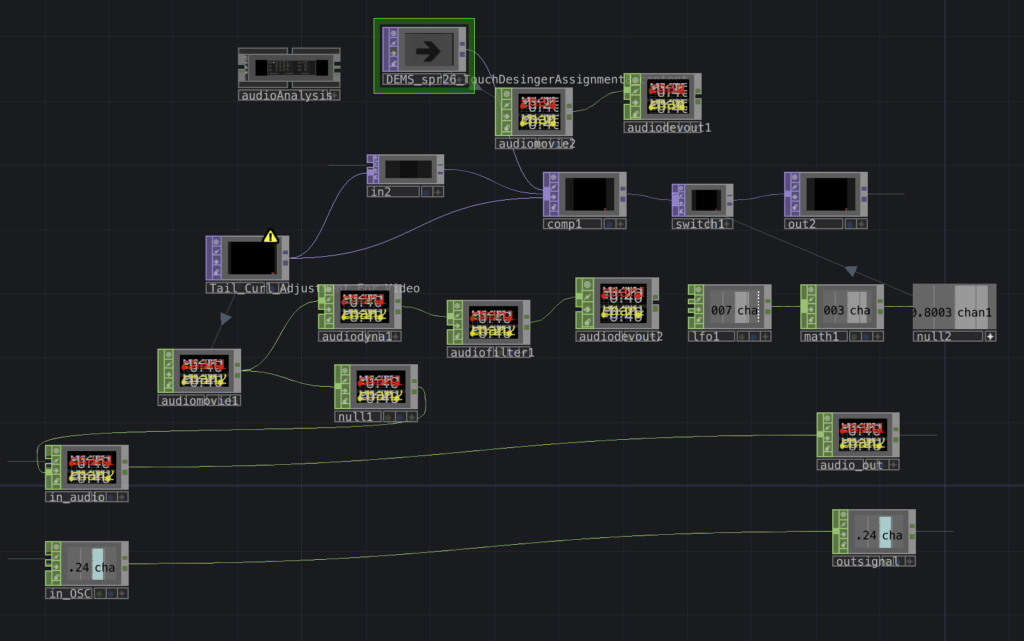
Much of the content has been rearranged, some components appear overridden/inactive as a result.
I’ve entitled this “Dragon Boogie,” There were some elements I found online or developed using generative A.I. (Gemini), specifically the dragon, borrowed from my stack of variants created in conjunction with a theatre production of Acute Exposure, for which I had already begun beating my head against the brick wall of Isadora, so I did my best to follow along with the class as Michael demonstrated “components” (versus “actors” in Isadora) and how to use them in Touchdesigner. One of the big takeaways was the concept of signal flow, to make sure I organized components left to right on the screen, and that to troubleshoot one had to work their way backwards from the problem, following the thread back to the misaligned setting/component.
In advance I prepared this video with found content online, along with some A.I.-assisted audio, compositing it all together with After Effects:
Funkadelic goofy goodness right there. What could go wrong?…
…Turns out, when it comes to Touchdesigner, quite a lot. Much of my frustrations lay in my own ignorance as I struggled to connect the right TOPS and CHOPS for desired effects. Thankfully Michael once again proved invaluable in helping me troubleshoot my way to some sort of successful iteration that worked.
This patch composited the dancing music video above with a red dragon spewing radioactive flames. My aim was to see something cool as my composition interplayed over NDI with patches of my fellow students’ respective work. The results were mixed, much of the class time was spent setting up and working through issues that some of our patches displayed once connected on the local network. Certain patches created some interesting instances of emergence with media channels, for my part there was a hint of funkadelic beats and a dragon blowing fire on top of other’s video content. Halprin’s RSVP cell-block system was by nature a modular implementation of different acts occurring simultaneously, interlaced with one another as directed by the performers/artists, this Touchdesigner experiment could easily be considered a digital portrayal of this idea in action as we connected our own patches with our own IP addresses across a network that jumbled up our content into a real-time evolution of media.
All in all this pressure project introduced me to some of the particularities of this amazing tool, and I have become convinced that I must continue learning its secrets for future projects and cycles.
Recent Comments